

Remove MOIA Ransomware (Decrypt And Recover Your Data)

Before we dive in
Before we dive in, let's make sure you stay safe online. We created SpyHunter because your security matters to us.
Protect your computer today — download SpyHunter right here! Check out our top tips below to keep your computer safe and secure.

MOIA ransomware, a STOP/DJVU family member, encrypts files and seeks ransom, endangering digital data. Learn about MOIA’s behavior, spread tactics, and effects on users.
We’ll also explore practical strategies for removing the ransomware and safeguarding your system against future attacks. Read on:
Understanding MOIA ransomware and its operations
MOIA ransomware represents a formidable threat in the digital world. It is categorized under the STOP/DJVU ransomware family.
The MOIA ransomware infiltrates computers silently and embarks on a malicious operation where it encrypts files, rendering them inaccessible to users.
This encryption process is thorough, targeting essential data such as images, videos, and vital productivity documents.
By appending a .moia extension to every file it encrypts, MOIA ransomware effectively locks users out of their data. The infection process is stealthy, leveraging various distribution techniques to ensure successful entry into unsuspecting systems.
Following the encryption, MOIA ransomware demands a ransom from its victims for data recovery.
The demanded ransom in Bitcoin ranges significantly, emphasizing the cybercriminals’ intent to profit from their malicious activities.
Communication channels are established through specified email addresses, through which the victims are expected to negotiate the release of their data.
The dangers of MOIA ransomware infection
A system compromised by MOIA ransomware faces several severe consequences:
- Loss of Data Access: Encrypted files immediately lose crucial data, potentially disrupting personal and professional life.
- Financial Strain from Ransom Demands: Victims are coerced into paying a significant ransom in Bitcoin, leading to financial losses without data recovery assurance.
- Introduction of Additional Malware: MOIA ransomware may install Trojans like VIDAR and AZORULT, aiming to steal sensitive information such as banking details, passwords, and login credentials.
- Risk of Further Financial Loss and Privacy Invasion: The theft of personal information can result in additional financial loss and severe privacy breaches.
Recognizing the multifaceted dangers posed by MOIA ransomware is essential. Awareness and proactive cybersecurity measures are vital to minimizing the risk and impact of this threatening malware.
MOIA ransomware infection symptoms
Identifying a MOIA ransomware infection can be crucial for limiting its damaging effects.
The most definitive sign of an infection is the sudden inability to access your files, coupled with a new .moia extension for each file name. This alteration indicates that the encryption process has been completed, and the ransomware has locked you out of your data.
Another glaring marker is a ransom note, named _readme.txt, placed on your desktop or within encrypted directories.
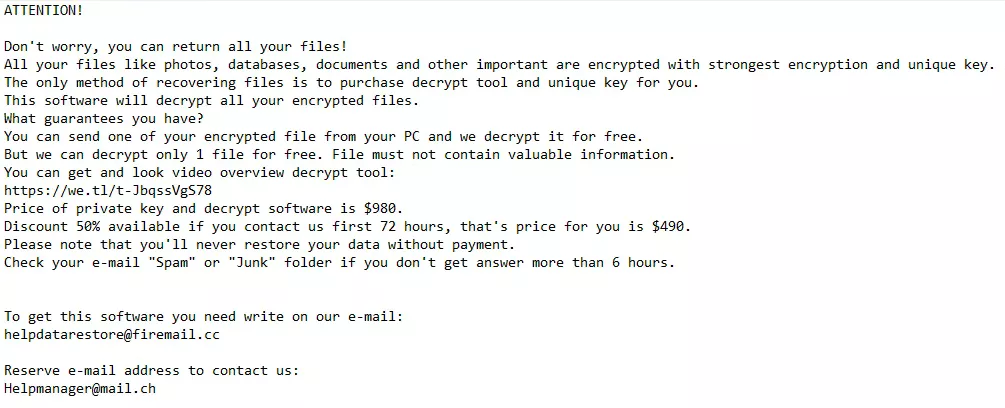
This note details the ransom demand, payment instructions, and contact information for negotiating data release.
System performance may also undergo noticeable degradation. Ransomware operations consume significant system resources, leading to slowdowns, frequent crashes, and instability.
Unusual network activity could be another indicator, as the ransomware communicates with its command and control servers during the encryption process.
Early detection and identification of these signs are essential steps toward mitigating the impacts of a MOIA ransomware infection and initiating recovery.
Step-by-step guide to remove MOIA ransomware
Successfully removing MOIA ransomware from your computer involves a series of critical steps taken with precision and awareness of the potential threats to your data.
Before embarking on this removal journey, ensure you’ve backed up your encrypted files.
This action lets you restore your data if decryption keys become available later. Follow the guide below to remove the MOIA ransomware effectively and safely.
Start in Safe Mode with Networking on Windows
Initiating Safe Mode with Networking is a strategic step for Windows users to weaken MOIA ransomware’s grip on the system.
This mode only activates necessary system services and drivers, reducing the ransomware’s operational scope. Here’s how to enter Safe Mode:
- Begin the reboot process.
- As your computer restarts, press the F8 key (or the specific key for your system) repeatedly until the Advanced Boot Options menu appears.
- Use the arrow keys to select the Safe Mode with Networking option. Your computer will boot with minimal services, setting the stage for safer malware removal efforts.
Booting Windows into Safe Mode with Networking creates a more controlled environment for tackling MOIA ransomware, enhancing your chances of successful removal.
Remove MOIA ransomware using advanced malware removal tools
To effectively combat MOIA ransomware, leveraging advanced malware removal tools like SpyHunter ensures a thorough infection cleansing from your system.
SpyHunter is designed to detect and eliminate ransomware and other malware threats precisely.
For Windows Users: SpyHunter 5
SpyHunter 5 specializes in identifying and removing malware threats on Windows platforms. It offers powerful features to tackle the latest ransomware variants, including MOIA.
- Download SpyHunter from here and install the software on your Windows system.
- Open SpyHunter 5 and perform a comprehensive scan. This will detect MOIA ransomware and any associated malicious entities.
- Follow the prompts provided by SpyHunter to eliminate the detected ransomware from your system.
For Mac Users: SpyHunter for Mac
SpyHunter for Mac addresses the unique security challenges faced by Mac users. It’s tailored to detect and remove malware that infiltrates macOS, including MOIA ransomware.
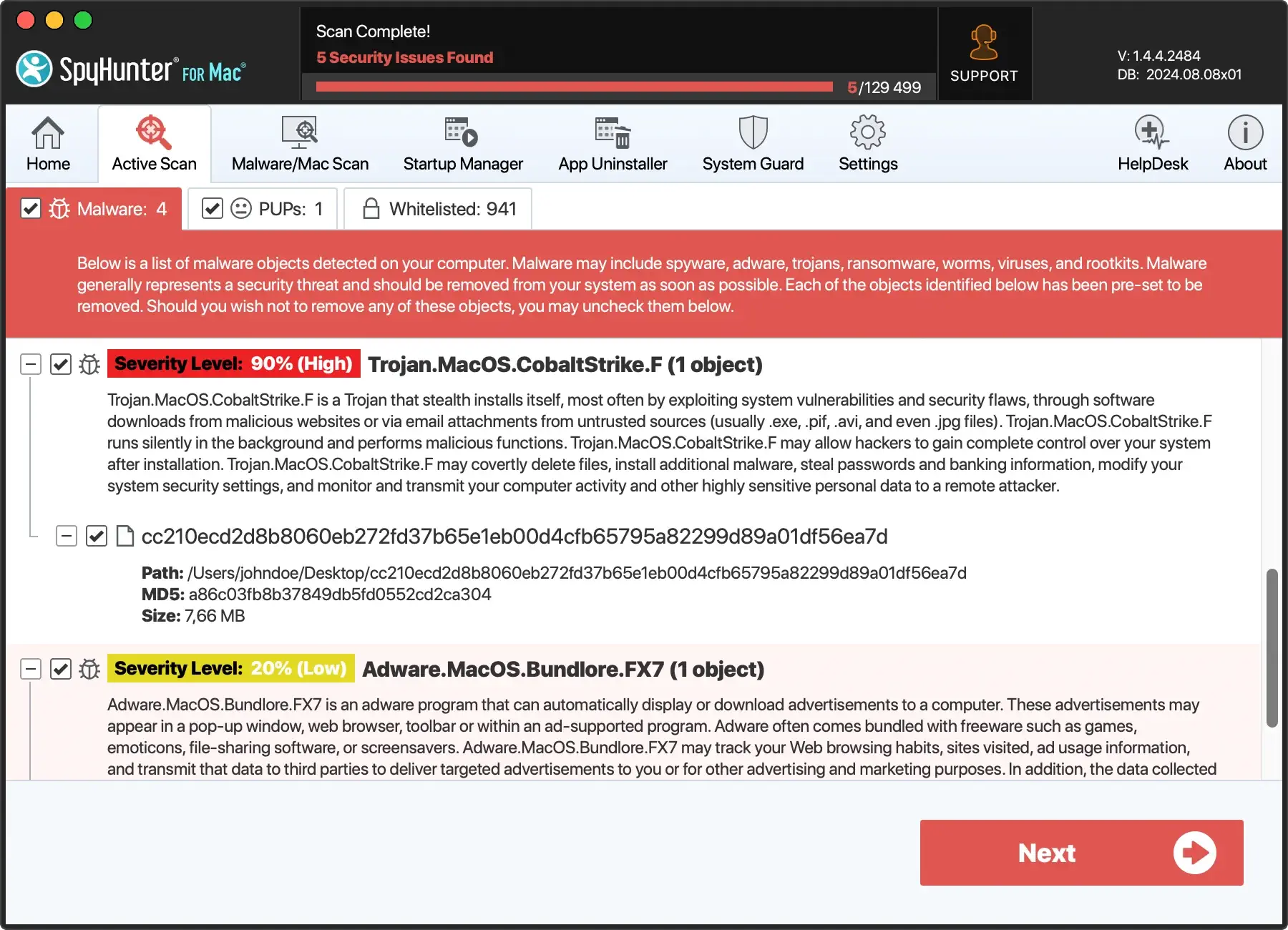
- Download SpyHunter for free here and follow the instructions for installing the application.
- Launch SpyHunter for Mac and conduct a full scan to uncover MOIA ransomware and related threats lurking on your Mac computer.
- Utilize the guidance provided by SpyHunter for Mac to remove any identified malware.

SpyHunter offers a streamlined and practical approach to removing MOIA ransomware. The software helps restore your system’s integrity and security.
Restore your operating system to a previous state
If MOIA ransomware has altered system settings or harmed your installation, reverting to a prior state can help. This process differs for Windows and Mac users.
For Windows Users:
- Access System Restore: Hit the Windows key, type “System Restore,” and click “Create a restore point.”
- Initiate Restore: In the System Properties window, hit “System Restore,” then follow the on-screen instructions to pick a restore point before the infection has occurred.
- Reboot: Start the restore and wait for your PC to reboot, reversing the ransomware changes. This does not affect personal files.
For Mac Users:
- Enter Recovery Mode: Restart your Mac and immediately press and hold
Command + Runtil the Apple logo appears. - Use Time Machine: In the macOS Utilities window, select “Restore From Time Machine Backup,” then follow the prompts to choose a backup made before the ransomware attack.
- Reinstall macOS: If you don’t have a backup, select “Reinstall macOS” from the macOS Utilities window and follow the instructions to reinstall a clean version without losing personal data.
System Restore and macOS Recovery options do not impact personal files. This means encrypted data will need separate decryption or recovery from backups.
Regular backups and updated security measures are vital to preventing and recovering from ransomware attacks like MOIA.
How to recover encrypted §.moia files
After a MOIA ransomware attack, the foremost priority is to recover the encrypted data without paying the ransom demands.
While sophisticated encryption renders brute-force decryption practically impossible, hope is not entirely lost. Several practical solutions and methods exist that victims can explore to attempt recovery of their precious files.
Decrypting .moia files: Is it possible?
Decrypting files hit by MOIA ransomware can be tricky and depends on the type of encryption key used:
- Offline Encryption Key: If MOIA uses this because it couldn’t reach its server, there’s a chance files can be decrypted using tools created by cybersecurity experts once they figure out the key.
- Online Encryption Key: Files locked with unique online keys are much harder to unlock. The encryption is too strong for brute force attacks, leaving little hope outside of existing backups or future decryption tools developed by security professionals.
What to do
- Look for Decryption Tools: Always search trusted sources for any available decryption tools.
- Be Cautious: Ensure any decryption tool you try is from a reliable source to avoid extra risks.
- Consult Experts: Cybersecurity experts can help you navigate the decryption process safely.
Relying on backups remains the safest method for restoring data while the cybersecurity community works on potential solutions for those affected by online keys.
Tools to decrypt .moia files
Occasionally, cybersecurity researchers manage to create decryption tools for ransomware variants, including MOIA. These tools can decrypt files locked by ransomware without the need to pay a ransom.
It’s important to note that the success of decryption tools largely depends on the ransomware’s encryption key (online vs. offline keys).
Professional data recovery services
In cases where decryption tools are ineffective due to the ransomware employing unique, online encryption keys for each victim, seeking professional data recovery services may be warranted.
These services are often provided by digital forensics and ransomware mitigation firms. They have more advanced tools and techniques, enabling data recovery that free tools cannot achieve.
- Professional services may employ advanced disk scanning technologies to recover “shadows” or remnants of the original files that haven’t been overwritten on the physical disk.
- Experts can sometimes exploit ransomware’s encryption algorithm flaws that are not apparent to the average user or in publicly available decryption tools.
- Engaging professional recovery services is also advisable when the data is of significant value, and all other recovery methods have been exhausted. This includes critical business documents, legal records, or irreplaceable personal memories.
While professional recovery services offer an alternative to decryption tools, they come with costs that vary greatly depending on the recovery process’s complexity and the data volume.
Thus, it’s essential to assess the value of the encrypted data. Consultate with several recovery companies to understand the potential cost and success rate of recovery efforts.
Preventing future MOIA ransomware attacks
Surviving ransomware attacks by MOIA highlights the importance of preventing future threats. Here’s a simplified guide to bolster your defense against ransomware:
Back up your data regularly
- Diverse Backups: Mix cloud and physical backups, like external drives, to ensure your data is stored in multiple places.
- Automate Backups: Set your system to back up data automatically, reducing the risk of losing recent files.
- Check Backups: Periodically test your backups to ensure they work correctly when needed.
- Secure Backups: Encrypt and password-protect your backups to protect them from unauthorized access.
Keep your software up-to-date
- Automatic Updates: Turn on automatic updates for your OS and apps to get the latest security patches.
- Manual Updates: Regularly check for updates, especially for essential software like browsers and security tools.
- Stay Informed: Follow cybersecurity news to learn about the latest threats and the updates you might need.
- Use Legitimate Software: Avoid pirated software, which often misses critical security updates.
Taking these steps can drastically reduce your risk of ransomware attacks.
Regular backups ensure you can recover your data without paying a ransom, while updated software closes security gaps that ransomware could exploit.
By staying vigilant and following these best practices, you can strengthen your cybersecurity posture and protect your digital assets against MOIA ransomware and similar threats.
