How To Uninstall uTorrent On Mac (Complete Guide)

Before we dive in

Trying to uninstall an app completely? SpyHunter for Mac includes an App Uninstaller that removes unwanted apps and their leftover files in just a few clicks.

Avoid clutter and save time — download SpyHunter right here and follow the steps to clean up your system.

Download SpyHunter

Have you ever considered the impact of keeping uTorrent on your Mac? While uTorrent offers a convenient way to download and share files, you may be looking for a way to uninstall the app.

Whether you no longer need a torrent client or you are considering other apps for peer-to-peer file sharing, you should make sure the previous application is completely deleted from your computer.

This article examines essentials every Mac user should be aware of regarding uTorrent, including the steps for removing it and the benefits of maintaining a clean system.

Why remove uTorrent from your Mac?

Many Mac users might wonder why the recommendation to remove uTorrent often comes up. There are several reasons, touching both on legal considerations and the functionality of your Mac.

uTorrent is a popular bittorrent client for downloading and sharing files through the BitTorrent protocol. However, despite its utility, there are valid concerns surrounding its use that you can consider.

  • Security Concerns: Torrenting involves sharing files with anonymous users, increasing the potential risk of malware and viruses. Some torrent files may contain malicious code that can harm your computer and compromise your data.
  • Adware and Unwanted Software: Depending on the location where you obtained it, uTorrent’s installer may come bundled with adware and potentially unwanted programs (PUPs). These additions can cause annoying pop-ups, slow down your Mac, and alter system settings without consent.
  • Performance Considerations: Running uTorrent in the background can slow down internet speeds and reduce overall system performance. The process of sharing files involves “seeding” or uploading to other users, which can tax your connection even after you have obtained the files you wanted.
  • Legal Risks: Torrenting itself is legal, but it’s often used for downloading pirated content, which is illegal in most regions. Engaging in illegal downloading can lead to serious legal consequences.

Deciding to uninstall uTorrent can help safeguard your Mac, maintain optimal performance, and avoid any potential legal issues.

Step-by-step guide to manually uninstall uTorrent from Mac

Removing uTorrent from your Mac might seem straightforward, but it involves a few more steps than just moving the application to the Trash.

This guide will help you thoroughly uninstall uTorrent, ensuring that no associated files remain to take up space or affect your system’s performance.

Step 1: Quit uTorrent

Before you uninstall uTorrent, make sure it’s not running in the background. You can properly quit the application in a couple of different ways.

You can simply right-click the application’s icon in the Dock and select Quit from the menu.
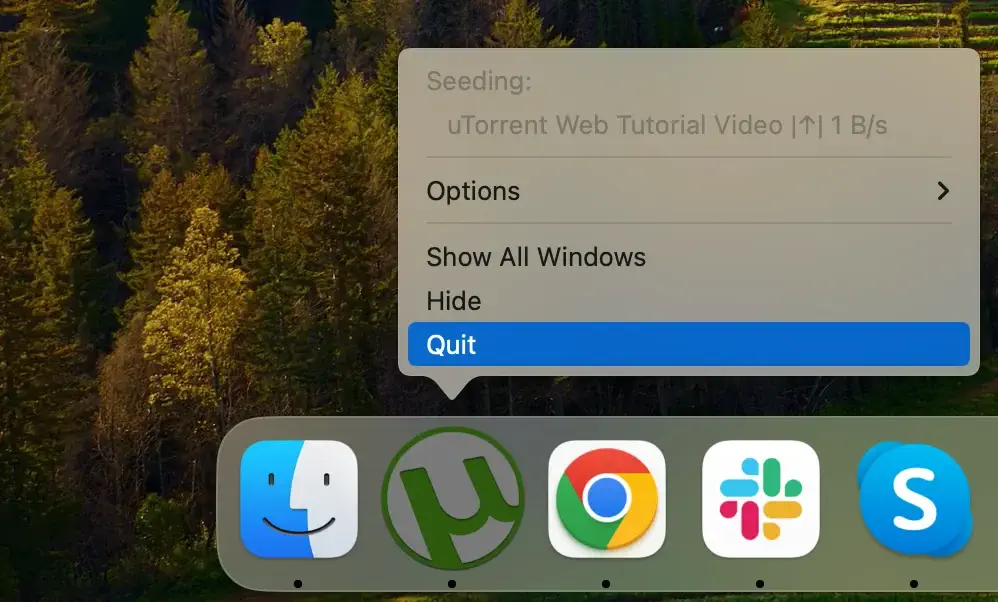
quit utorrent on mac

Alternatively, you can use the Activity Monitor app. Look for any process that includes the word “uTorrent” in its name. If you find any, select them and click the [X] button above the process list to close them. Click on Force Quit in the new dialog window that appears to confirm your choice.
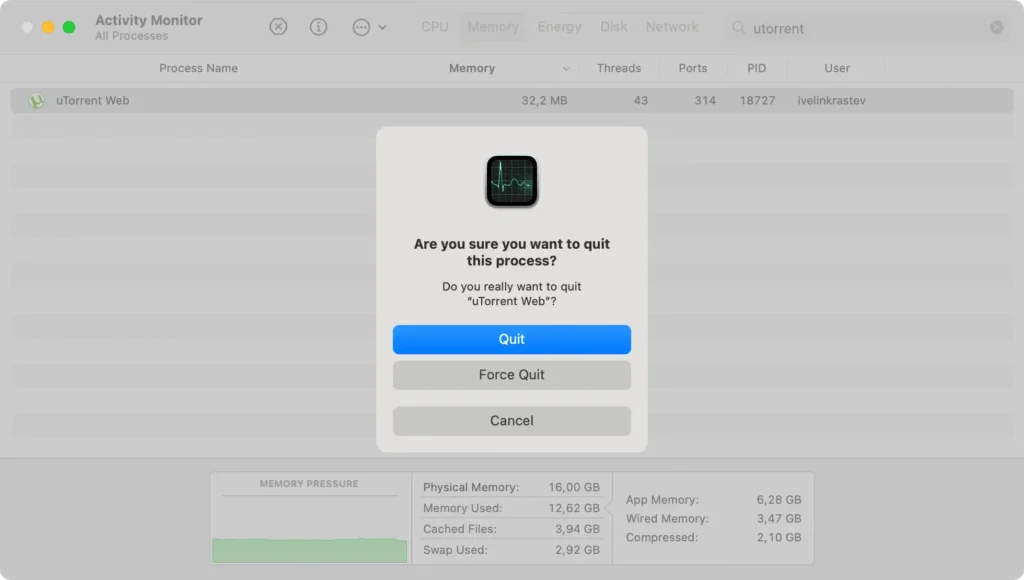
force quit utorrent using activity monitor

Step 2: Delete uTorrent from the Applications folder

Once you have quit the app properly, open Finder and navigate to your Applications folder in the sidebar or use the Go menu at the top of your screen. Scroll through your Applications folder until you find uTorrent.

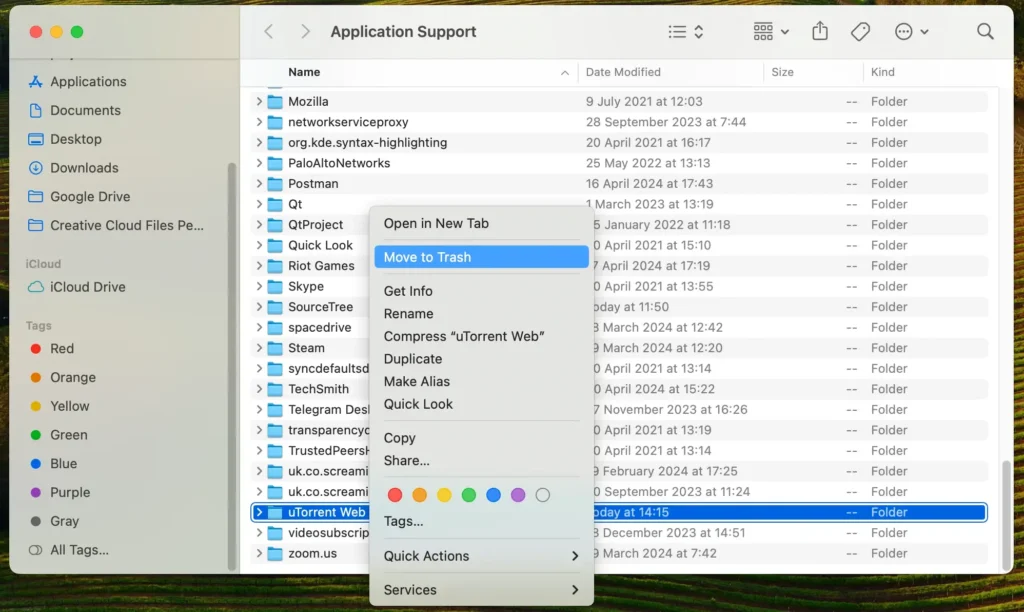
Drag and drop the uTorrent icon onto your Trash or right-click the app and select Move to Trash in the context menu. Remember to empty the Trash to finish this step.
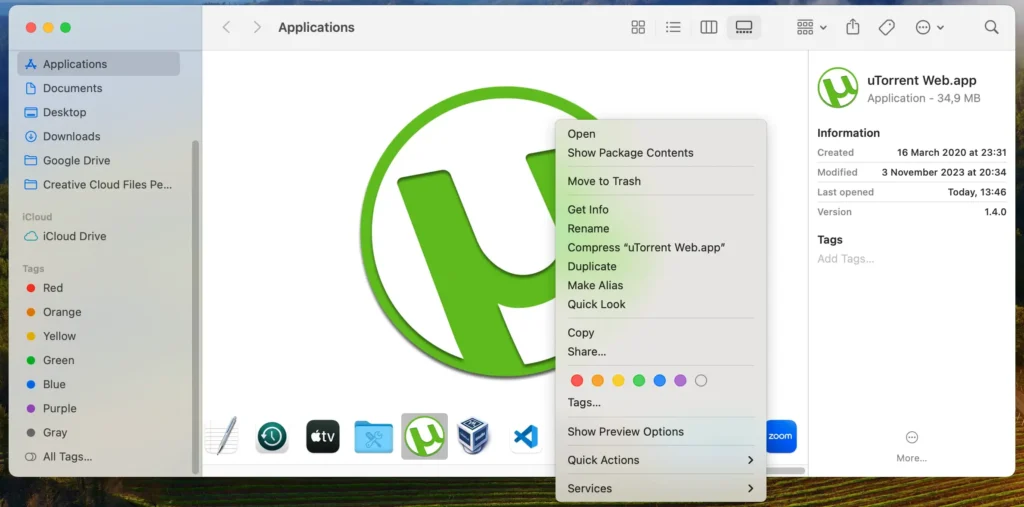
delete utorrent app

Step 3: Clean up leftover files and folders related to uTorrent

Like many apps, uTorrent can leave behind files and caches that aren’t removed with the initial uninstall.

Follow these steps to completely remove any associated files and folders that may linger after the program’s deletion.

Open Finder and then press Shift+Command+G to bring up the Go to Folder window and type or paste the following directory paths in the input field:

  • ~/Library/Application Support/
  • ~/Library/Preferences/
  • ~/Library/Caches/
remove utorrent files and folders

Inside those folders, look for any files or folders that have uTorrent in their names or may be linked to the application and move them to the Trash, then empty it.

This final manual removal step will ensure that all residual files and settings are completely removed from your Mac and you have reclaimed some hard drive space.

Completely uninstall uTorrent using SpyHunter

To fully uninstall the uTorrent application from your Mac and make sure there are no remaining files, you can use SpyHunter’s App Uninstaller for comprehensive and automated removal.

Here’s a simple guide on how you can completely uninstall uTorrent from your Mac:

  1. Download SpyHunter and follow the installation instructions on your screen to properly set it up on your Mac.
  2. Open SpyHunter and click the App Uninstaller tab in the top menu of the SpyHunter app.
  3. SpyHunter will automatically start scanning your system when you access the tab. This scan identifies all installed apps on your Mac, along with their respective directories and files.
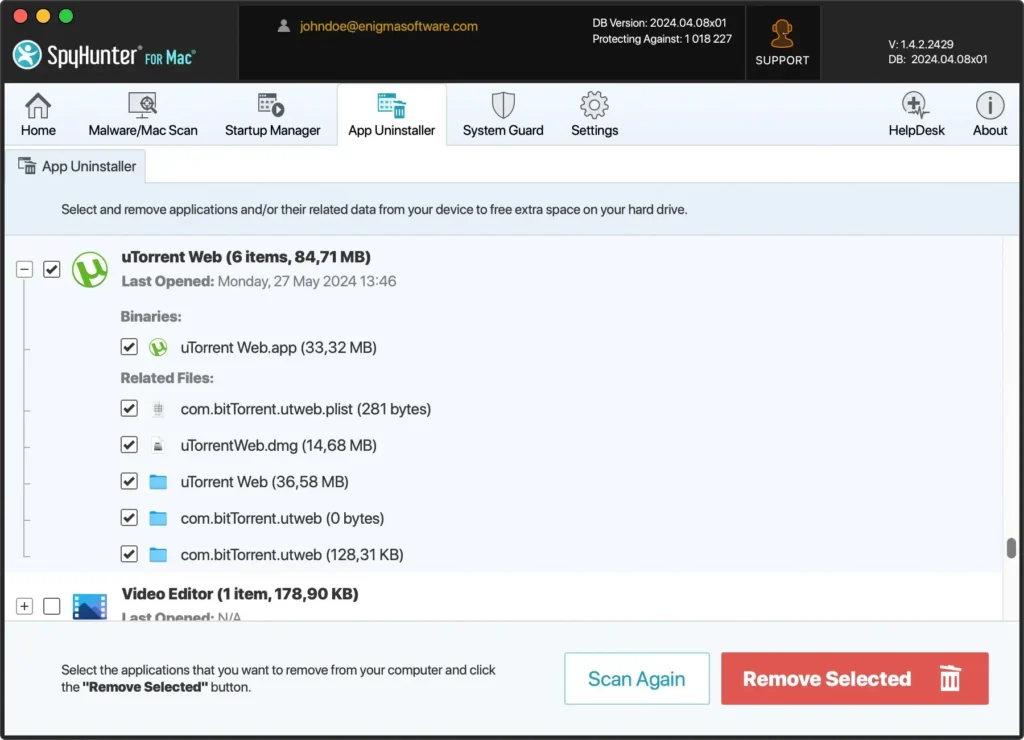
  4. Find uTorrent in the list of programs that appear after the scan. Select it and make sure to choose everything in the Related Files list to ensure no leftovers remain.
uninstall utorrent completely with spyhunter
  1. Confirm the uninstall process within SpyHunter. This will remove the uTorrent application and all its components from your Mac.
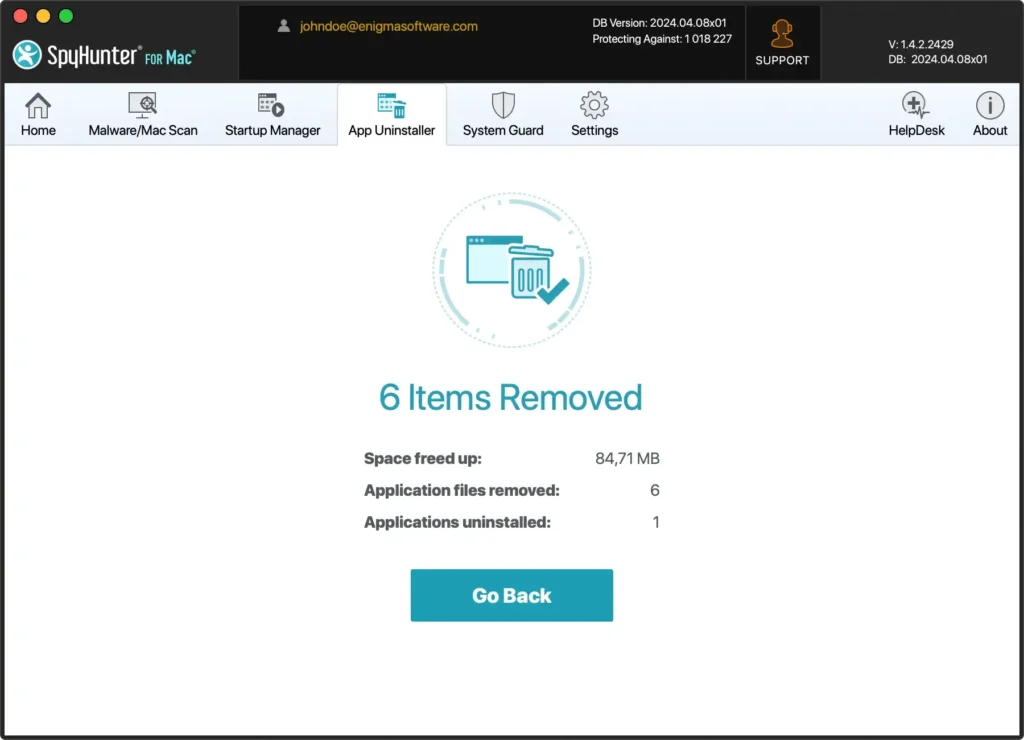
spyhunter can completely delete utorrent on mac

Using SpyHunter’s App Uninstaller makes it easy to remove uTorrent or any other app completely, including all the app’s dependencies and leftover files.

This automated method ensures a thorough uninstallation, helping your Mac perform well and keeping it secure.

Final thoughts

In conclusion, uninstalling uTorrent from your computer doesn’t have to be a time-consuming process if you follow the steps outlined in this guide.

If you are simply switching to another torrent client, there are several great alternative torrent clients available that you can download and explore. If you are simply removing the application, you can enjoy the benefit of less clutter and more free drive space.

Having uninstalled uTorrent, you can enjoy a cleaner, more efficient system. This not only enhances your computer’s performance but also contributes to a more secure and streamlined digital environment. With reduced clutter, you can focus on more productive tasks and enjoy a smoother overall experience on your device.

If you are looking to uninstall other applications too, you can use our guide on how to uninstall apps on Mac for additional information and tips.

Share this post on your favorite social media
Keep Your Mac Fast and Secure
Optimize your Mac and stay malware-free with SpyHunter

For a better understanding of our policies, please review our Free Trial Offer below, EULA, and Privacy/Cookie Policy.

SpyHunter Free Trial: Important Terms & Conditions

The SpyHunter Trial version includes, for one device, a one-time 7-day Trial period for SpyHunter 5 Pro (Windows) or SpyHunter for Mac, offering comprehensive malware detection and removal functionality, high-performance guards to actively protect your system from malware threats, and access to our technical support team via the SpyHunter HelpDesk. You will not be charged upfront during the Trial period, although a credit card is required to activate the Trial. (Prepaid credit cards, debit cards, and gift cards are not accepted under this offer.) The requirement for your payment method is to help ensure continuous, uninterrupted security protection during your transition from a Trial to a paid subscription should you decide to purchase. Your payment method will not be charged a payment amount upfront during the Trial, although authorization requests may be sent to your financial institution to verify that your payment method is valid (such authorization submissions are not requests for charges or fees by EnigmaSoft but, depending upon your payment method and/or your financial institution, may reflect on your account availability). You can cancel your Trial by contacting EnigmaSoft’s payment processor (identified in your confirmation email) or EnigmaSoft directly no later than two business days before the 7-day Trial period expires to avoid a charge coming due and being processed immediately after your Trial expires. If you decide to cancel during your Trial, you will immediately lose access to SpyHunter. If, for any reason, you believe a charge was processed that you did not wish to make (which could occur based on system administration, for example), you may also cancel and receive a full refund for the charge any time within 30 days of the date of the purchase charge. See FAQs.

At the end of the Trial, you will be billed upfront immediately at the price and for the subscription period as set forth in the offering materials and registration/purchase page terms (which are incorporated herein by reference; pricing may vary by country per purchase page details) if you have not timely canceled. Pricing typically starts at $72 for 3 months (SpyHunter Pro Windows) and $42 for 3 months (SpyHunter for Mac). Your purchased subscription will be automatically renewed in accordance with the registration/purchase page terms, which provide for automatic renewals at the then applicable standard subscription fee in effect at the time of your original purchase and for the same subscription time period, provided you’re a continuous, uninterrupted subscription user. Please see the purchase page for details. Trial subject to these Terms, your agreement to EULA/TOS, Privacy/Cookie Policy, and Discount Terms. If you wish to uninstall SpyHunter, learn how.

For payment on the automatic renewal of your subscription, an email reminder will be sent to the email address you provided when you registered before your next payment date. At the onset of your trial, you will receive an activation code that is limited to use for only one Trial and for only one device per account. Your subscription will automatically renew at the price and for the subscription period in accordance with the offering materials and registration/purchase page terms (which are incorporated herein by reference; pricing may vary by country per purchase page details), provided that you are a continuous, uninterrupted subscription user. For paid subscription users, if you cancel, you will continue to have access to your product(s) until the end of your paid subscription period. If you wish to receive a refund for your then current subscription period, you must cancel and apply for a refund within 30 days of your most recent purchase, and you will immediately stop receiving full functionality when your refund is processed.

For CALIFORNIA CONSUMERS, please see the notice provisions:
NOTICE TO CALIFORNIA CONSUMERS: Per the California Automatic Renewal Law, you may cancel a subscription as follows:

  1. Go to www.enigmasoftware.com and click the "Login" button at the top right corner.
  2. Log in with your username and password.
  3. In the navigation menu, go to "Order/Licenses." Next to your order/license, a button is available to cancel your subscription if applicable. Note: If you have multiple orders/products, you will need to cancel them on an individual basis.

Should you have any questions or problems, you can contact our EnigmaSoft support team by phone at +1 (888) 360-0646 (USA Toll-Free) / +353 76 680 3523 (Ireland/International) or by email at support@enigmasoftware.com.
How do you cancel a SpyHunter Trial? If your SpyHunter Trial was registered via MyCommerce, you can cancel the trial via MyCommerce by logging into the MyAccount section of MyCommerce (see your confirmation email for further details). You can also contact MyCommerce by phone or email to cancel. To contact MyCommerce via phone, you can call +1-800-406-4966 (USA Toll-Free) or +1-952-646-5022 (24x7x356). You can contact MyCommerce by e-mail at ordersupport@mycommerce.com. You can easily identify if your trial was registered via MyCommerce by checking the confirmation emails that were sent to you upon registration. Alternatively, all users may also contact EnigmaSoft Limited directly. Users can contact our technical support team by emailing support@enigmasoftware.com, opening a ticket in the SpyHunter HelpDesk, or calling +1 (888) 360-0646 (USA) / +353 76 680 3523 (Ireland/International). You can access the SpyHunter HelpDesk from SpyHunter's main screen. To open a support ticket, click on the "HelpDesk" icon. In the window that appears, click the "New Ticket" tab. Fill out the form and click the "Submit" button. If you are unsure of what "Problem Type" to select, please choose the "General Questions" option. Our support agents will promptly process your request and respond to you.

———

SpyHunter Purchase Details
You also have the choice of subscribing to SpyHunter immediately for full functionality, including malware removal and access to our support department via our HelpDesk, typically starting at $42 for 3 months (SpyHunter Basic Windows) and $42 for 3 months (SpyHunter for Mac) in accordance with the offering materials and registration/purchase page terms (which are incorporated herein by reference; pricing may vary by country per purchase page details). Your subscription will automatically renew at the then applicable standard subscription fee in effect at the time of your original purchase subscription and for the same subscription time period, provided you’re a continuous, uninterrupted subscription user and for which you will receive a notice of upcoming charges before the expiration of your subscription. Purchase of SpyHunter is subject to the terms and conditions on the purchase page, EULA/TOS, Privacy/Cookie Policy and Discount Terms.

———

General Terms
Any purchase for SpyHunter under a discounted price is valid for the offered discounted subscription term. After that, the then applicable standard pricing will apply for automatic renewals and/or future purchases. Pricing is subject to change, although we will notify you in advance of price changes.
All SpyHunter versions are subject to your agreeing to our EULA/TOS, Privacy/Cookie Policy, and Discount Terms. Please also see our FAQs and Threat Assessment Criteria. If you wish to uninstall SpyHunter, learn how.