

Remove LKHY Ransomware (Decrypt .lkhy Files In 2025)

Before we dive in
Before we dive in, let's make sure you stay safe online. We created SpyHunter because your security matters to us.
Protect your computer today — download SpyHunter right here! Check out our top tips below to keep your computer safe and secure.

LKHY ransomware, a branch of the notorious STOP/Djvu family, targets individuals and organizations by encrypting files and demanding a ransom for their release.
This article delves into the workings of LKHY, revealing its tactics, impact, and the essential steps for protection and recovery. Discover how to safeguard your data and respond if LKHY strikes.
What you need to know about LKHY ransomware
LKHY ransomware is a challenging threat targeting both individuals and organizations. It encrypts their data and demands a ransom for its release.
Key characteristics define this particular strain of malware, distinguishing it within the broader category of file-encrypting ransomware.
First and foremost, LKHY, like LKFR, is a variant of the more widely recognized STOP/Djvu ransomware family. This ransomware family is renowned for its prolific nature and substantial impact.
The malware typically penetrates systems through:
- compromised websites
- phishing emails
- exploitation of unpatched vulnerabilities.
Upon successful infiltration, LKHY ransomware initiates a complex encryption process utilizing sophisticated algorithms. This process locks users of their files, which are then appended with a .lkhy extension.
Unlike other ransomware types that lock the screen or display threatening messages, LKHY targets files directly, rendering them inaccessible without a specific decryption key.
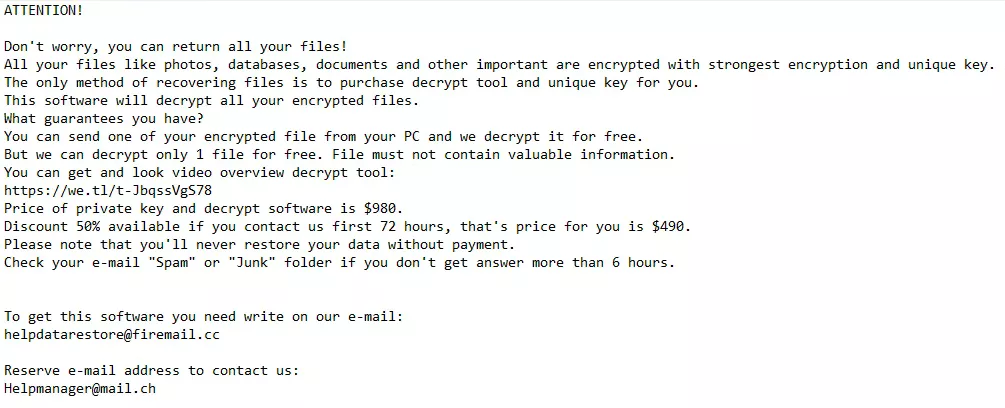
This key is held only by the attackers, who demand payment, usually in Bitcoin, to provide the decryption software needed to unlock the files.
The issue of a unique online ID for each victim complicates recovery efforts, as it necessitates a bespoke decryption key.
It’s crucial to underline the enhanced danger LKHY ransomware poses due to its integration with information-stealing malware, like Vidar or RedLine.
This combination restricts access to files and threatens the confidentiality of sensitive data, underscoring the multi-faceted security challenge LKHY represents.
Signs of a LKHY ransomware infection
Identifying a LKHY ransomware infection early can impact the ability to mitigate its effects. Several vital signs suggest the presence of this malicious software on a system:
- File Extension Modification: One of the most glaring indicators is the alteration of file extensions. Documents, images, and other personal files will have the ‘.lkhy’ extension appended to them, signaling their encrypted state.
- Ransom Note Appearance: Victims find a ransom note, “_readme.txt,” on their desktop or within affected directories. This note includes instructions for payment and contact details for the attackers, providing further evidence of the ransomware’s activity.
- Inability to Access Files: An obvious but critical sign is the sudden inability to open or access previously functional files. Attempts to open these files will likely result in error messages or demands to pay a ransom.
- System Performance Issues: While not exclusive to ransomware infections, a noticeable slowdown in system performance can accompany the encryption process, especially if the ransomware is simultaneously deploying additional malicious payloads.
Recognizing these signs promptly can be the first step towards countering the ransomware’s impact, allowing affected users to seek professional help or explore recovery options before further damage is done.
Steps to remove LKHY ransomware
Removing LKHY ransomware demands a systematic approach to eradicate the malware and minimize potential damage.
The process involves several critical steps, from identifying and isolating the infection to utilizing specialized removal tools. Following this guide will help secure your system and potentially restore encrypted files.
Identify and isolate the infection
The initial step in combating LKHY ransomware involves confirming the presence of the infection and then isolating the affected devices to prevent further spread.
This can be achieved by looking for signs of infection, such as changed file extensions and ransom notes.
Once the ransomware is identified, disconnect the infected computer from any networks and external devices that contain the malware.
Utilize Safe Mode with networking for a cleaner removal
Booting your Windows computer in Safe Mode with Networking is a crucial step in removal.
This restricted startup mode limits Windows operations to essential services and drivers, which helps prevent the ransomware from hindering the removal process.
To enter Safe Mode with Networking:
- Restart your computer.
- Press the F8 key (or Shift + F8) repeatedly as the computer boots up.
- Choose
Safe Mode with Networkingfrom the Advanced Boot Options menu and press Enter.
In Safe Mode with Networking, the system is more receptive to the following removal steps, maximizing the efficiency of the ransomware eradication process.
Effectively remove LKHY ransomware with SpyHunter
After isolating your device, a robust anti-ransomware solution like SpyHunter is crucial for addressing threats like LKHY ransomware.
SpyHunter offers specialized versions for Windows (SpyHunter 5) and macOS (SpyHunter for Mac), designed to identify and eradicate ransomware and other malware forms adeptly.
For Windows Users: SpyHunter 5
SpyHunter 5 is engineered to provide comprehensive protection against ransomware, spyware, and other malware. Its user-friendly interface and advanced scanning technology make it an effective tool for Windows users facing malware threats.
- Download SpyHunter for free here and follow the on-screen instructions to install SpyHunter 5 on your Windows PC.
- Launch the application and initiate a comprehensive system scan with SpyHunter to isolate components of the LKHY ransomware.
- Follow SpyHunter 5’s recommendations to eradicate detected malware, which may entail several scans and system restarts to purge the ransomware thoroughly.
For macOS Users: SpyHunter for Mac
SpyHunter for Mac is tailored to the unique security needs of macOS users, offering deep scanning capabilities and customized removal of malware, including ransomware, ensuring your Mac stays secure.
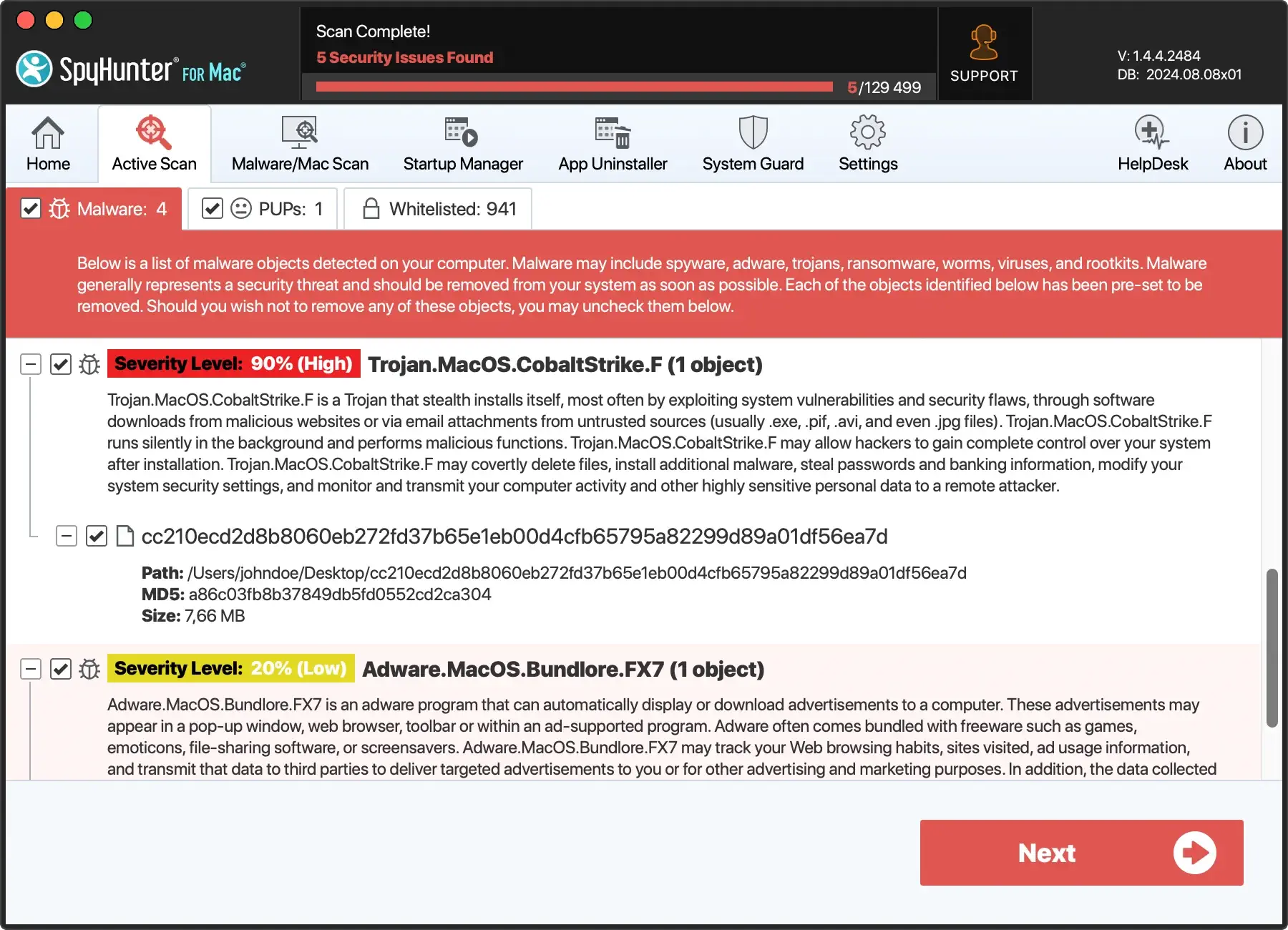
- Download SpyHunter from here and install it following the on-screen instructions.
- Open SpyHunter for Mac and initiate a full system scan to pinpoint components of the LKHY ransomware and other potential threats.
- Adhere to SpyHunter for Mac’s recommendations to eradicate detected malware.

Ensuring your system is clean provides a solid foundation for reinstating robust security measures, keeping your software updated, and maintaining regular backups of crucial data to prevent future incursions.
Decrypt and restore your .lkhy files
Due to its sophisticated encryption algorithms, unraveling the grip of LKHY ransomware on your files can be daunting.
While it might seem that paying the ransom is the only way out, it’s imperative to understand that this does not guarantee the recovery of your encrypted data and further encourages malicious activities.
Thus, the initial focus should be attempting to decrypt ‘.lkhy’ files through legitimate means without succumbing to cybercriminals’ demands.

Beginning the recovery process involves a multi-faceted approach. First, ensure that the ransomware is completely removed from your system to prevent additional files from being encrypted.
Following this, explore various decryption and data recovery possibilities.
This might include leveraging official decryption tools, employing alternative data recovery methods, or consulting cybersecurity experts who can advise on the feasibility of recovering your specific data.
Finding the right decryption tool for .lkhy files
As of the current year, while a dedicated ‘.lkhy’ file decryptor might not be available, it is worthwhile to remain vigilant for updates on decryption tools.
Cybersecurity communities and organizations often work to develop decryption solutions for various ransomware strains, and breakthroughs can happen.
Regularly check reputable sources that offer free decryption tools for many ransomware variants.
Additionally, monitoring cybersecurity forums and official security vendor websites for announcements can inform you about new developments in decrypting ‘.lkhy’ files.
When searching for a decryption tool, ensure it is credible to avoid further compromising your system’s security. Downloading and using an unofficial tool could result in additional malware infections or data loss.
Alternative data recovery methods to restore encrypted files
If a direct decryption tool for ‘.lkhy’ files is not available, don’t lose hope—several alternative data recovery methods might help retrieve some of your files:
- File Recovery Software: Several reputable file recovery programs can scan your drives for “shadows” or versions of your files saved by Windows as part of a restore point or backup system. Using software like Shadow Explorer might enable you to recover earlier, unencrypted versions of your files.
- Third-party Data Recovery Services: Professional data recovery services may have tools and methods unavailable to the general public. However, the success of such services can vary, and it’s essential to use a trusted service to avoid scams.
- Decrypting Djvu Variants: If your ‘.lkhy’ files are identified as part of the Djvu ransomware family, specific decryptors for older Djvu variants might occasionally work, as some encryption keys have been made public. While this is a long shot, it’s an avenue worth exploring.
Ultimately, patience is crucial when dealing with ransomware like LKHY.
Back up your encrypted files in a separate drive before attempting any recovery processes, as you might need these files intact for future decryption solutions that may become available.
Preventative measures: Safeguarding against future ransomware attacks
Preventing ransomware attacks requires a proactive and comprehensive approach to cybersecurity.
Incorporating several vital practices into your digital hygiene routine can significantly reduce the risk of being victimized by ransomware like LKHY.
Understanding that ransomware attackers continuously evolve their tactics, staying ahead with preventative measures is crucial.
Regular Backups: Your First Line of Defense Against Data Loss
One of the most effective strategies against ransomware is consistently creating data backups.
Keeping regular backups of your essential files ensures you can restore your data during an attack, making the ransomware’s encryption efforts futile. It is vital to follow the best practices in backup processes:
- Frequency: Perform backups regularly, depending on the significance of your data. For critical data, daily backups might be necessary.
- Diversification: Use a combination of local backups and cloud-based services. This strategy, known as the 3-2-1 backup rule, offers a robust defense against data loss. You need three copies of your data, two local but on different devices and one offsite.
- Isolation: Ensure that backups are not constantly connected to your network. Ransomware can infect connected devices, so disconnected or offsite backups provide an additional layer of security.
- Verification: Regularly verify the integrity of your backups by performing test restorations. This ensures your backups are both complete and adequate for disaster recovery.
Enhancing security: Updates, education, and professional tools
Upgrade your digital defenses by enhancing software and network security and promoting cybersecurity knowledge:
- Update Regularly: Ensure your operating systems, applications, and software are constantly updated. Ransomware often targets outdated systems with known weaknesses.
- Educate Your Team: Teach yourself and your team about phishing and ransomware strategies. Informed users can effectively prevent social engineering attacks.
- Use Advanced Security Tools: Apply comprehensive security measures, including firewalls, email filters, and antivirus programs. Opt for solutions with real-time threat detection.
- Configure for Safety: Secure your devices and networks. Turn off unused ports and services, and activate security features like 2FA.
Being proactive and informed about cybersecurity practices is crucial for defending against the dynamic threat of ransomware.
