

Remove LKFR Ransomware (Decrypt .lkfr Files)

Before we dive in
Before we dive in, let's make sure you stay safe online. We created SpyHunter because your security matters to us.
Protect your computer today — download SpyHunter right here! Check out our top tips below to keep your computer safe and secure.

LKFR ransomware represents a formidable threat to digital security, encrypting victims’ files and demanding payment for their release.
This article delves into the nature of LKFR ransomware, exploring its mechanisms, impact, and the crucial steps users can take to protect their data and mitigate potential damages.
Understanding LKFR Ransomware: Origin and spread
LKFR ransomware is a newer variant within the vast landscape of ransomware attacks, which have evolved rapidly.
The origins of LKFR ransomware can be traced to sophisticated cybercriminals who continuously develop and refine malware to exploit vulnerabilities within computer systems and networks.
This ransomware variant spreads through a mixture of traditional and modern digital vectors, utilizing phishing, software exploits, and social engineering to widen its attack base.

The rapid spread of LKFR ransomware is mainly due to its stealthy nature and various infiltration methods at its disposal.
By capitalizing on unsuspecting users, outdated software systems, and unsecured network protocols, LKFR ransomware has successfully established itself as a formidable threat.
Once infiltrated, the ransomware leverages complex encryption methodologies to hold victim’s files hostage, compelling them to pay a ransom to regain access.
How LKFR ransomware infects your computer
LKFR ransomware employs a multi-faceted approach to infect computers. Beyond the common vectors such as malicious email attachments and deceptive websites, LKFR also uses more sophisticated techniques. These include:
- Exploiting software vulnerabilities that have not been updated with the latest security patches
- Spreading through peer-to-peer (P2P) networks where files are shared directly between users.
- Malvertising – malicious advertising where cybercriminals infiltrate advertising networks to place ads that discreetly download malware when clicked or even sometimes just displayed.
These methods, combined with weak Remote Desktop Protocol (RDP) passwords, showcase the advanced techniques employed by the LKFR variant to gain unauthorized access to users’ computers.
Common symptoms of LKFR ransomware infection
Recognizing the symptoms of LKFR ransomware infection early can help mitigate the damage. Common signs include:
- Encrypted files with a new extension indicate the ransomware has locked access to your personal or critical files.
- The appearance of ransom note files (e.g., “_readme.txt”) on your desktop or within folders explicitly demands payment for a decryption key.
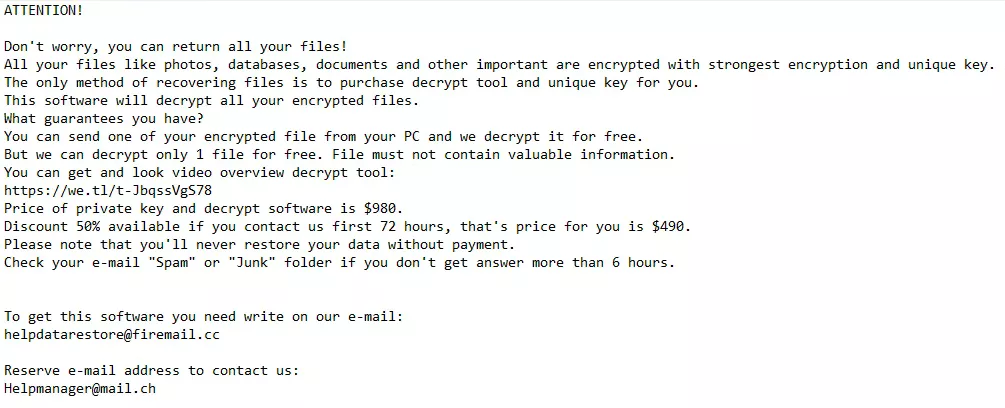
Other symptoms include:
- Slower than usual computer performance or frequent crashes, as the ransomware uses substantial resources to encrypt files.
- Inability to access regular files, applications, or system utilities, which may indicate that crucial system files have been encrypted or tampered with.
- Unusual network communication or data traffic. This signals the ransomware is communicating with its command and control servers to download further malicious payloads or exfiltrate data.
Early detection and understanding of these symptoms are crucial in preventing the further spread of LKFR ransomware within a network and hastening the recovery process from such an infection.
Step-by-step guide to remove LKFR ransomware
Removing LKFR ransomware requires a systematic approach to eradicating the malware from the infected operating system. It is imperative to follow these steps carefully to avoid further damage or loss of data.
Initiating the removal process involves first identifying the presence of the ransomware and then proceeding with several critical steps designed to cleanse the system of the malicious software.
Initial steps to take after discovering LKFR infection
Upon detecting an LKFR ransomware infection, immediate actions are crucial to limit its impact:
- Disconnect the infected device from the internet and any network connections to prevent the spread of the ransomware to other devices.
- Identify and note any unusual file changes or ransom notes, as these can provide clues for decryption.
- Avoid paying the ransom as it does not guarantee file recovery and can fund future criminal activities.
- Initiate a backup of encrypted files to an external storage device for future decryption attempts.
These initial steps help prepare the computer for the removal process and secure potential evidence that might be required for decryption or investigation.
Remove LKFR virus with SpyHunter
Effectively detecting and eliminating LKFR ransomware requires powerful anti-malware software. For users on both Mac and Windows, SpyHunter offers tailored solutions to combat this threat:
For Windows Users:
- Download SpyHunter from here and install SpyHunter 5, which is specifically designed to tackle malware threats on Windows.
- Before initiating a scan, update the software to the latest version to ensure its current virus definitions, offering the best protection against the newest malware threats, including LKFR ransomware.
- Launch SpyHunter 5 and conduct a comprehensive system scan to detect all traces of LKFR ransomware and other malicious entities lurking on your device.
- Follow SpyHunter 5’s guidance to quarantine and eliminate any detected malware. The software is designed to safely remove threats without harming your system.
For Mac Users:
Download SpyHunter and follow the instructions to install SpyHunter for Mac. This version is optimized for macOS, ensuring effective malware detection and removal.
Ensure your version of SpyHunter for Mac is up-to-date, enabling it to identify and address the most recent malware variants, including the LKFR virus.
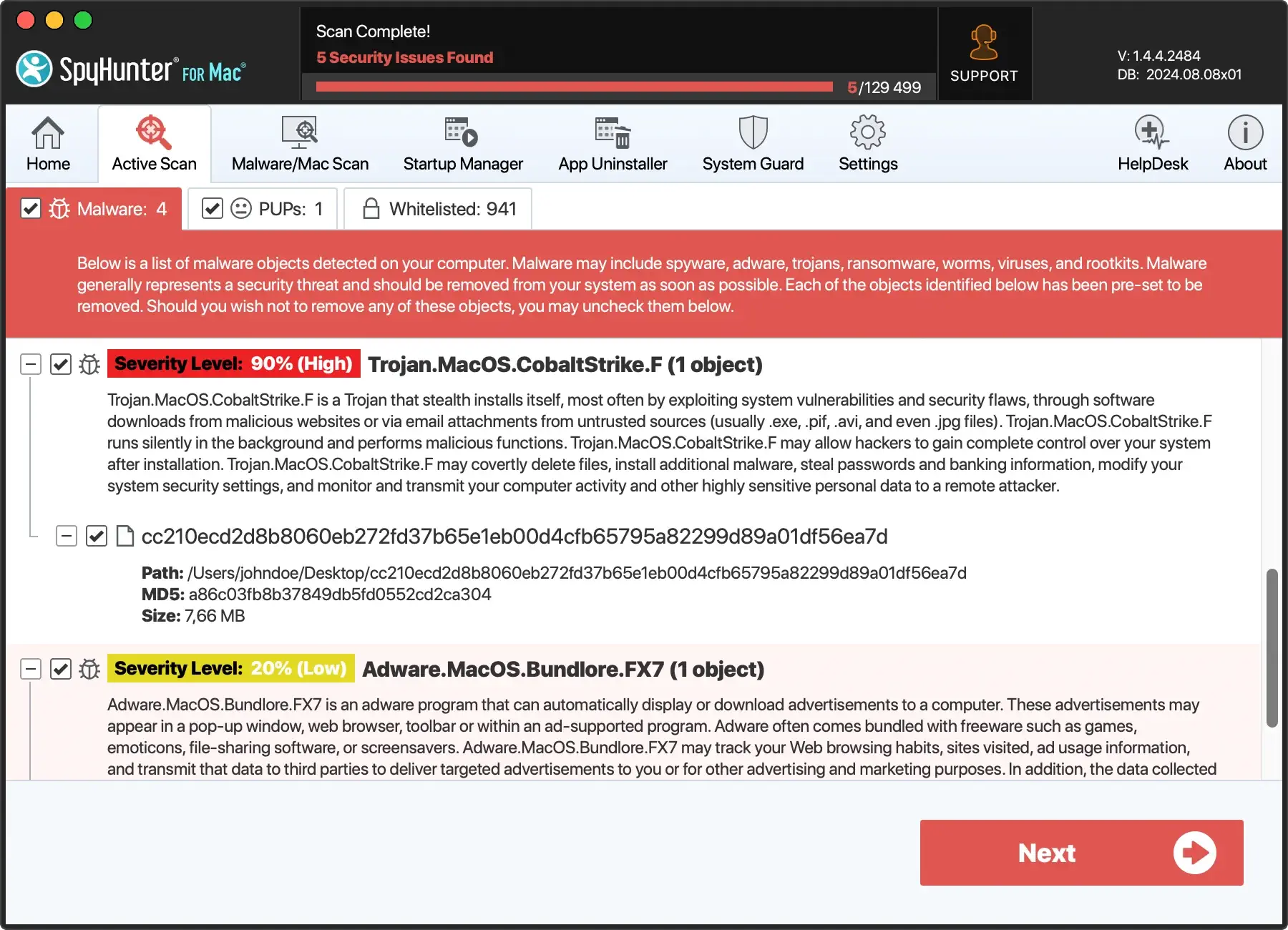
With SpyHunter for Mac, perform a full system scan to uncover and isolate components of the LKFR ransomware alongside any additional malicious code.
Utilize SpyHunter for Mac’s recommendations to remove any malware found. The software ensures thorough cleanup, preserving your system’s integrity.

After using SpyHunter on your respective system, conducting a follow-up scan is wise to verify that all malicious software, including remnants of the LKFR ransomware, has been entirely eradicated.
Regularly updating and scanning with SpyHunter can prevent future infections and keep your device secure.
Decrypting .lkfr files: Tools and techniques
Decrypting files affected by LKFR ransomware can seem daunting. However, various tools and techniques have been developed to assist victims in recovering their data without succumbing to cybercriminals’ demands.
First, removing the ransomware infection from your system is crucial to prevent further encryption. Following this, several options can be explored for decrypting or recovering your .lkfr files.
Free decryption tools for .lkfr files
Free decryption tools have been a glimmer of hope for victims of ransomware attacks.
Occasionally, cybersecurity researchers and law enforcement agencies succeed in cracking the encryption algorithms of certain ransomware families, leading to the creation of free decryption tools.
The effectiveness of these tools for .lkfr files largely depends on the specific variant of the ransomware and the complexity of its encryption algorithm.
Victims should visit reputable cyber security websites and forums regularly to check for new decryption tools released for the LKFR ransomware.
It’s essential to ensure that any decryption tool you use is downloaded from a reliable source to avoid further malware infections.
Decrypting .lkfr files with professional software
Some professional programs claim they can unlock files encrypted by ransomware, like .lkfr files. However, success isn’t always sure with these tools.
These decryption tools, often paid, might only work on some ransomware types, failing on the newer or stronger ones. Before buying:
- Check the software’s reviews.
- Confirm the provider’s trustworthiness.
- Try decrypting a few files to see if it works.
Recover your files without decryption keys
Recovering files encrypted by LKFR ransomware without the decryption keys can be challenging but not impossible.
For victims who have not backed up their data or where backup files have also been compromised, several methods may offer a glimmer of hope:
- File Recovery Software: Various data recovery tools can scan your hard drive for deleted files and attempt to restore them. Since ransomware typically encrypts files and sometimes deletes the original ones, such software can recover the pre-encryption versions of some files.
- Shadow Copies: Windows creates automatic backups known as shadow copies. Some ransomware variants fail to delete these backups, making restoring files from shadow copies possible using specific tools.
- Data Recovery Services: Professional data recovery services may offer more sophisticated methods for recovering encrypted files. Although this can be costly, it’s an option for those with critical data with no other means of recovery.
While these methods offer alternative paths to decryption, their success can vary based on several factors, including the type of ransomware, the extent of the encryption, and the condition of the computer’s hard drive.
It’s always recommended to keep multiple backups of important data, including off-site or cloud storage, to mitigate the risks associated with ransomware and other forms of data loss.
Prevent future ransomware attacks
Ensuring robust protection against future ransomware attacks like LKFR requires a multi-faceted approach incorporating preventive strategies and the correct set of tools.
Recognizing the importance of taking steps before an attack occurs is vital to minimizing the risk of infiltration.
By adhering to industry best practices and leveraging advanced cybersecurity tools, users can create a formidable defense mechanism against ransomware threats.
Regular backups: Your first line of defense against ransomware
One of the most reliable defenses against ransomware is the maintenance of regular data backups.
Implementing a comprehensive backup strategy enables you to recover encrypted files without succumbing to cybercriminals’ demands.
It’s crucial to:
- Automate the backup process to ensure data is consistently saved without manual intervention.
- Store backups in multiple locations, including off-site and cloud storage, to prevent total data loss in a physical disaster or ransomware attack.
- Test backups regularly to confirm data integrity and ensure a smooth recovery process when necessary.
Integrating these practices into your data management routine creates a resilient defense that minimizes the impact of ransomware attacks on your precious data.
Enhance your network security to avoid LKFR and other ransomware
Securing your network is a critical aspect of preventing ransomware infections. Effective network security measures include:
- Utilizing advanced firewalls and intrusion detection systems to track network traffic.
- Implementing secure configurations for all hardware and software on your network.
- Segmenting the network to ensure sensitive data is isolated and protected.
- Applying the principle of least privilege to all systems and services to cut the potential impact of a ransomware attack.
Continuous network activity monitoring can also help detect suspicious behavior indicating a ransomware attack.
Stay updated: The importance of software and OS updates
Regularly updating software and operating systems is a cornerstone in protecting against ransomware. Cybercriminals often exploit known vulnerabilities to gain unauthorized access to systems.
To combat this, adhere to the following guidelines:
- Enable automatic updates for your operating system and all software to ensure you receive the latest security patches.
- Conduct periodic audits of all systems to verify that the latest updates are installed and functioning correctly.
- Stay informed about the latest security threats and vulnerabilities that could affect your systems, allowing you to take proactive measures to mitigate them.
By consistently applying these practices, you significantly reduce the risk of ransomware infections through exploited vulnerabilities, ensuring your systems remain secure against potential threats.
What do you do if you cannot decrypt your .lkfr files?
If you find yourself in a position where decrypting your .lkfr files seems impossible, it’s important not to lose hope.
While the situation may appear dire, you can still take actions that don’t involve giving in to cybercriminals’ demands.
Exploring all possible avenues for data recovery is crucial, as is safeguarding your system against further attacks.
This may involve consulting with data recovery experts, using advanced file recovery software, or seeking assistance from law enforcement and cybersecurity professionals who may have access to new decryption keys or methods.
Should you pay the ransom? Understanding the risks
Paying the ransom to cybercriminals might seem like a quick solution to regain access to your encrypted files, but it’s fraught with risks and drawbacks. There are several crucial points to consider before even contemplating this option:
- No Guarantee of Decryption: There’s no assurance that the attackers will honor their word and provide a working decryption key upon payment.
- Encouraging Criminal Activity: Paying the ransom directly finances the activities of these cybercriminals, enabling them to continue their illicit operations and target more victims.
- Potential Repeat Targeting: Succumbing to the ransom demands marks you as a willing payer, possibly leading to future attacks.
- Legal Implications: Depending on your jurisdiction, paying a ransom to cybercriminals may have legal ramifications.

Evaluating these risks thoroughly and considering alternative recovery methods before making any decisions that might exacerbate the situation is imperative.
Report LKFR ransomware to authorities
One critical step that shouldn’t be overlooked is reporting the incident to the appropriate authorities. This helps fight against cybercrime and may provide you with access to additional resources and support.
Consider the following actions:
- Contacting Local Law Enforcement: They can investigate the crime and may coordinate with international agencies to track down the perpetrators.
- Reporting to National Cybersecurity Centers: Many countries have dedicated authorities for handling cybercrime incidents. Writing to these entities can contribute to broader efforts to combat ransomware and aid others in similar predicaments.
- Engaging with Industry Forums and Support Groups: Online forums and support groups for ransomware victims can offer practical advice and moral support. Sometimes, they may have information on decryption tools or methods that have worked for other victims.
While the immediate recovery of your files may not be guaranteed, taking these steps helps contribute to a collective effort against ransomware.
It underlines the importance of community and resilience in the face of cyber threats.
