

Remove InitialSkill Mac [Complete Instructions Included]

Before we dive in
Before we dive in, let's make sure you stay safe online. We created SpyHunter because your security matters to us.
Protect your computer today — download SpyHunter right here! Check out our top tips below to keep your computer safe and secure.

InitialSkill is a form of adware that targets Mac users. It can disrupt users’ digital experience through unwanted advertisements and browser modifications.
This invasive software sneaks into systems without the user’s knowledge, leading to privacy concerns and a compromised browsing environment.
This article aims to shed light on InitialSkill’s operations, detailing how it infiltrates Macs, its effects on users, and providing practical strategies for its identification and removal.
By understanding the threat InitialSkill poses, Mac users can take the necessary steps to protect their devices and maintain a secure online presence. Let’s dive in:
Understanding InitialSkill adware
What is InitialSkill?
InitialSkill adware is a potentially unwanted application (PUA) that explicitly targets macOS users. It gains access to systems through deceptive methods such as bundled software installations, fake software updates, and visits to compromised websites.
How does InitialSkill affect your Mac?
- Browser Hijacking: InitialSkill takes control of web browsers on Apple devices, altering system and browser settings without permission to push sponsored content and generate revenue.
- Intrusive Advertising: Users experience aggressive advertising through pop-ups, ads, and banners, significantly hampering the browsing experience.
- Redirects to Malicious Sites: The adware redirects users to potentially harmful websites, increasing the risk of further infections or security breaches.
- Unauthorized Changes: It can change your homepage, new tab page, and default search engine to a fake search engine, leading to search result manipulations.
Security and privacy risks
In addition to its disruptive advertising and browser hijacking activities, InitialSkill adware is known for its data-tracking capabilities.
It employs various tracking technologies to monitor and collect information on the user’s online behavior, including visited websites, search queries, and potentially sensitive personal information.
This collected data is then exploited for targeted advertising campaigns or sold to third parties.
To safeguard your macOS system and maintain your online privacy, it’s imperative to promptly detect and eliminate InitialSkill adware and any associated potentially unwanted files from both the system and affected web browsers.
Removing InitialSkill will prevent further unauthorized modifications and intrusive advertising and protect against potential privacy invasions and security threats.
Remove InitialSkill from Mac: Detailed guide
Eliminating InitialSkill adware from your Mac involves a comprehensive approach to ensure your system is thoroughly cleaned and protected from future threats.
This guide outlines the necessary steps to remove this intrusive software effectively.
Step 1: Remove malicious configuration profiles related to InitialSkill
InitialSkill may install configuration profiles that alter your Mac’s settings to its advantage. Removing these profiles is a critical first step:
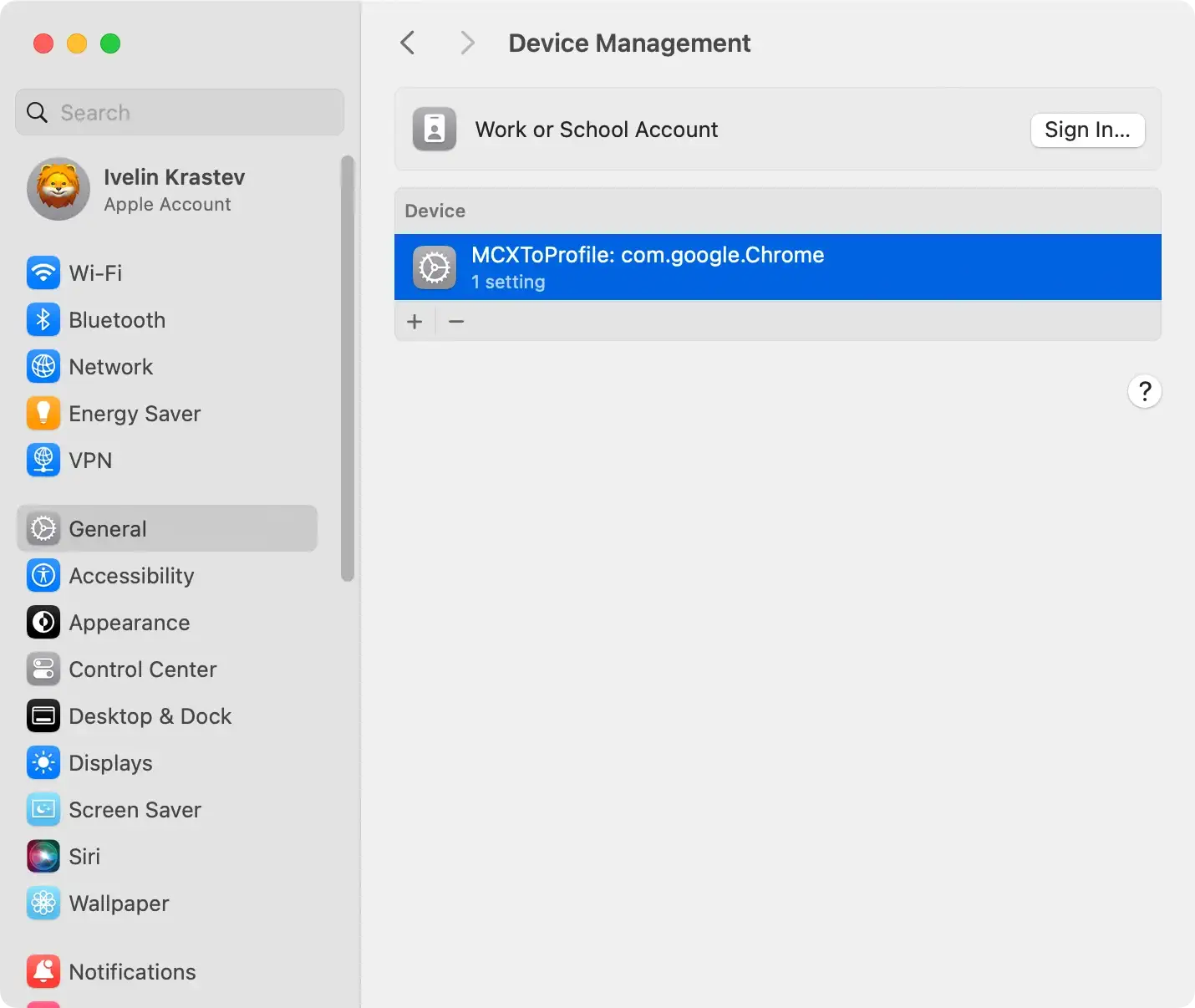
- Open
System Preferences/System Settings: Click on the Apple menu and selectSystem Preferences(System Settingson newer macOS versions). - Find Profiles: Look for a
Profilesoption. If it exists, it indicates the presence of one or more configuration profiles, possibly installed by InitialSkill. - Delete Suspicious Profiles: Identify any profiles related to InitialSkill or that seem suspicious. Select them and click the minus (-) button to remove them, effectively stopping the adware from making unauthorized changes to your system settings.
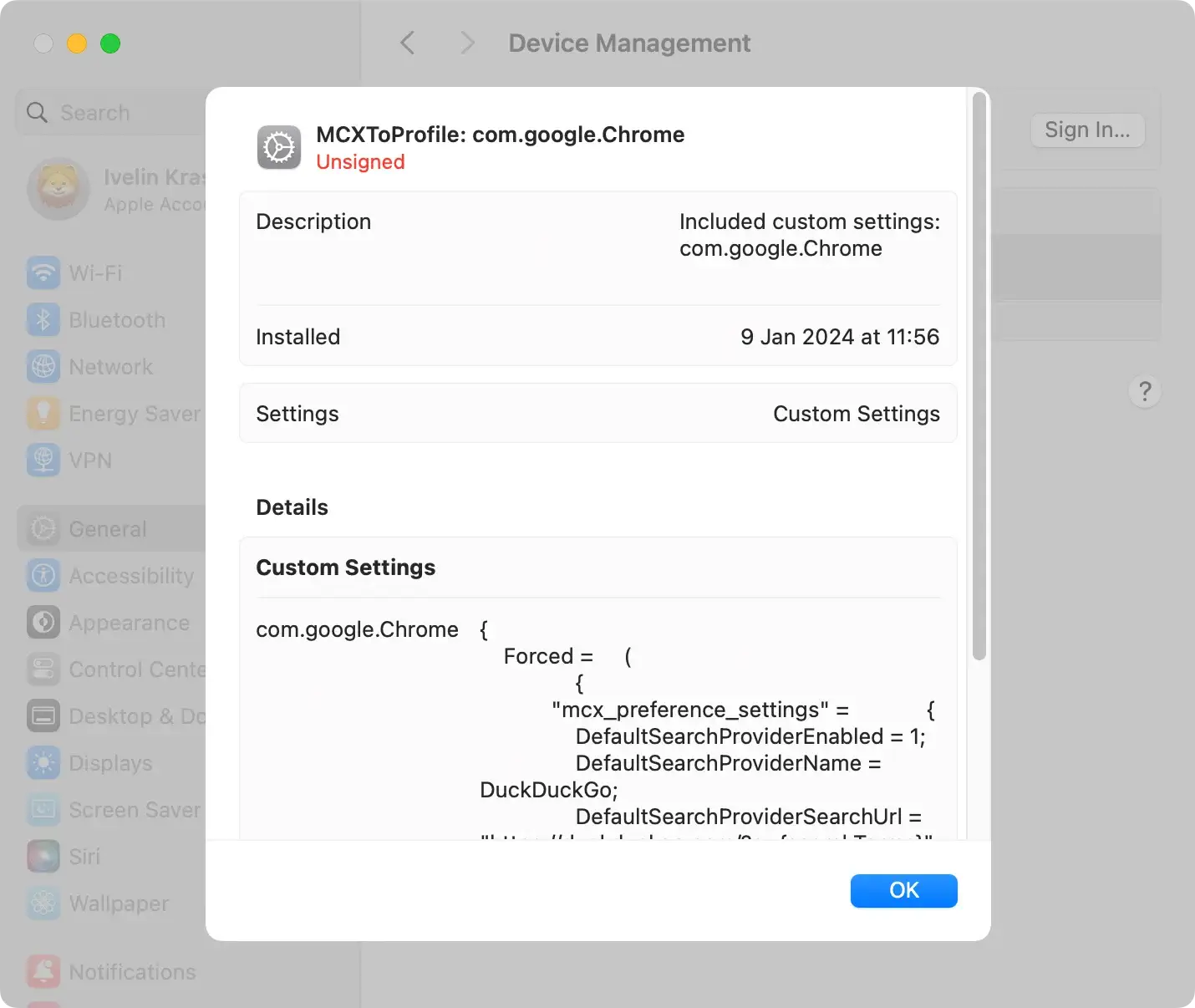
Step 2: Identify and remove InitialSkill applications and related files
Uninstall InitialSkill applications
- Open the Applications Folder: Access your
Applicationsfolder viaFinder. This is where most applications are stored, including those installed by adware. - Locate InitialSkill Applications: Look for any applications that you don’t recognize, seem suspicious, or know are related to InitialSkill. Adware often disguises itself with legitimate-looking names to avoid detection.
- Move to Trash: To uninstall an application, drag it to the
Trash. Alternatively, you can right-click on the application and selectMove to Trash.

Remove related files and folders
After uninstalling InitialSkill applications, it’s essential to delete any files and folders associated with the adware:
- Use Finder to Search: Open Finder and use the
Go to Folderfeature to navigate to specific directories. Common locations where adware hides its files include~/Library/Application Support/~/Library/LaunchAgents//Library/LaunchDaemons//Library/StartupItems/~/Downloads/
- Identify Suspicious Files: Look for any files or folders related to InitialSkill or such you don’t recognize. Pay special attention to files with “InitialSkill” in their name.
- Delete the Files: Move any identified files to the Trash. Be cautious to ensure you’re only deleting files related to the adware, as removing system files by mistake can affect your Mac’s functionality.
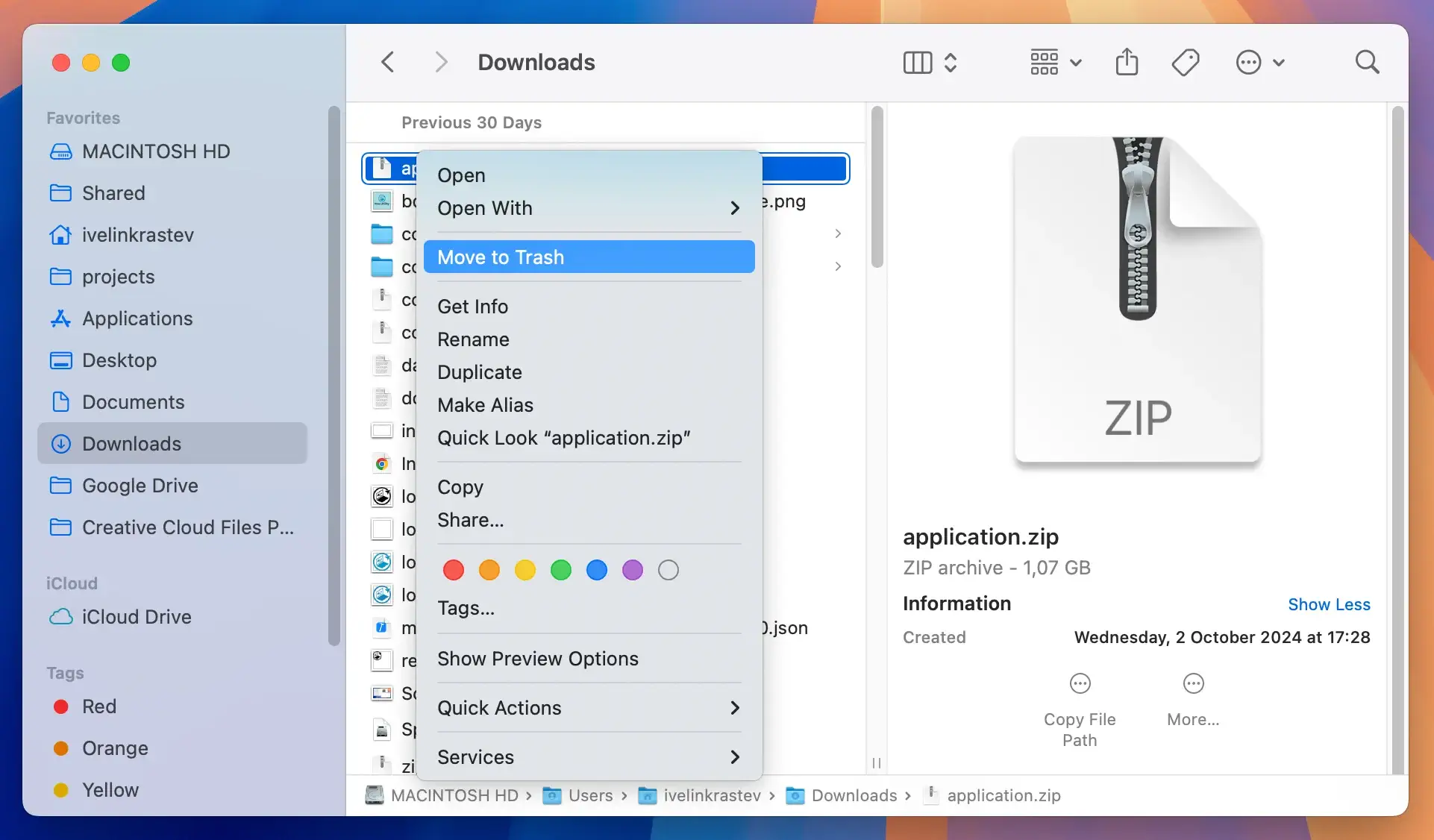
Once you’ve moved the suspicious applications and files to the Trash, right-click on the Trash icon and select Empty Trash to remove them permanently from your system.
Removing the InitialSkill applications and any related files is crucial for thoroughly cleaning your Mac and preventing the adware from continuing to affect your system’s performance and security.
Step 3: Remove InitialSkill extensions from web browsers
Adware like InitialSkill often targets web browsers. Removing malicious extensions is essential:
Remove InitialSkill from Safari
- Navigate to Safari’s Preferences and locate the extensions tab.
- Identify any dubious extensions related to InitialSkill and uninstall them.
- Reset Safari to its original state to ensure all changes made by the adware are reverted.
Eliminate InitialSkill extensions from Google Chrome
- Open Chrome’s menu, proceed to
More tools, and locate the extensions menu. - Look for extensions that don’t belong or seem out of place and remove them.
- Consider resetting Chrome’s settings to default to eliminate any residual data.
Delete InitialSkill add-ons from Mozilla Firefox
- Access the add-ons section in Firefox.
- Please inspect for any unknown or suspicious add-ons and remove them.
- Resetting Firefox settings can also help in entirely removing the adware’s alterations.
Step 4: Comprehensive cleanup with SpyHunter
Employing a specialized anti-malware tool is recommended to ensure no remnants of InitialSkill linger on your Mac.
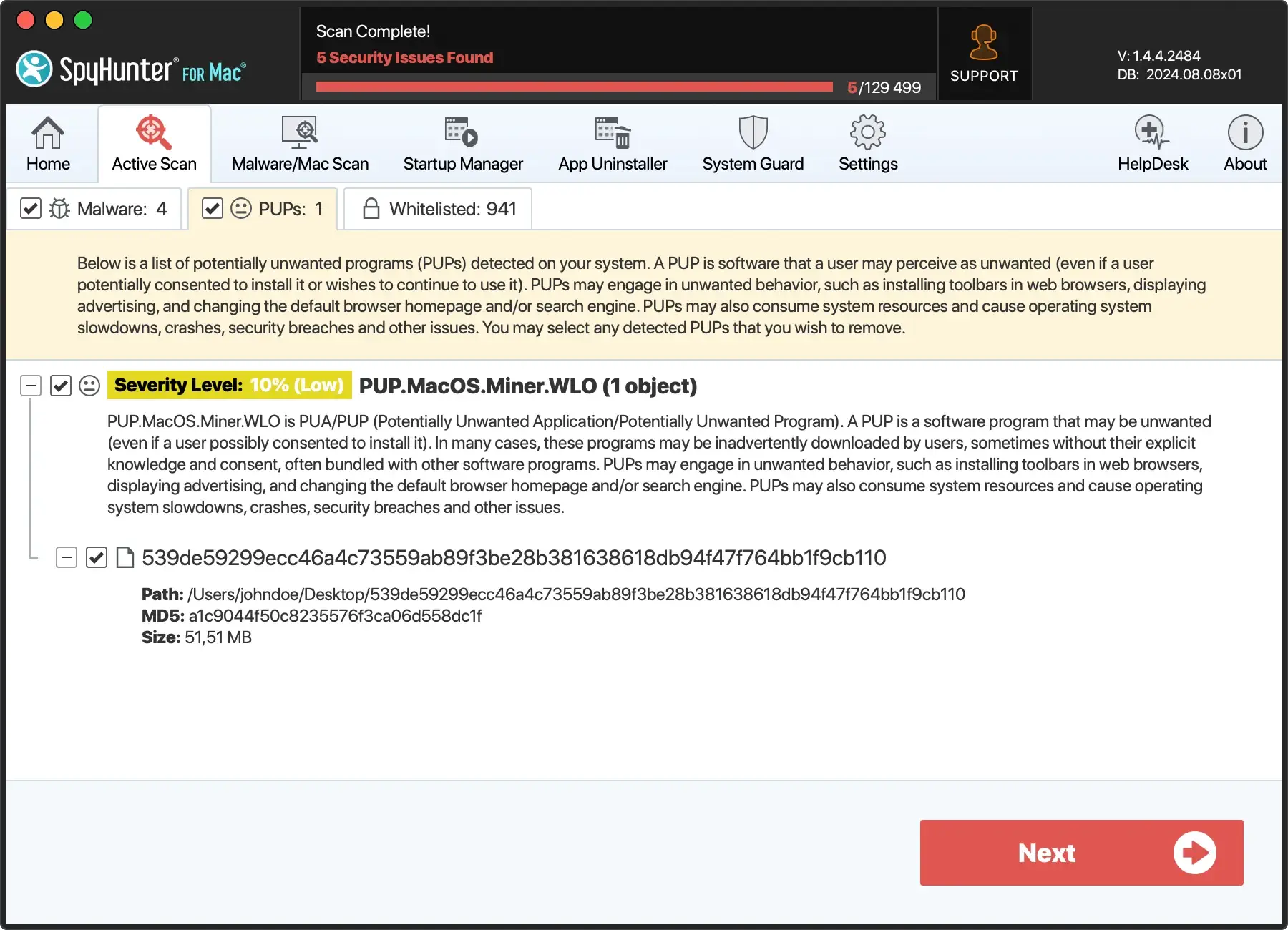
For a thorough removal and future protection, consider using SpyHunter for Mac. SpyHunter offers deep system scans to detect hidden adware components, ensuring a complete cleanup:

- Download SpyHunter from here and install it on your Mac.
- Once established, open SpyHunter and initiate a full system scan.
- SpyHunter will identify all traces of InitialSkill and other potential threats. With your approval, it will proceed to remove them safely.
- Activate SpyHunter’s real-time protection to prevent future adware attacks and malware threats.

By meticulously following these steps and utilizing SpyHunter for the final cleanup, you can ensure the complete removal of InitialSkill from your Mac and enhance your system’s defense against similar adware threats in the future.
Enhance your Mac’s security after removing InitialSkill
Regularly update macOS and installed software
One of the most pivotal steps in safeguarding your Mac against malware and adware like InitialSkill is to ensure your system and all installed software are up to date.
Apple frequently releases updates for macOS that include security enhancements and vulnerability patches.
Similarly, software developers update their applications to close any security gaps that malware could exploit.
Regularly checking for and installing these updates can significantly reduce the risk of infection.
Utilize trusted antivirus software
Despite macOS being renowned for its robust security features, the increasingly sophisticated nature of malware and adware means that built-in protections may not always suffice.
Installing a reputable antivirus or adware removal tool offers an additional security layer.
Options like SpyHunter for Mac are well-regarded in the cybersecurity community and can be powerful allies in maintaining your Mac’s health and security ( Download SpyHunter ).
FAQ: Common questions about InitialSkill
Is InitialSkill harmful to my Mac?
While InitialSkill adware primarily aims to generate revenue through aggressive advertising, its presence can significantly impact your Mac’s performance and security. It can lead to:
- Decreased system speed.
- Unresponsive applications.
- Potential breaches of personal information due to its data tracking capabilities.
Therefore, while it may not directly damage your system’s hardware, its activities can be harmful.
How can InitialSkill adware impact my internet privacy?
InitialSkill adware’s data tracking activities pose a considerable risk to your internet privacy.
It can monitor and collect details of your online behavior, including the websites you visit, search queries, and even personal information entered online.
This data can then be used for targeted advertising or sold to third parties, leading to privacy invasions and, potentially, identity theft.
What are the signs that my Mac is infected with InitialSkill?
- Unexpected ads, pop-ups, and banners appear during browsing sessions.
- Your web browser’s homepage, new tab, or search engine settings have been altered without your consent.
- The system runs slower than usual, and browsers frequently crash or become unresponsive.
- Programs or extensions you don’t recognize are installed on your Mac.
Can anti-malware programs detect InitialSkill?
While many anti-malware programs are equipped to detect and remove various types of malware, adware like InitialSkill can sometimes slip through, especially if it’s a new or particularly stealthy variant.
Using an antivirus solution known for its adware detection capabilities, such as SpyHunter, is essential. Keep it updated for the best protection.
Should I handle InitialSkill removal myself?
If you are comfortable with manually navigating your system’s files and settings, you may be able to remove InitialSkill adware by following detailed instructions.
However, due to the risk of accidentally deleting necessary files or failing to remove all adware components, it’s often safer to use specialized removal tools or seek professional assistance.
