

Remove Sighful.app From Mac [Works in 2025]

Before we dive in
Before we dive in, let's make sure you stay safe online. We created SpyHunter because your security matters to us.
Protect your computer today — download SpyHunter right here! Check out our top tips below to keep your computer safe and secure.

Sighful.app discreetly injects advertisements into the websites you visit and redirects your browser search queries.
Suppose you’ve unwittingly encountered this intrusive software. In that case, it’s crucial to promptly take action and remove Sighful.app to restore the seamless functionality of your browser and ensure an uninterrupted online experience.
What is Sighful.app?
Known as problematic adware, the Sighful.app is specifically designed to target Mac users. Its primary intrusion method typically pushes relentless pop-up advertisements, resulting in a taxing and frustrating user experience.
While it may initially seem harmless, its disturbing actions extend beyond interfering with browsing sessions.
How did I get it?
The Sighful.app virus is often implanted into systems through crafty methods.
Most users unknowingly install it during other software installations, where it usually hides within bundled packages.
Alternatively, it may sneak into systems via infected sites or deceptive pop-up advertisements. Understanding this infiltration mode is vital in fortifying your Mac’s defenses and preventing reinfection after removal.
What does it do?
Once installed, Sighful.app goes into overdrive, flooding your Mac with constant advertisements.
Besides being a nuisance, these pop-up ads can often lead to unexpected and potentially harmful redirects.
The adware also risks installing other unwanted or potentially dangerous applications, further complicating its removal and heightening the potential for damage.
Is it a Mac virus?
Although it lacks some hallmarks of traditional viruses, classifying Sighful.app as harmless would be misleading.
Its behaviors, such as intrusive ad displays, unwanted installations, and potential backdoor exploits, indicate significant potential for harm.
Even without directly damaging your files or stealing your data, it can render your Mac unstable, compromising overall performance and posing vital security risks.
Symptoms of Sighful.App threat on Mac
The Sighful.app threat manifests several distinctive symptoms, making it easier for Mac users to identify an infection.
These symptoms hint at adware and disruptive activities on your Mac. Here is a list of the most common symptoms:
Mac becoming slow
One of the immediate and most noticeable signs of Sighful.app on your Mac is a significant slowdown in overall system performance.
Your Mac may take longer to boot up, and applications may lag or freeze while using.
This sluggish performance is mainly because this unwanted app utilizes your system resources to run its activities in the background.
Unwanted toolbars, add-ons, or browser extensions
If you notice unfamiliar toolbars, add-ons, or extensions present on your web browsers that you do not recall installing, it’s likely due to the Sighful.app adware.
These unwanted installations often serve as conduits for delivering further intrusive ads and redirects.
Pop-ups and redirection to random sites
This adware is notorious for its intrusive advertising, so frequent pop-ups and unexpected redirects to random, unwanted websites are vital indicators of its presence.
The ads promoted by Sighful.app do not necessarily reflect the content you’re browsing, as their primary function is to generate revenue for its developers through click-based schemes.
Unwanted apps installed on Mac
Sighful.app can download and install other potentially unwanted apps on your Mac without your consent.
If you observe new applications on your system you don’t remember installing, especially if they’re launching without your initiation, it’s a strong symptom of Sighful.app’s presence.
Suspicious processes running on Mac
Sighful.app operates through multiple processes running in the background of your Mac.
If you notice unfamiliar tasks in your Activity Monitor – particularly those consuming high system resources – it could indicate that the adware is active.
Simultaneously executing multiple processes, such as ad generation and data collection, is instrumental in maintaining its intrusive operations.
Preparare before you remove Sighful.app
The removal process of Sighful.app can be complex and may require a meticulous approach.
Proper preparations can streamline the procedure and provide a safety net for your data. Here are some steps to take before beginning the removal:
Backup your files
Creating a backup of all your important files is essential before starting the removal process. Despite taking all precautions, there’s always a potential risk of data loss.
Please store your files in a secure external drive or a cloud storage platform to ensure their safety.
This way, even if the worst scenarios occur, your valuable data will be secured elsewhere.
Have a device with the instructions on standby
During removal, you’ll likely need to restart your Mac or temporarily turn off your web browser.
Therefore, it’s crucial to have another device accessible to display the removal instructions.
This will help you stay on track throughout the process and prevent confusion or interruptions.
Be patient
Removing the Sighful.app may be time-consuming and require specific technical knowledge.
Nonetheless, it is essential to approach it with patience and care. Rushing through the steps may lead to mistakes or missed adware remnants.
Remember that performing the process correctly will completely eradicate the threat, restoring your Mac’s health and security.
Remove Sighful.app from Mac
Given the Sighful.app’s disruptive nature, early removal is critical. A comprehensive removal guide can effectively eradicate this system pest.
It helps with the removal process and provides recommendations on fortifying your Mac against future invasions. Hence, restoring your Mac’s optimal performance gives you peace of mind.
Remove Sighful.app manually
For those well-versed in system complexities and preferences, opting for manual removal provides a tech-savvy approach.
However, meticulous adherence to a specific sequence is vital to avoid unintentionally deleting essential files. Here’s a simplified guide to help you eradicate Sighful.app manually:
Remove malicious configuration profiles
While configuration profiles serve as valuable tools in business environments for streamlined Mac device management, home users often face vulnerabilities exploited by adware and browser hijackers.
These threats manipulate configuration profiles to restrict users from uninstalling malicious software and adjusting browser settings.
To regain control, follow these steps to identify and delete these potentially harmful profiles:
1. Open System Settings and navigate to the Profiles section under Privacy & Security.
2. Examine the list of installed profiles, paying attention to unfamiliar ones associated with Sighful.app or other adware.
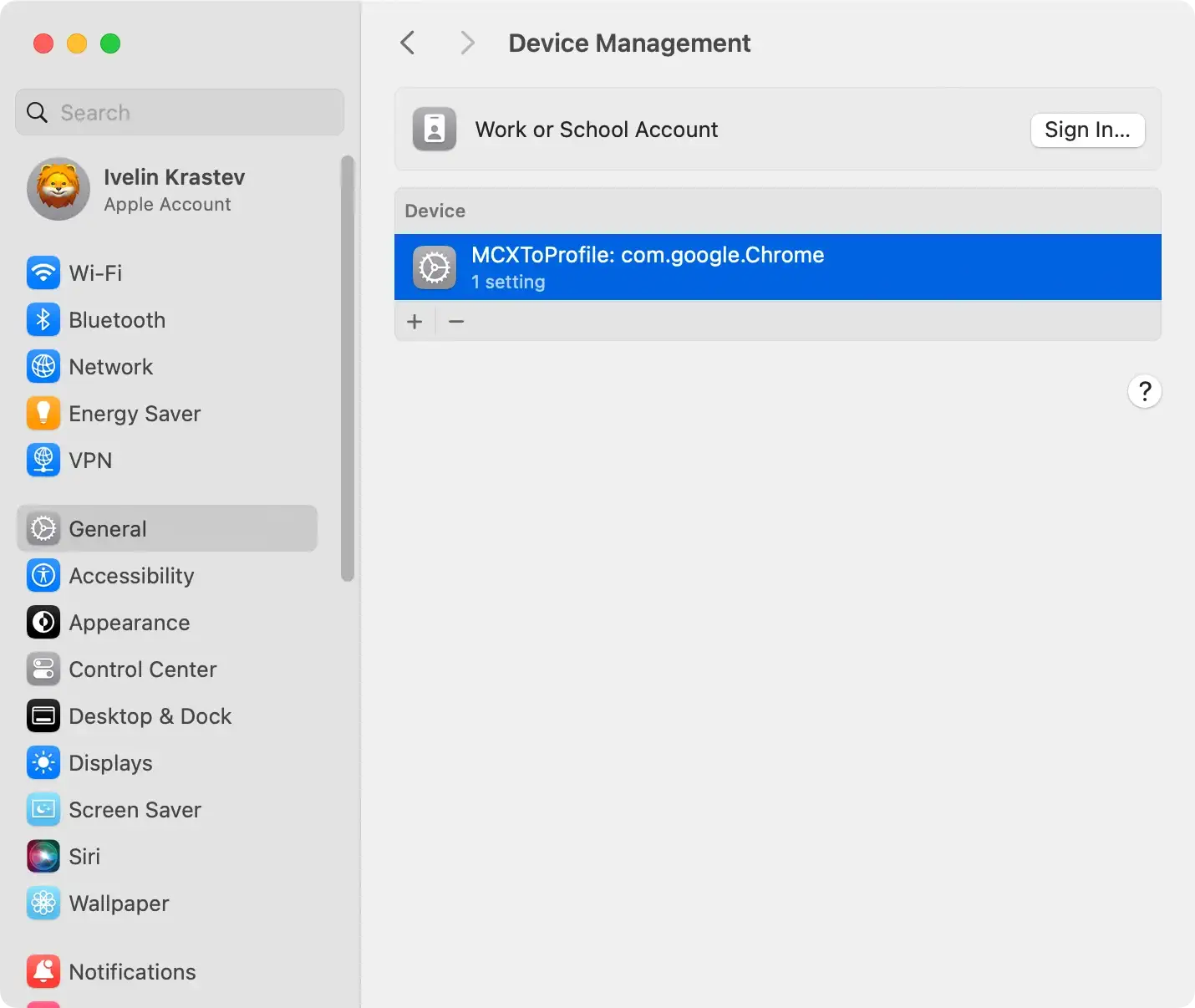
3. Select the suspicious profile, then click on the ‘-‘ (minus) button to remove it. Confirm the deletion if prompted.
4. Authentication with your admin credentials may be required.
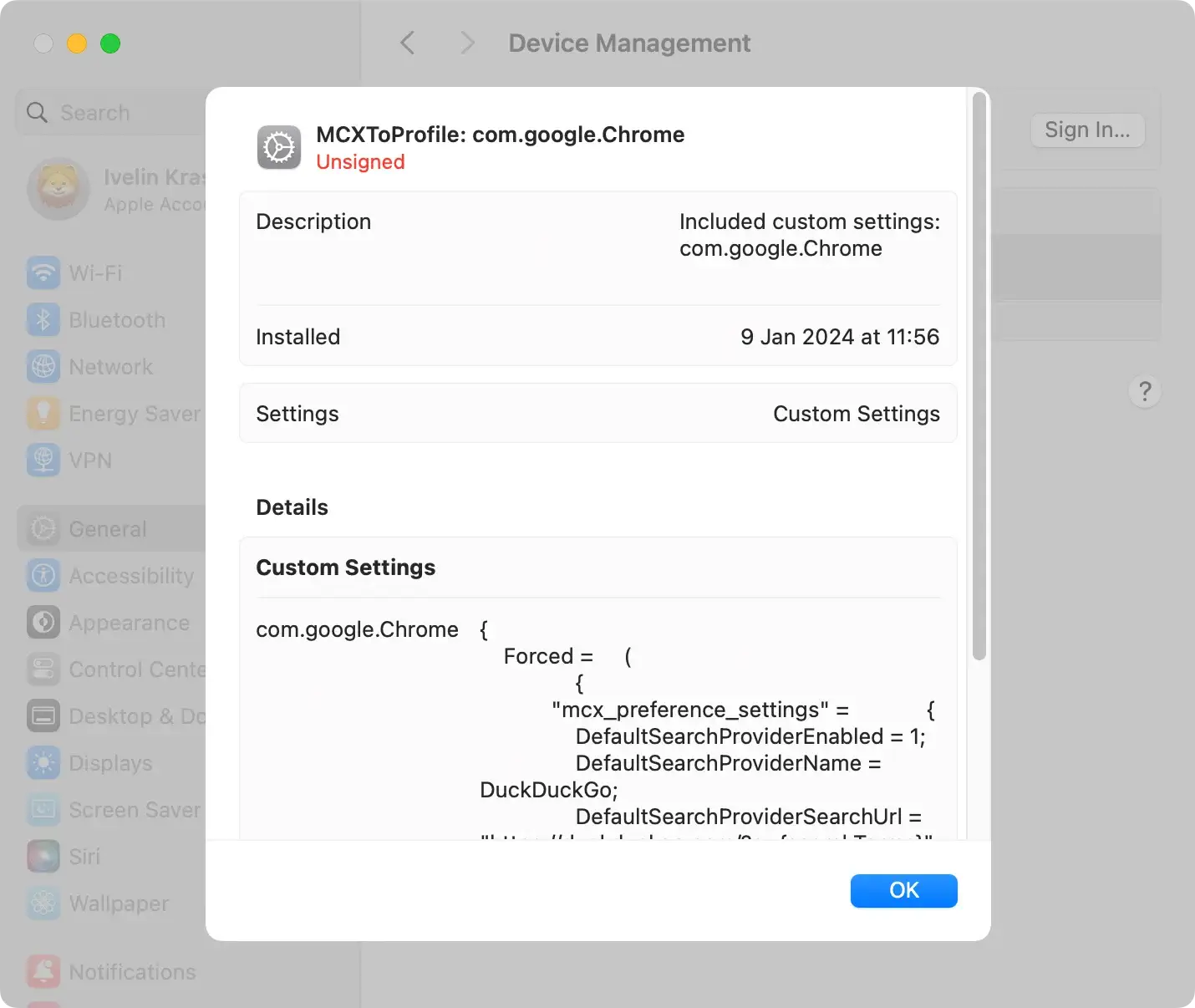
By systematically removing these malicious configuration profiles, you restore control over your Mac, thwarting persistent manipulations by adware and browser hijackers. Regularly reviewing and managing installed profiles adds an extra defense against potential threats.
Remove Sighful.app program
To shield your Mac from potential threats, follow these steps to identify and eliminate any harmful applications and files that might have infiltrated your system.
Some redirect or adware programs might offer uninstall options for their removal. We’ll explore both manual uninstallation and a more convenient automated approach.
Note: These guidelines are practical for any Mac device, including MacBook Air, Mac mini, MacBook Pro, and iMac.
Remove Sighful.app via Finder:
- Open
Finderand navigate to theApplicationsfolder. - Review the list of installed programs for any unfamiliar or suspicious apps.
- Right-click on the app you want to remove and select
Move to Trash/Binor drag it into theTrash/Bin. - Empty the
Trash/Bin.

Remove Sighful.app using the Launchpad
- Open
Launchpadand review the list of installed applications for any unfamiliar or suspicious apps. - Press the
⌥ (Option)key until the app icons start vibrating. - Click the
[X]icon next to the app to delete it. Then empty theTrash/Bin.
Bonus tip
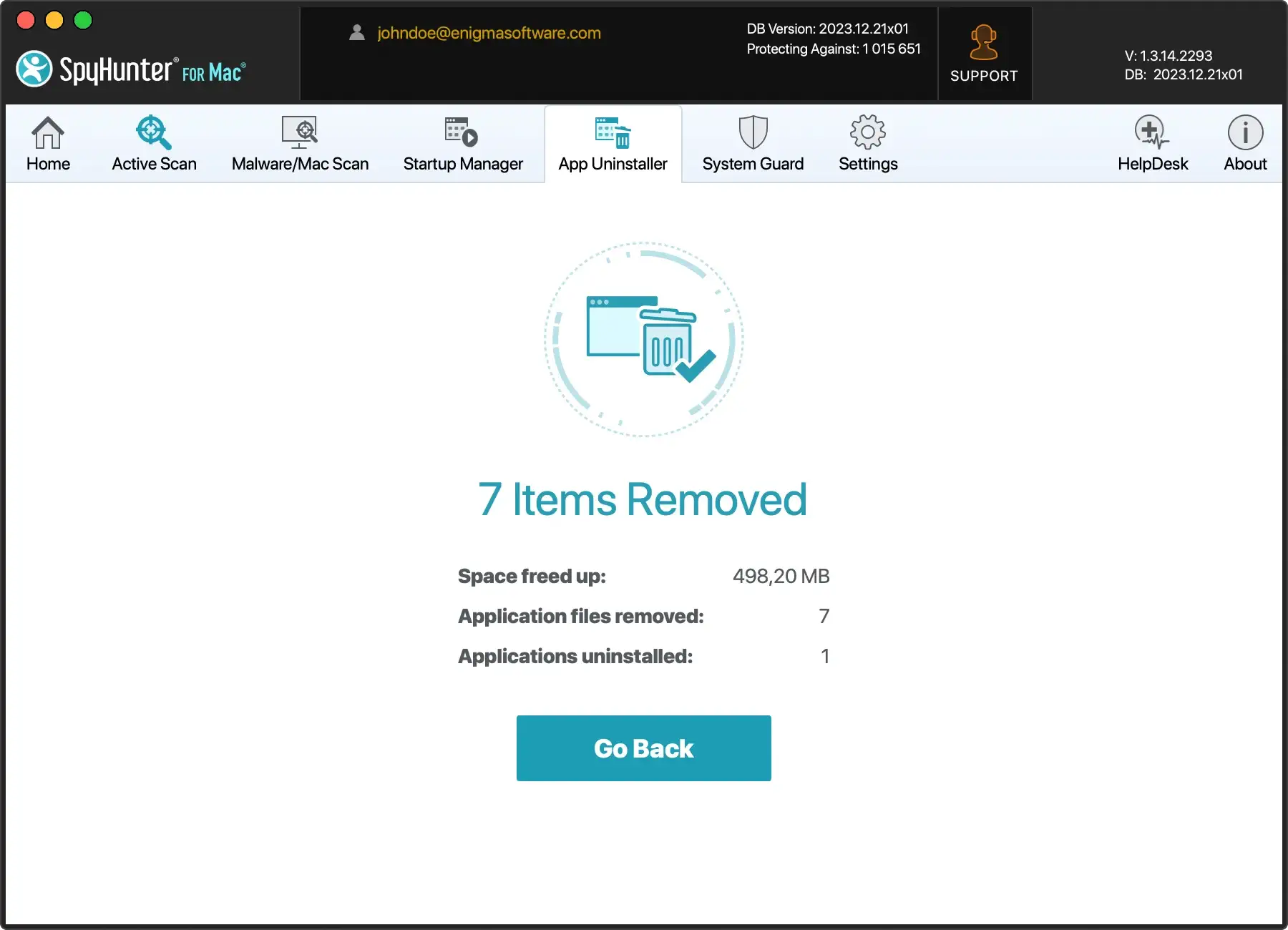
For a thorough approach to app removal, consider leveraging SpyHunter. This powerful anti-malware program includes a high-tech app uninstaller.
Download SpyHunter for free here and experience its usefulness for yourself.
Use an antivirus program to remove Sighful.app
One of the most efficient means to eliminate such malware is to employ trusted antivirus software.
Applications like SpyHunter for Mac can assist in removing Sighful.app from your Mac swiftly.

- Download SpyHunter and follow the installation instructions.
- Once installed, an automatic scan will identify any remaining malware on your Mac, including traces of Sighful.app.
- Click Next; SpyHunter will swiftly quarantine the threats, keeping your system secure.
Remove Sighful.app from browsers
Browser hijackers often tamper with extensions and settings, compromising your browsing experience. To reclaim control, follow these steps tailored for popular browsers:
Safari
- Go to
Preferences > Extensions. - Remove Sighful.app or any other suspicious extensions.
- Click on
Generaland set your preferred homepage. - On the Search tab, choose your desired search engine.
Google Chrome
- Open browser settings.
- Go to
Extensionsand remove Sighful.app or any unfamiliar extensions. - In the “
On startup” section, click “Open a specific page or set of pages” and set a preferred page. - In the Search engine section, select a recognized search engine.
Firefox
- Go to
Add-ons > Extensions. - Remove Sighful.app or any other unknown extensions.
- Visit
Preferencesto set your preferred homepage and search engine.
Each browser may have a unique process for virus removal. Ensure you follow the appropriate steps for your specific browser to effectively remove Sighful.app and restore your browser to a secure state.
Types of threats that can affect Mac
Contrary to popular belief, Macs are susceptible to numerous malware and cyber threats.
While the perception is that they are less prone to such threats than other systems, they can still be a target and suffer the devastating effects of malware attacks.
Among the most common Mac threats include:
Rogue antivirus programs
This deceptive software tricks you into believing your Mac is infected with viruses or malware.
They often push alarming notifications and prompt you to purchase and install a ‘full version’ to resolve the non-existent threats. Unfortunately, these are scams intended to trick you.
Adware and browser hijackers
Adware and browser hijackers, like the Sighful.app primarily focuses on delivering intrusive ads and taking over your web browsers.
They modify browser settings, inject unwanted ads, and redirect to suspicious websites, ultimately diminishing the quality of your online experiences.
Trojan horses and other spyware
Trojan horses and spyware pose substantial security risks as they sneak into your Mac disguised as legitimate software.
Once inside, they monitor your activities, steal sensitive data, and create backdoors for other malware to invade your system.
Ransomware and screen-lockers
Ransomware and screen-lockers are more malicious, as they encrypt or block access to your valuable files and then demand a ransom to restore access.
Dealing with these threats requires caution, as paying the ransom doesn’t guarantee converting your files.
Cryptocurrency miners
Cryptocurrency miner malware uses your system resources to mine digital currency for cybercriminals.
Often, a sudden drop in your Mac’s performance and an unexplained increase in power usage are signs of this type of intrusion.
Recommendations for future protection
It’s not just about removing the existing threat; preventing future invasions is paramount to maintaining a healthy and secure Mac.
Implementing simple preventive measures can go a long way in protecting your system from threats like the Sighful.app adware.
Here are some key recommendations:
Use antivirus software with real-time protection
Arming your system with a robust antivirus program is pivotal in safeguarding against diverse cyber threats.
Elevate your defense strategy by opting for SpyHunter for Mac—an advanced antivirus solution that provides unparalleled protection.

Activate its system guards to enable the real-time protection feature that allows continuous monitoring of your system for potential threats.
This ensures instant detection and swift removal of suspicious activities, strengthening your Mac against evolving cybersecurity challenges.
Experience heightened security and peace of mind with SpyHunter for Mac’s comprehensive and proactive approach to threat prevention.
Inform the bank in case of stolen information
If you suspect your financial information has been compromised due to the adware, immediately contact your bank or credit card company.
They can guide you on the necessary steps, like suspending your cards or monitoring your accounts for suspicious transactions.
Change all passwords
Adware and similar threats often aim to steal personal information. Hence, changing all your passwords is crucial, especially for sensitive accounts like emails, online banking, and social media platforms.
Use strong, unique passwords to lower the chances of unauthorized access.
Keep software up to date
Ensuring your operating system and all software are updated regularly is crucial for maintaining system security.
Updates often contain security patches that fix known vulnerabilities that threats like Sighful.app could exploit.
Avoid downloading software from unknown sites
Stick to downloading software from official or reputable third-party sites. Unknown sources often bundle their software with unwanted apps and malware.
Being cautious of where you download software can significantly reduce the risk of inviting potentially harmful programs onto your Mac.
