

Remove DeployPlatform From Mac (Updated Guide For 2025)

Before we dive in
Before we dive in, let's make sure you stay safe online. We created SpyHunter because your security matters to us.
Protect your computer today — download SpyHunter right here! Check out our top tips below to keep your computer safe and secure.

DeployPlatform is a highly intrusive adware that targets Mac users. It embeds itself within your browser, disrupting the online experience with unwanted advertisements and pop-ups.
This adware alters browser settings without consent, pushing ads that range from annoying to severely disruptive. It impacts browsing efficiency and raises significant privacy and data security concerns.
This article explores DeployPlatform in detail. It provides a full overview of how it operates, the risks it presents, and steps to remove it. This ensures a safe and clean browsing environment. Let’s dive in:
DeployPlatform adware overview
DeployPlatform is malicious software that infiltrates Mac computers, often without the user’s permission. Once installed, it displays many intrusive advertisements that can disrupt the user experience.
These ads manifest in several forms, including pop-up ads, banner ads, and in-video commercials, which can redirect users to harmful websites or perpetrate phishing attempts.
DeployPlatform is annoying and poses a security threat, potentially degrading system performance and compromising sensitive information.
What exactly is DeployPlatform?
DeployPlatform falls under the category of adware due to its primary function of generating unwanted advertisements on infected systems.
The presence of DeployPlatform on a Mac device is a cause for concern. It not only bombards users with ads but also has the potential to monitor and collect personal data.
The adware can track browsing habits, search queries, and other online activities, leading to privacy issues.
Furthermore, the adware can slow down your Mac and increase exposure to other malware infections. Its ability to redirect to dubious sites raises the risk level as users could be led to fraudulent or malicious content.
DeployPlatform entry points
The chief method through which DeployPlatform finds its way onto Macs is via downloading and installing freeware or bundled software from untrustworthy websites.
DeployPlatform usually gets onto Macs when people download free software or a group of programs from websites that aren’t safe.
Sometimes, without realizing it, users agree to add the adware while installing the desired software.
Mac users should only download apps from the official Mac App Store or other trusted sources. Being careful during the installation process is essential. This way, you can say no to any extra programs that try to sneak in.
DeployPlatform threat analysis
DeployPlatform represents a growing concern in the realm of cybersecurity, particularly for Mac users.
An independent investigation into its behavior reveals a pattern of unauthorized modifications and a slew of unwelcome and potentially harmful activities.
Understanding the risks associated with DeployPlatform is crucial for Mac users to protect their systems effectively from this intrusive adware.
Potential risks and system compromises caused by DeployPlatform
- Unauthorized Browser Configurations: DeployPlatform has been reported to alter browser settings, such as changing the default homepage or search engine, without consent.
- Performance Deterioration: The surge of ads generated by DeployPlatform is intrusive and can significantly slow down computer performance.
- Increased Vulnerability: With the capability to deactivate antivirus and firewall settings, DeployPlatform compromises built-in system defenses, making it prone to additional malware attacks.
- Privacy Breaches: DeployPlatform may track online activities. This leads to unauthorized collection and transmission of personal data to unknown third parties or cyber criminals.
DeployPlatform infection symptoms
- Invasive Pop-ups: A bombardment of continuous pop-up advertisements is often one of the first indicators of a DeployPlatform infection.
- Unsolicited Redirects: Experiencing automatic redirection of web searches to unfamiliar and possibly dangerous websites can suggest that DeployPlatform has hijacked your browser.
- Spontaneous Application Failures: Previously reliable applications may start to function erratically or crash unexpectedly due to interference from DeployPlatform.
- Unexpected System Changes: Discovering new, unwanted browser extensions or noticing that your antivirus software has been turned off can signify that DeployPlatform is operating on your Mac.
Remove DeployPlatform from your Mac
The removal of DeployPlatform requires a swift response and precise actions. Mac users have two primary options: manual removal or automated tools.
Each method comes with its own set of procedures. The choice typically depends on the user’s level of tech-savviness and the severity of the adware’s impact on the system.
Manual removal: Step-by-step guide to eradicate DeployPlatform
Removing DeployPlatform manually requires careful attention and a bit of know-how.
This process involves digging into your Mac’s system to find and remove anything related to the adware.
It’s not just about deleting files; you might also need to check your browser extensions and reset your browser settings back to normal.
Here’s a detailed guide to help you through it, step by step.
Delete configuration profiles related to DeployPlatform
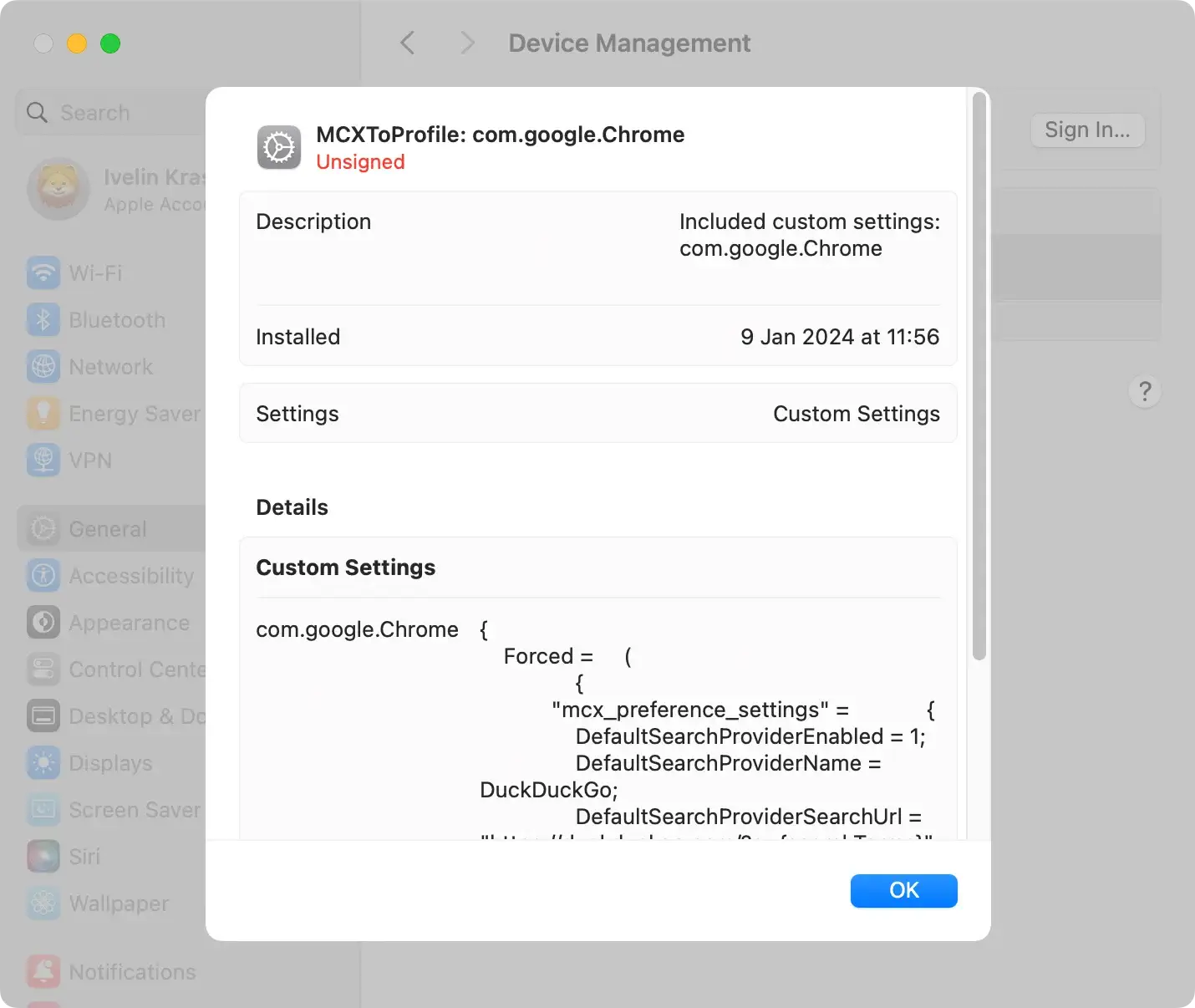
DeployPlatform can install config profiles on your Mac, which might alter the behavior of your system.
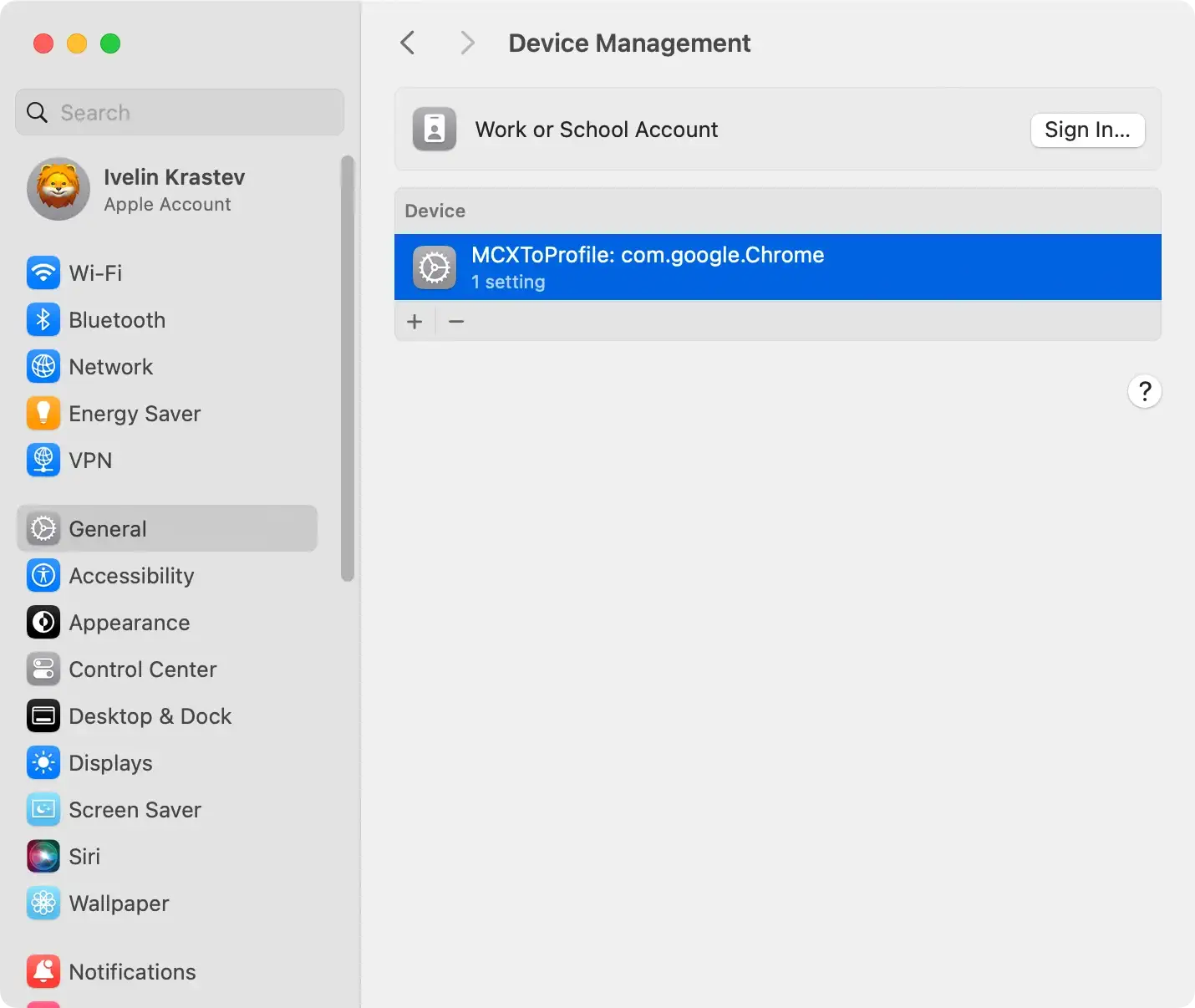
- Click on the Apple menu and select
System Preferences(namedSystem Settingson newer macOS versions). - If you see a
Profilesoption, click on it. If you don’t, DeployPlatform hasn’t added any profiles. - Look for any profiles that seem out of place, or you don’t remember adding.
- Select the suspicious profile and click the minus (-) button to remove it.
Remove DeployPlatform applications
DeployPlatform may be disguised as a legitimate application or bundled with other software.
- Use Finder to navigate to your Applications folder.
- Look for applications you don’t recognize or seem related to DeployPlatform.
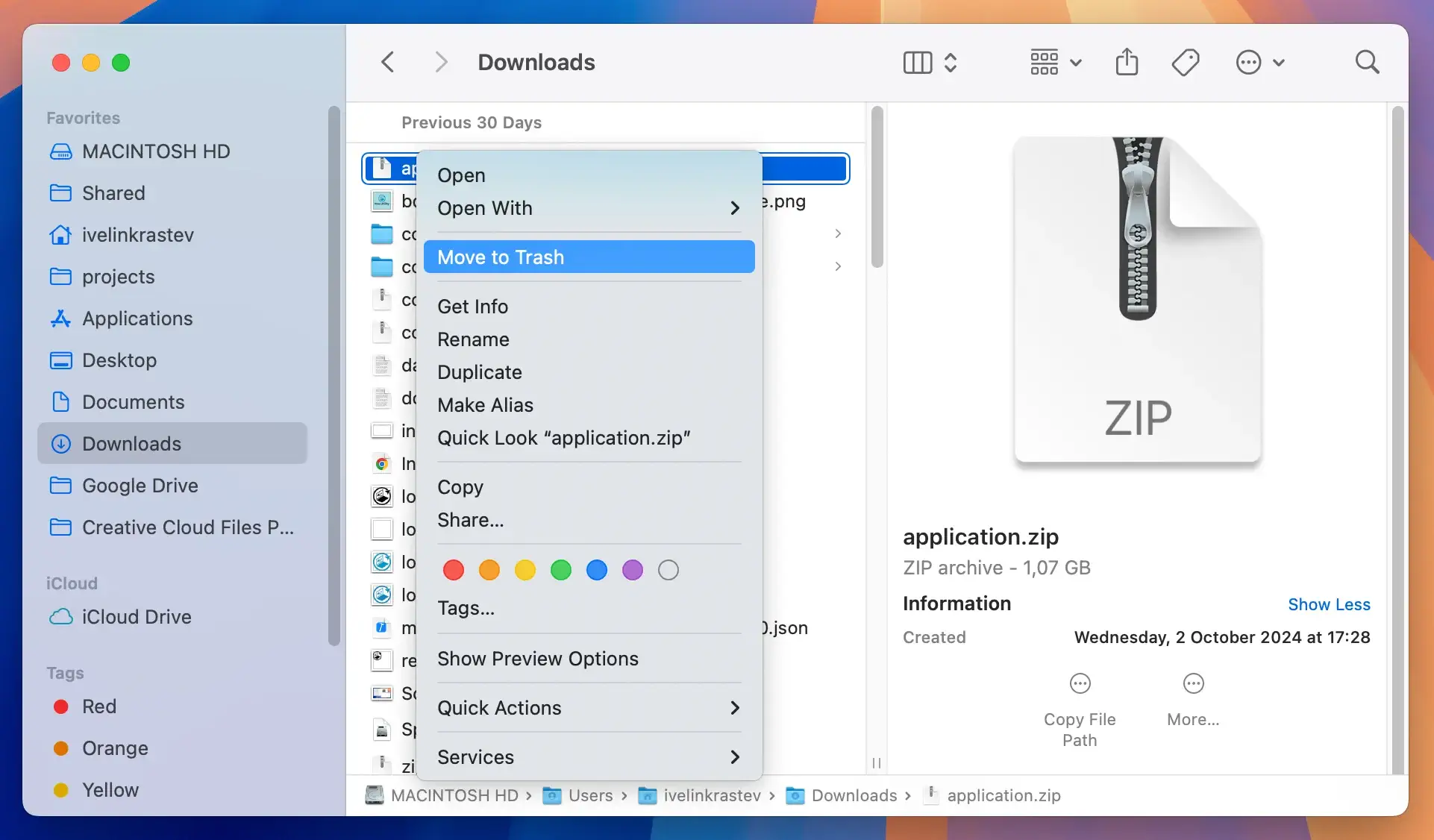
- Move any suspicious applications to the Trash.
- Empty the Trash to remove the applications permanently.

Remove files and folders related to DeployPlatform
Adware like DeployPlatform can scatter files that need to be found and deleted across your system.
- Press ⇧+⌘+G in Finder to open the
Go to foldersearch box. - Enter the following paths one at a time and look for any suspicious files related to DeployPlatform:
/Library/LaunchAgents//Library/Application Support//Library/LaunchDaemons/~/Library/LaunchAgents/~/Library/Application Support/~/Downloads/
- Move any files you find to the Trash and then empty it.
Remember, manual removal demands thoroughness. Missing a single file or profile can allow DeployPlatform to linger or return.
If digging through your system’s folders feels daunting or the adware won’t go away, consider using a professional anti-malware tool for Macs. SpyHunter can do the job automatically, finding and removing DeployPlatform for you.
Automatically remove DeployPlatform
Automated tools like SpyHunter offer a robust solution for those seeking a straightforward and reliable method to eliminate DeployPlatform adware from their Mac.
SpyHunter for Mac is designed to fight many threats, including adware, trojans, and spyware. It is perfect for users who want a deep clean without the hassle of doing it manually.
About SpyHunter for Mac
SpyHunter is a robust anti-malware application that provides real-time protection. It specializes in detecting and removing malicious software.
With its advanced scanning technology, SpyHunter can identify hidden threats, including DeployPlatform. Its quarantining technology ensures your Mac remains safe and adware-free.

Its user-friendly interface simplifies the process, making malware removal accessible to users of all technical levels.
Download instructions
- Download SpyHunter from here to ensure you get the software from a reliable source.
- Open the downloaded file and follow the on-screen instructions to install SpyHunter on your Mac. The installation process is straightforward and guides you through the necessary steps.
- Open SpyHunter and check for the latest updates once installed. Keeping the software updated ensures it can detect the newest threats.
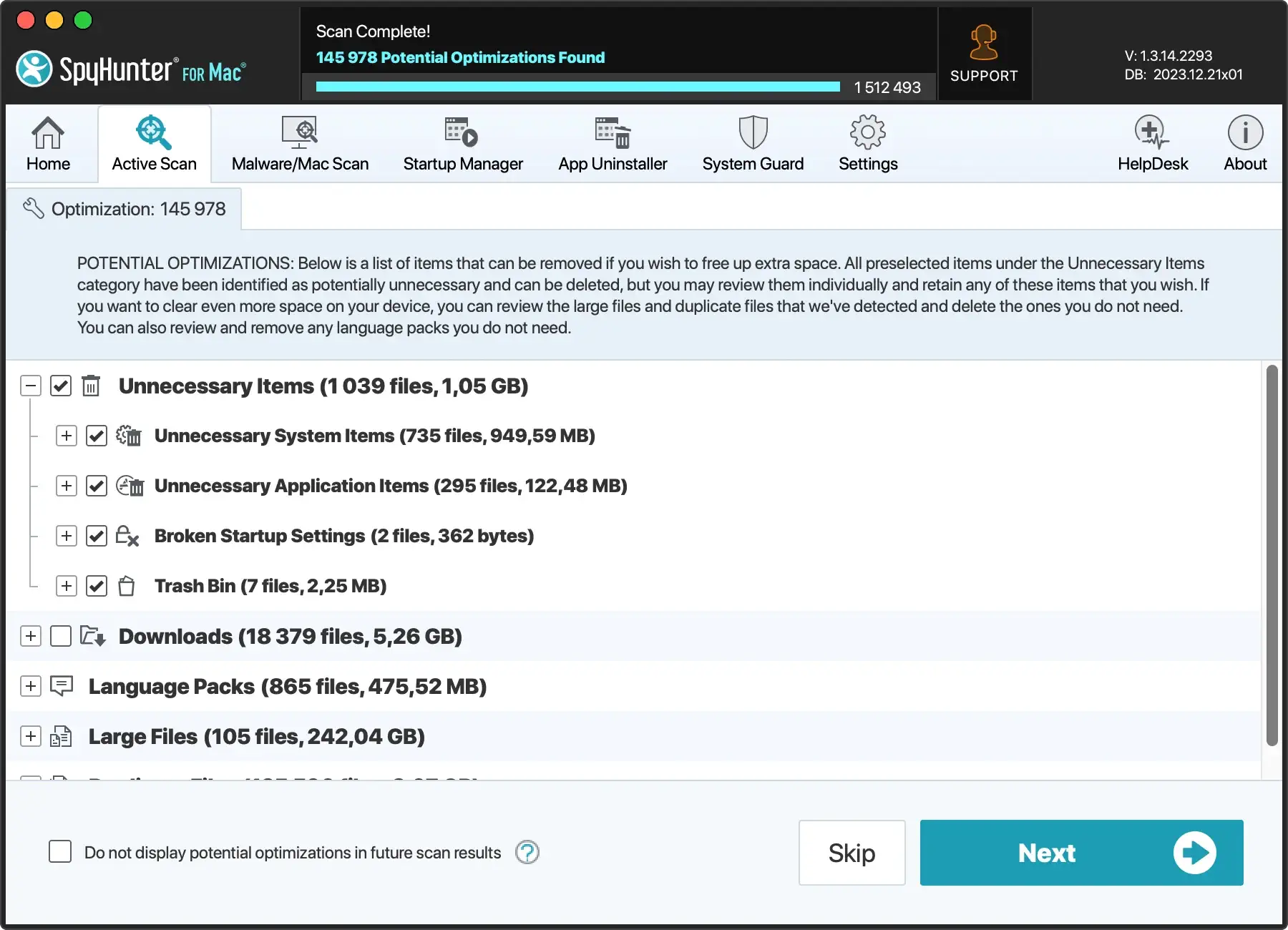
- Initiate a full system scan with SpyHunter. The scan will search your Mac for DeployPlatform adware and other malicious entities.
- After the scan, SpyHunter will display a list of detected threats. You can then review this list and choose to quarantine the identified malware, including any components related to DeployPlatform.

By opting for SpyHunter for Mac, you’re choosing a path of less resistance toward a clean and secure system.
Its automated detection and removal capabilities save time and provide peace of mind, knowing your Mac is safeguarded against a broad spectrum of cyber threats.
Cleaning and restoring your Mac after removing DeployPlatform
Clean up infected browsers: Safari, Chrome, and Firefox
Post-adware removal, your browsers may still contain remnants of malicious extensions.
It’s essential to restore default settings and remove any lingering traces of DeployPlatform from Safari, Chrome, and Firefox.
- Begin by accessing the browser’s extensions or add-ons section and removing any suspicious or unknown extensions.
- Then, reset the homepage and search engine preferences and clear browsing data such as cookies and cache. This will ensure a clean slate for your browsing experience.
Staying vigilant about the extensions you install in the future can help prevent reinfection.
Revitalize your Mac’s performance
Adware invasions like DeployPlatform can take a toll on your Mac’s performance. After the malware has been eradicated, it’s time to focus on revitalization.
Consider employing optimization tools like SpyHunter that clean up junk files, find and resolve system issues, and streamline performance parameters. Download SpyHunter and keep your Mac clean and optimized!
Regular scans with SpyHunter can also catch potential threats before they cause significant damage.
Maintaining a secure Mac: Prevention and protection strategies
To ensure a safe environment against various Mac threats like adware, browser hijackers, Trojan horses, and crypto-miner malware, it’s essential to implement a combination of preventive measures and protective strategies.
Proactive vigilance and the right tools and practices can vastly improve your Mac’s resilience to external threats and protect your data from unauthorized access.
Best practices to secure your Mac against malware attacks
- Download with Caution: Always download apps from the official Mac App Store or trusted developers’ sites to avoid bundled adware installations.
- Stay Updated: Regularly update your operating system and all installed software to patch vulnerabilities that malware could exploit.
- Use Security Software: Install and maintain a reputable anti-malware program with real-time protection to detect and block adware and other threats. Download SpyHunter to protect your Mac from threats.
- Modify System Preferences: Configure your system settings only to allow apps from identified developers or the App Store.
- Read Installation Prompts: Pay careful attention during software installation processes, and opt out of any additional bundled software that seems unnecessary or suspicious.
- Enable Firewall: Use the built-in firewall on your Mac to filter network traffic and block unauthorized connections.
- Practice Safe Browsing: Utilize ad blockers and avoid clicking on suspicious links or pop-ups that may lead to adware installations.
Advanced defensive strategies
- Use VPNs and secure browsers to encrypt internet traffic and prevent interception by malicious actors.
- Enable 2FA wherever possible to add a layer of security to your online accounts.
- Keep your System Integrity Protection (SIP) enabled to prevent malicious software from changing macOS system parts.
- Consider user behavior analytics tools to detect and respond to unusual activity indicative of a security breach.
