

Remove Reinquire Adware (Protect Your System Now)

Before we dive in
Before we dive in, let's make sure you stay safe online. We created SpyHunter because your security matters to us.
Protect your computer today — download SpyHunter right here! Check out our top tips below to keep your computer safe and secure.

In the ever-evolving digital landscape, threats like adware persistently target Mac users. Reinquire, a recent addition to this category, poses potential risks to your system.
This article guides you through understanding, identifying, and removing Reinquire from your Mac, ensuring a secure and optimal computing experience.
Reinquire adware analysis
The Reinquire application is identified as a harmful adware that is part of the more prominent Pirrit adware family.
Adware applications typically develop intrusive advertisement campaigns with the potential for detrimental effects.
Definition and function of Reinquire
As a rogue adware application, Reinquire delivers unwanted and intrusive advertisements to users—a practice popularly known as ad-supported software.
Adware like Reinquire infiltrates the devices of unsuspecting users, manifesting harmful effects.
Impact on browsing quality and system performance
Reinquire can significantly impact browsing quality by flooding your system with continuous and intrusive ads.
Apart from being a nuisance, these ads can consume significant system resources, resulting in sluggish computer performance.
Additionally, constant redirects induced by the adware may lead to frequently interrupted and ineffective browsing sessions.
Possibility of promoting online scams
Adware applications such as Reinquire not only run aggressive advertising campaigns but can also potentially promote online scams and further malware.
The ads displayed by such software may lead users to harmful websites, tricking them into sharing sensitive information or downloading malicious software.
Potential privacy threats
Reinquire adware may pose a significant privacy risk through data collection. To customize ads, adware often collects data regarding users’ online activity.
This includes sites visited, search queries, and time spent on certain pages.
However, the gathered data may also contain personally identifiable information, which can be exploited in various privacy violation scenarios.
Illegal commissions through dubious promotions
Reinquire may engage in questionable promotion tactics, often to earn illicit commissions.
By compelling the user to click on the pop-ups or even install additional rogue applications, Reinquire reinforces its revenue-generating mechanism.
How Reinquire gets installed
Adware like Reinquire can infiltrate your Mac through various deceptive techniques, mostly involving unnoticeable installation during regular software downloads and updates.
Bundling with other software
Software bundling is a prevailing method Reinquire uses to install itself onto systems.
Hidden as part of the installation process of other freeware or shareware, Reinquire latches onto these third-party applications and gets installed alongside them.
Mac users should exercise caution while installing free applications, as the bundle may contain Reinquire or other malicious software.
Downloads from unreliable sources
Downloading and installing software from suspicious channels like freeware and unofficial sites increases the risk of accidental Reinquire installation. Rushed installations, where terms are ignored, installation steps are skipped, or simplified installation settings are used, often allow adware and other unwanted applications to sneak in.
Endorsement on untrustworthy web pages
Reinquire is frequently endorsed on scam sites and untrustworthy download webpages that may appear legitimate.
These pages are often visited due to redirects by rogue advertising networks, mistyped URLs, intrusive ads, or through the force-opening capabilities of installed adware.
Intrusive advertisements
Intrusive advertisements can proliferate the Reinquire adware. Clicking these ads can execute scripts that perform stealthy downloads or installations of the adware.
This deceptive tactic allows Reinquire to infiltrate systems unnoticed by the user.
Remove Reinquire from your Mac
Addressing the presence of Reinquire on your Mac requires a systematic and thorough removal process.
Follow these comprehensive steps to eliminate this adware effectively.
Prepare for the removal
Before initiating the removal process, take preventive measures. Back up your important files to prevent accidental loss during the removal procedure.
This ensures that your data remains intact throughout the malware removal process.
Identify and remove malicious profiles
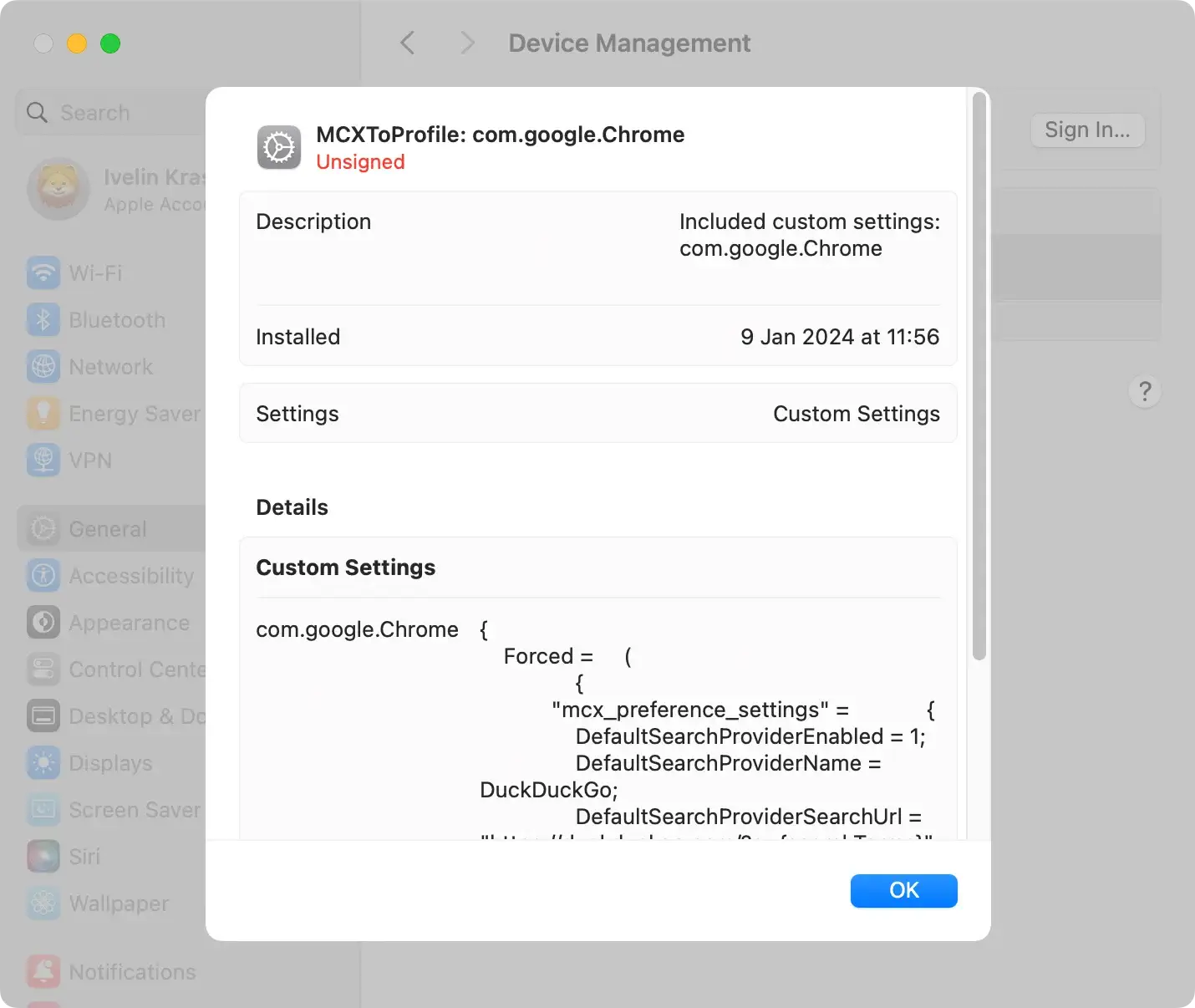
Commence the removal process by checking for and deleting any potentially harmful profiles installed on your Mac.
These profiles are often exploited by adware to resist user attempts to remove malicious programs.
Navigate to System Preferences from the Apple menu, locate the Profiles icon if available, and delete any suspicious profiles you find.
Remove Reinquire аpp
After successfully removing suspicious profiles, proceed to uninstall any lingering Reinquire applications.
Open the Finder app, navigate to the Applications folder, and identify the Reinquire app.
Right-click on the app and select Move to Trash from the context menu. Then, empty the Trash to ensure its complete removal.

Remove Reinquire browser extensions
Adware like Reinquire may persist as a browser extension even after uninstalling the application.
To eliminate this, follow specific instructions for your browser:
Safari:
- Open Safari and go to
Preferences - Navigate to the
Extensionstab - Locate and uninstall any Reinquire extensions
Google Chrome:
- Open Chrome and go to
Settings - Select
Extensionsfrom the left menu - Find and remove any Reinquire extensions
Mozilla Firefox:
- Open Firefox and go to
Add-ons - Navigate to the
ExtensionsorPlug-instab - Remove any Reinquire extensions
Remove Reinquire-related files
Ensure a thorough removal by deleting any Reinquire-related files lingering on your Mac.
Use the Go to Folder option in Finder and check the following paths for suspicious files:
/Library/LaunchAgents~/Library/LaunchAgents/Library/Application Support/Library/LaunchDaemons
Locate and move any identified malicious files to the Trash.
Reset browser settings
To altogether remove Reinquire’s impact on your browsing experience, consider resetting your browsers to default settings:
Safari:
- Open Safari and go to
Preferences - Navigate to the
Privacytab and clickRemove All Website Data - Next, go to the
Generaltab and clickRemove All Website Data
Google Chrome:
- Open Chrome and go to
Settings - Scroll down and click
Advanced - Select
Restore settings to their original defaultsin theReset and clean upsection
Mozilla Firefox:
- Open Firefox and go to
Help - Choose
Troubleshooting Information - Click
Refresh Firefox
Use SpyHunter for a comprehensive cleanup
Consider using SpyHunter, a reputable anti-malware tool, for a more thorough and reliable removal.
Download SpyHunter from here and follow the installation instructions.
Conduct a system scan, identify Reinquire and related threats, and let SpyHunter guide you through the removal process.

Following these steps diligently will help remove Reinquire from your Mac, restoring its security and optimal performance.

Prevention measures against adware
Addressing adware issues like Reinquire becomes more manageable with proactive prevention measures that reduce the risk of malware infections.
- Thorough Software Research: Before installation, conduct thorough research on software by reading user reviews to identify potential flags for adware like Reinquire.
- Trusted Download Sources: Download software only from trusted sources to avoid unintentional adware installations often bundled with downloads from untrusted third-party sites.
- Caution in Installation Processes: Exercise caution by choosing “Advanced” or “Custom” options to deselect any additional, potentially harmful applications that may accompany the desired software.
- Browsing Vigilance: Stay vigilant while browsing to avoid accidental visits to untrustworthy sites. Recognizing and avoiding fake or malicious online content, such as deceptive ads, can significantly reduce the risk of adware downloads.
In conclusion, safeguarding your Mac from adware threats like Reinquire involves a combination of awareness, caution, and proactive measures.
You can significantly reduce the risk of adware infections by implementing thorough software research, relying on trusted download sources, exercising caution during installations, and maintaining vigilance while browsing.
Additionally, using reliable anti-malware tools like SpyHunter provides an extra layer of defense, ensuring your Mac stays protected against evolving threats.
Staying informed and adopting preventive strategies will provide a safer and more secure digital experience.
