

How to Remove Laser.app (Complete Virus Removal Guide)

Before we dive in
Before we dive in, let's make sure you stay safe online. We created SpyHunter because your security matters to us.
Protect your computer today — download SpyHunter right here! Check out our top tips below to keep your computer safe and secure.

Laser.app can infiltrate your Mac, causing unwanted disruptions and potential security risks.
Understanding its impact and adopting effective removal strategies is crucial for maintaining the integrity of your system.
Here’s a comprehensive guide to help you comprehend the threat and remove Laser.app from your Mac.
What is Laser.app?
Security researchers analyzing fresh submissions to the VirusTotal website encountered the Laser.app application.
Upon in-depth scrutiny of the application, it became evident that Laser.app is not just an ordinary piece of software.
It belongs to the Pirrit malware family and is identified as adware.
Investigation of Laser.app
The Laser.app was identified as potentially harmful software through investigations conducted by cybersecurity research teams.
Initially submitted to the VirusTotal website, this application became a part of an intense investigation due to its behavior and potential threat.
It was revealed to be part of the Pirrit malware family, notorious for producing adware – software designed to flood users with unwanted and often misleading advertisements.
Operation of Laser.app
The operation of Laser.app is characterized by deception to the highest degree. Users often become aware of its existence when they identify the Laser.app installed as an integrated search engine.
The adware manipulates the user’s online search habits. Each online search redirected through Laser.app leads the user to other unwanted web pages—a process often unnoticed.

Despite seeming like legitimate search results, users are mostly unaware that all links affiliated with Laser.app are paid.
The primary function of these links is to garner revenue by driving online traffic to the partners and advertisers associated with Laser.app.
Potential risks posed by Laser.app
Beyond being a nuisance, Laser.app endangers user safety while posing significant security risks.
This adware is designed to exploit user information and internet habits to generate profit, disrupt normal browser operations, and potentially serve as an entry point for other malicious programs.
Harming user safety
Laser.app is not just intrusive but can pose significant safety concerns.
By consistently redirecting users to external pages, it compels users to engage with online platforms that could potentially harm their digital assets.
Facilitating online scams
Laser.app is known to exploit poorly regulated digital advertising mechanisms, thereby enabling the spread of online scams.
Unaware of the redirects and hidden paid links, users may unknowingly participate in these scams, jeopardizing their online security.
Promoting harmful software & malware
Laser.app does not stop showing unyielding and deceptive adverts.
It extends its harmful operations by promoting software that severely damages the user’s internet browsing capability.
On top of being a form of adware, Laser.app can act as a recruiter for other malware.
By changing browser settings and redirecting internet traffic, Laser.app creates pathways for other malware to infiltrate the user’s device system, posing even more serious security risks.
Data tracking capabilities
One of the most alarming features of Laser.app is its sophisticated data tracking mechanisms. Collecting and tracking web data gives Laser.app unprecedented access to users’ digital habits.
This includes commonly accessed URLs, searched queries, and stretches encompassing cookies from various web sessions.
This kind of extensive data tracking puts users at significant risk, particularly when combined with the regular exposure to external malicious sites, a characteristic of how Laser.app operates.
It increases the likelihood of being subjected to targeted scams, web attacks, or more personalized ad bombardments.
Collection of sensitive data
While data tracking presents a severe enemy to privacy, gathering sensitive data is another notable malicious feature of Laser.app.
The adware is designed to seamlessly skim through and collect crucial personal data such as login credentials, personally identifiable information (PII), and even financial data such as credit card numbers.
Despite functioning as adware, Laser.app paints a picture of a broad array of threats associated with its presence on any device.
From invading privacy through data tracking to threatening financial security through unauthorized data collection, the harm caused by Laser.app cannot be underestimated or overlooked.
Distribution methods of Laser.app
The distribution tactics employed by creators and promoters of adware like Laser.app are carefully designed to exploit users’ trust and lack of attention during seemingly harmless web activities.
Unwrapping Laser.app’s spread involves understanding the mechanisms of deceptive websites, software bundling techniques, and more.
Promotion through deceptive websites
Laser.app primarily finds its way into users’ systems by leveraging deceptive and scam websites.
These websites create illusions of authenticity and often mimic legitimate download pages to trick users into downloading the Laser.app adware under the guise of a trusted application.
Users may be lured to these risky pages through rogue advertising networks, spam notifications, intrusive ads, or even mistyped URLs.
Furthermore, Laser.app initiates forced browser opens through previously installed adware, causing users to land on these scam sites.
The deceptive sites are engineered to exploit users’ trust, delivering stealthy downloads and installations of dangerous software like Laser.app through intrusive advertisements and hidden download scripts.
Distribution via “bundling”
An underhand distribution method often employed by promoters of Laser.app is “bundling”. Bundling involves packing the Laser.app adware as part of the installation setup of a regular program downloaded by the user.
Users unintentionally allow the additional unwanted bundled content into their system without thoroughly checking the details during installation.
Rushing through the installation process by ignoring terms and conditions or using “Easy/Quick” setup settings further heightens the chance of allowing such bundled content into the system.
Additionally, downloading software from untrustworthy sources such as free file-hosting websites and Peer-to-Peer sharing networks also increases the possibility of accidental Laser.app infiltration.
Remove Laser.app adware from Mac
To safeguard your digital landscape from the malicious operations of Laser.app, it is crucial to understand the process of removing this adware.
This removal process can be done using reputable antivirus software or manual deletion methods. Let’s delve into both these strategies.
Identify Laser.app on your Mac
Recognizing the existence of Laser.app on your Mac is the first step toward its elimination.
Look out for signs such as alterations to browser settings, an influx of unwanted ads, and unexpected changes in your browsing behavior. Identifying these indicators promptly allows for timely countermeasures.
Pinpoint and delete malicious profiles
Initiate the removal procedure by scrutinizing and eliminating potentially harmful profiles on your Mac.
Adware like Laser.app commonly manipulates these profiles, making it challenging for users to eradicate malicious programs.
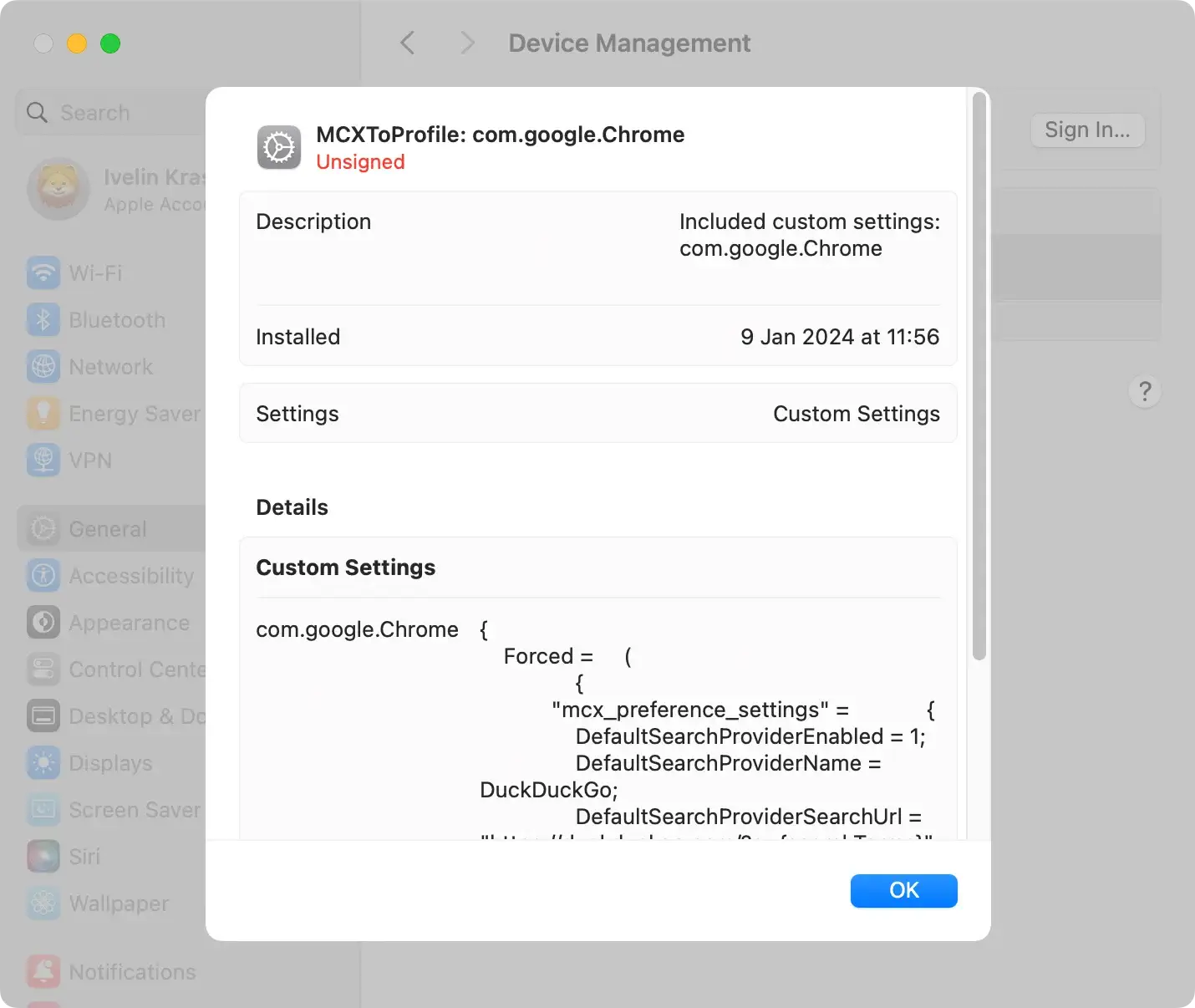
To execute this step, go to System Preferences in the Apple menu, locate the Profiles icon if available, and delete any suspicious profiles.
Remove Laser.app from system folders
When eliminating Laser.app from your Mac, inspect the list of installed programs. If you spot the Laser.app icon on your Apple menu bar at the top-right corner, click on it, and choose Quit from the context menu.
Open the Finder application, navigate to the Applications folder located in the sidebar, and peruse the list of currently installed apps on your device.
Scroll through this list and locate Laser.app. Right-click on it, and select Move to Trash/Bin from the dropdown menu.
To complete the removal, empty your Trash. This ensures the permanent deletion of the Laser.app program and other contents in the trash.

You’ll need to find and delete Laser.app application-related files for a thorough cleanup.
In a Finder window, select Go and then Go to Folder from the menu. Copy and paste the following paths into the search bar:
/Library/LaunchAgents/~/Library/LaunchAgents//Library/Application Support//Library/LaunchDaemons//Library/StartupItems/
Search for any suspicious files related to Laser.app in these directories. Although the filenames may vary, every folder should contain some trace of “laser.” Once identified, move these malicious files to the Trash.
It’s important to note that this manual method requires more IT knowledge to avoid unintentionally deleting vital system files.
Opt for a comprehensive app removal with SpyHunter’s App Uninstaller
For a hassle-free and exhaustive removal process, consider utilizing SpyHunter’s App Uninstaller. This specialized tool eliminates Laser.app and its associated files with just a few clicks.
SpyHunter’s user-friendly interface and powerful scanning capabilities provide an efficient solution for users seeking a quick and thorough cleanup.
Download SpyHunter and follow the installation instructions to get started. Launch the App Uninstaller within SpyHunter, allowing it to handle the app cleanup for a safer and optimized Mac experience.
Use SpyHunter to remove Laser.app
We strongly recommend using professional antivirus software to thoroughly eradicate the Laser.app from your system.
Software such as SpyHunter can provide an effective solution for automatically removing the app.

- Download SpyHunter for free here and follow the installation instructions provided by the installer.
- Run a system scan to detect and remove Laser.app and other potential threats.
The antivirus software method simplifies the adware removal process. It works by scanning the entire system and identifying any Laser.app components and subsequently remove them safely.
This method ensures a thorough cleanup and protects against potential re-infiltration of Laser.app or similar threats.

Remove Laser.app-related extensions
Laser.app’s impact transcends your system’s core functions and extends into your web browsers.
This involves the addition of unwanted extensions and plugins, intensifying its malicious activities. As a result, the removal of these browser extensions becomes a pivotal step in eliminating Laser.app.
Whether your preferred browser is Safari, Google Chrome, or Mozilla Firefox, a customized approach is necessary for removing extensions.
Detailed guides are readily accessible, providing step-by-step instructions on identifying and eliminating any browser extensions or plugins associated with the Laser.app.
Prevention of Laser.app
After successful removal, adopt preventive measures to minimize the risk of future adware infections.
Exercise caution while downloading software, stick to trusted sources, and keep your operating system and applications updated. Consider using an ad blocker for an added layer of protection.
Thoroughly scrutinizing installation guidelines, terms, and conditions is also highly advised.
It helps detect any hidden bundling clause that might lead to inadvertent downloads of additional unwanted or harmful software such as Laser.app.
By understanding the impact of Laser.app and following these removal strategies, you can safeguard your Mac and enjoy a secure online experience.
