

Remove ActiveChannel.gqa Adware [Complete Guide]

Before we dive in
Before we dive in, let's make sure you stay safe online. We created SpyHunter because your security matters to us.
Protect your computer today — download SpyHunter right here! Check out our top tips below to keep your computer safe and secure.

Users often encounter persistent threats like ActiveChannel.gqa adware in the digital security landscape.
This intrusive software can compromise your Mac’s performance, flooding your online experience with unwanted advertisements and potentially exposing your system to further risks.
In this comprehensive guide, we delve into the sophistication of ActiveChannel.gqa, exploring its characteristics and the potential risks it poses.
The step-by-step instructions will show you how to remove ActiveChannel.gqa from your Mac effectively.
Safeguard your digital environment by gaining insights into this adware and implementing the necessary measures for a secure and optimized computing experience.
Understanding ActiveChannel.gqa
ActiveChannel.gqa is an adware application that targets Mac operating systems. An adware program is software that displays unwelcome advertisements on your digital device, such as your Mac.
These applications generally show ads through pop-up windows or banners, making your online experience less enjoyable. The ActiveChannel.gqa adware program demonstrates this behavior.
Characteristics of ActiveChannel.gqa
Adware applications such as ActiveChannel.gqa have some characteristic traits that computer users should be aware of:
Display of bothersome advertisements
One of the main characteristics of ActiveChannel.gqa is that it displays bothersome advertisements. This characteristic is a crucial trait of adware applications.
The display of such ads is frustrating and can disrupt your online activities and diminish the overall user experience.
Access to diverse data
An additional unsettling characteristic of ActiveChannel.gqa is its ability to access diverse data.
This information can range from your browsing history to personal information. Unauthorized access to such information can lead to privacy concerns and potential security risks.
Risks associated with ActiveChannel.gqa
ActiveChannel.gqa presents more than just a nuisance with unwanted advertisements. It actively poses many risks to your browsing experience and data safety.
Understanding these hazards can help emphasize removing this adware immediately from your Mac.
Redirects to unreliable websites
One significant risk associated with ActiveChannel.gqa is the spontaneous redirection to unreliable websites.
These websites may host further advertising content or potentially harmful materials such as malware or other security threats.
This uncontrollable redirect to suspicious websites hampers your browsing experience and can compromise your Mac’s security if these sites contain harmful elements.
Promotion of fake software updates and phishing websites
Adware like ActiveChannel.gqa may often promote phony software updates or direct you toward phishing sites.
The purpose of these activities is to get you to download additional unwanted software unknowingly or to trick you into providing personal and sensitive information on illegitimate websites.
Furthermore, ActiveChannel.gqa is known to promote counterfeit software updates and guide users to phishing websites.
These deceptive tactics aim to persuade users to download more unwanted software unknowingly or lure them into disclosing personal and sensitive information on fraudulent websites.
Staying vigilant against such misleading tactics is crucial to maintaining the security and integrity of your Mac system.
Triggering unwanted downloads and installations
In addition to promoting deceptive software, ActiveChannel.gqa can initiate unwanted downloads and installations on your Mac.
These unintended installations may introduce potentially harmful software or programs, contributing to the clutter on your system.
As a result, your Mac’s speed and performance may suffer, highlighting the need for timely action to remove this adware and restore optimal functionality to your device.
Data collection and impact on privacy
Another considerable risk posed by ActiveChannel.gqa is unwanted data collection. As detailed earlier, this adware can gather various data types, including browsing history and other personal information.
This collection of data not only leads to privacy concerns but also results in potential threats to your system’s security.
Cyber attackers can exploit this data breach for identity theft, fraudulent transactions, and other cybercrime.
Manual vs. automatic removal of ActiveChannel.gqa
Given these characteristics, users are strongly recommended to remove ActiveChannel.gqa from their Mac computers.
It is crucial to approach this task using steps appropriate for your machine to ensure the complete eradication of the adware.
Choosing the proper method for removing ActiveChannel.gqa from your Mac involves considering the pros and cons of both manual and automatic removal processes.
Manual removal
Manual removal can be time-consuming, requiring users to identify and delete each related file.
It also demands a certain level of technical expertise, and users may find it challenging, especially if they are unfamiliar with system files.
It’s important to note that manual removal may not permanently eliminate the problem, especially if the adware has installed additional components or modified system settings.
Automatic removal
If the manual removal method does not work or you want to ensure all adware traces have been removed from your Mac, using adware removal software can be a good choice. These programs scan your Mac for adware and other malicious items and altogether remove them.
Automatic removal using anti-malware software like SpyHunter is efficient and saves time, as the software comprehensively scans, detects, and removes the adware.
SpyHunter is designed to be user-friendly, making the removal process accessible to users with varying technical skills.
Choosing between manual and automatic removal depends on your preferences, technical skills, and the urgency of removing ActiveChannel.gqa.
While manual removal provides more control, automatic removal with trusted anti-malware software is generally recommended for its efficiency and user-friendly nature.
In this context, SpyHunter stands out as a reliable option, balancing effectiveness and ease of use (Download SpyHunter from here).
Remove ActiveChannel.gqa manually
Eliminating the ActiveChannel.gqa adware from your Mac manually involves several key steps, addressing system settings, OSX files, and browser extensions.
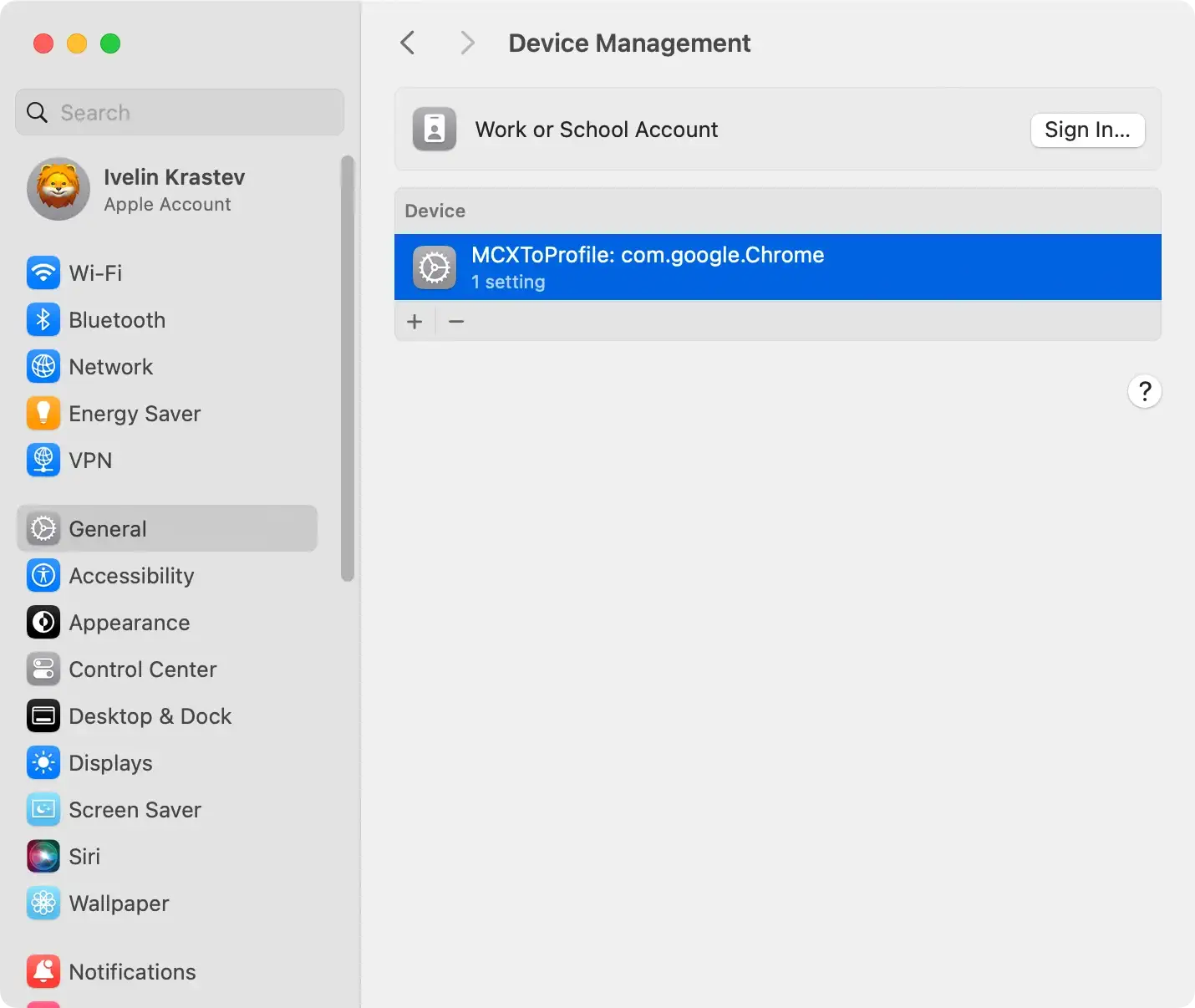
Check proxies and configuration profiles
Adware frequently manipulates system settings, such as proxies, to secure a firm grip on your Mac.
Navigate your Mac’s system settings to make necessary adjustments and scrutinize configuration profiles that may harbor adware-related modifications.
This proactive approach limits the adware’s influence and interference with your system, ensuring a more thorough removal process.
Remove ActiveChannel.gqa and related files from OSX
Locate and delete the ActiveChannel.gqa adware program and any associated files from your Mac’s OSX.
Search through your folders for ActiveChannel.gqa-related items and move them to the trash.
Empty the trash to remove these files from your system permanently.

Remove ActiveChannel.gqa from browsers
Lastly, ActiveChannel.gqa adware tends to embed itself within various web browsers.
As such, a thorough cleaning process should involve the removal of ActiveChannel.gqa from browsers such as Safari, Chrome, and Firefox.
This process may differ slightly between browsers but often consists of accessing the settings or preferences menu, searching for extensions or plugins related to ActiveChannel.gqa, and removing them.
- In Safari: Navigate to
Preferences > Extensionsand select ActiveChannel.gqa. Choose to uninstall it. - In Google Chrome: Access
More Toolsfrom the menu, go toExtensionsand remove ActiveChannel.gqa from the list. - In Mozilla Firefox: Go to
Add-ons and Themesand selectExtensionsfrom the options. Remove the associated adware.
Complete the removal process
After these steps, restart your computer to ensure the changes take effect. Despite these efforts, manual removal might only eliminate some adware traces due to their complex designs.
If persistent ads continue, consider investing in a reliable adware removal tool.
Tools like SpyHunter can detect and remove all traces of such programs, providing comprehensive protection for your device.
Remove ActiveChannel.gqa automatically
While manual removal of ActiveChannel.gqa could be effective, an automated process using a reliable and effective removal tool like SpyHunter is recommended for complete assurance.
This app efficiently scans your system, identifies any malicious elements related to ActiveChannel.gqa, and eliminates them effectively.
Download and install SpyHunter
The initial step in the removal process is to download the app.
Download SpyHunter for free here and install the program on your Mac. Detailed step-by-step instructions are provided during the installation process.
Thus, it should be relatively straightforward, even for non-technical users.
Conduct a malware scan
Once the SpyHunter tool is installed correctly, the next step is to scan your Mac.
The scanning process of SpyHunter is designed to analyze your system and uncover any ActiveChannel.gqa elements or other potential threats lingering deeply in your system.
At the end of the scanning process, the tool will provide a detailed report of its conclusions, which should help you identify the components that need to be removed.

Remove ActiveChannel.gqa altogether
After the scan, the SpyHunter tool will systematically eliminate all the identified components associated with ActiveChannel.gqa.
The removal process ensures that all adware traces, including any related files or settings, are permanently removed from your system, restoring security and peace of mind.

The importance of continuous system scans
After removing the ActiveChannel.gqa, keeping SpyHunter active on your Mac is significant. The tool eliminates the current adware and protects your Mac from further potential threats.
Regular scanning of your system guarantees early detection and removal of harmful elements, keeping your Mac clean and secure.
Safeguard your Mac from ActiveChannel.gqa
In light of the potential risks posed by ActiveChannel.gqa, implementing comprehensive preventive measures is crucial for maintaining the security and performance of your Mac.
Follow these detailed steps to bolster your defenses:
- Keep security software updated: Ensure your Mac has reliable antivirus or anti-malware software. Regularly update this software to stay protected against the latest threats, as these updates often include patches for newfound vulnerabilities.
- Exercise caution with online interactions: Be cautious while interacting with online content, especially ads and software downloads. Avoid clicking on suspicious ads or links, and refrain from downloading software from untrustworthy sources. Stick to reputable websites and official app stores to minimize the risk of accidental adware installations.
- Educate yourself on common threats: Stay informed about online threats, including adware tactics. Understanding adware’s typical behavior and entry points can help you recognize potential risks and take preemptive measures.
Integrating these practices into your digital routine creates a robust defense against ActiveChannel.gqa and similar threats, ensuring a safer and more secure computing experience.
