

Remove SimpleGuideSearch: Protect Your Mac Today

Before we dive in
Before we dive in, let's make sure you stay safe online. We created SpyHunter because your security matters to us.
Protect your computer today — download SpyHunter right here! Check out our top tips below to keep your computer safe and secure.

SimpleGuideSearch stealthily infiltrates systems, often bundled with seemingly innocuous applications, and then bombards users with unwanted ads and browser redirects.
This comprehensive guide delves into its characteristics, explores the potential risks it poses to your Mac, and provides step-by-step instructions to remove SimpleGuideSearch effectively.
SimpleGuideSearch threat analysis
The SimpleGuideSearch is recognized as an adware-type application that infiltrates Mac operating systems. This potentially unwanted application (PUA) prominently delivers an array of intrusive advertisements.
However, it also functions as a browser hijacker. It modifies the settings of your browsers, eventually preventing user access to them.
Definition and functions of SimpleGuideSearch
SimpleGuideSearch is a malicious application that primarily serves as adware but also holds the features of a browser hijacker.
It’s known to heavily distribute intrusive ads and significantly diminish browsing sessions by overlaying them, including coupons, banners, surveys, in-text ads, and pop-ups, over third-party graphical content. This can limit the web-browsing speed and visibility of websites.
In addition, SimpleGuideSearch alters the settings of installed browsers. It replaces the homepage, new tab, and default search engine options with the hacker’s desired sites. Hence, the application eventually controls the user’s browsing preferences and limits their management.
SimpleGuideSearch distribution methods
Typically, SimpleGuideSearch is distributed using deceptive methods to trick users into unintentional download and installation.
One of the most common distribution methods for this adware involves using a fake Adobe Flash Player installer.
Another frequent distribution method for this PUA is bundled software, where SimpleGuideSearch may be bundled along with other free software or shareware downloaded from unofficial websites.
The user may also inadvertently install this application by clicking infectious hyperlinks or fake software updates.
Potential dangers of SimpleGuideSearch
SimpleGuideSearch poses a significant threat to your system for various reasons. Here’s a list of possible risks associated with this adware:
- Clicking on the displayed ads may lead to untrustworthy and potentially harmful websites.
- Some ads might run malicious scripts, resulting in unwanted app or malware downloads.
- The application can track your browsing sessions and collect data on your online activities.
- Collected data may include sensitive information such as IP addresses, search queries, viewed pages, visited URLs, and ISP details.
- The gathered data could be shared with cybercriminals for illicit revenue generation and identity exposure.
- Potential damages include infiltrating other Potentially Unwanted Applications (PUAs) or malware.
- Privacy concerns arise due to extensive data tracking.
- Diminished system performance can be a consequence of the adware’s activities.
Unwanted effects of SimpleGuideSearch
The impact of SimpleGuideSearch goes beyond mere annoyance, as this adware application can lead to severe vulnerabilities in your system and interference with your browsing experience.
The unwanted effects can be broadly categorized into advertisement generation, browser hijacking, data collection, and potential misuse.
Advertisement generation
One of the most noticeable signs that your system is infected with SimpleGuideSearch is the increased ads displayed during browsing.
This includes diverse advertisements like coupons, in-text ads, banners, surveys, and numerous pop-ups, which can significantly degrade your web browsing experience.
The ads overlay with third-party graphical content and are notorious for reducing website browsing speed. Moreover, clicking these ads may lead users to untrustworthy or potentially malicious pages and cause unwanted application downloads or even malware infiltration.
Browser hijacking
SimpleGuideSearch exhibits the characteristics of browser-hijacker apps as well. It changes the settings of installed browsers and assigns hacker-linked sites to the homepage, new tab page, and default search engine. The app promotes a fake search engine, which shows results generated by search.yahoo.com.
The adware automatically reverts any attempts to restore original settings or halt redirects. Therefore, users must remove SimpleGuideSearch from their system to regain control of their browsing settings.
Data collection
An alarming function of SimpleGuideSearch is its capability to monitor users’ browsing sessions and gather data about their web activities.
This can include sensitive information like IP addresses, search queries, viewed pages, visited URLs, and Internet Service Provider details. The collected data could be shared with cyber criminals, who may misuse this data to generate illegal revenue.
This can result in privacy breaches and even cause identity theft. Thus, the early removal of SimpleGuideSearch is necessary to prevent such privacy-related issues.
Remove SimpleGuideSearch from macOS
If your system is infected with the SimpleGuideSearch adware, following a comprehensive removal process to restore safe and smooth computer usage is crucial.
The removal process involves multiple steps, starting with manual methods and potentially requiring the assistance of an anti-malware tool for a thorough cleanse.
Remove malicious system settings
When dealing with adware like SimpleGuideSearch, a comprehensive cleanup involves inspecting and adjusting various system settings to ensure complete eradication.
Follow these detailed steps to address system settings, proxies, the hosts file, and configuration profiles:
Adjust system settings
- Navigate to the Apple menu and select
System Settings - Look for any unfamiliar or suspicious applications listed under
Users & Groups - Remove any unknown users associated with SimpleGuideSearch
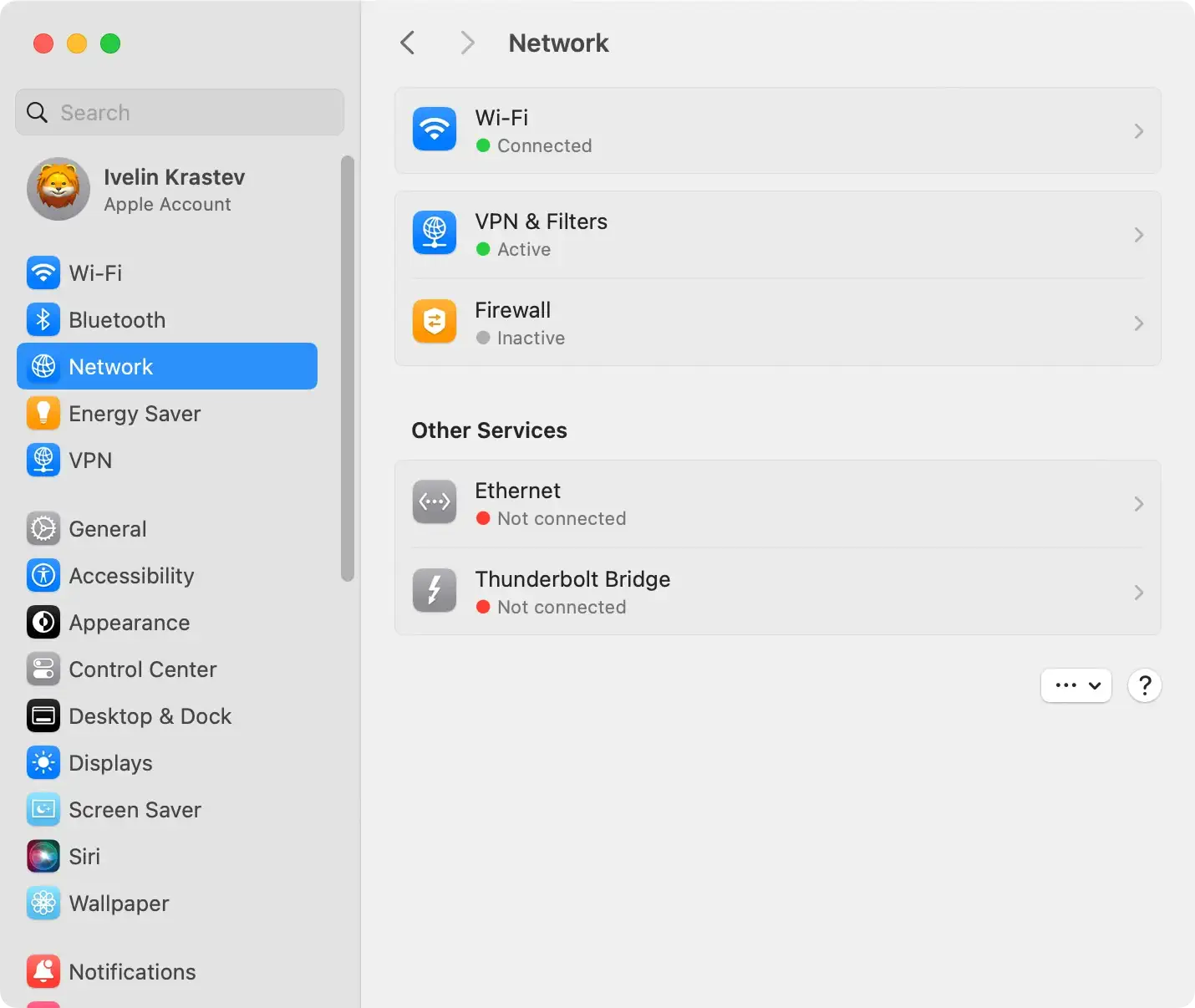
Review and modify proxies
- Open
System Settingsand go toNetwork - Select your active network connection (Wi-Fi or Ethernet) and click
Advanced - In the
Proxiestab, uncheck any boxes the adware may have manipulated, and save your changes
Edit the /etc/hosts file
- Open the
Terminalapplication from theUtilitiesfolder. - Type the command
sudo nano /etc/hostsand press Enter. - Enter your administrator password when prompted.
- Examine the hosts file for any suspicious entries related to SimpleGuideSearch.
- If found, delete or comment these entries out by adding a
#at the beginning of the line. - Save the changes and exit the Terminal.
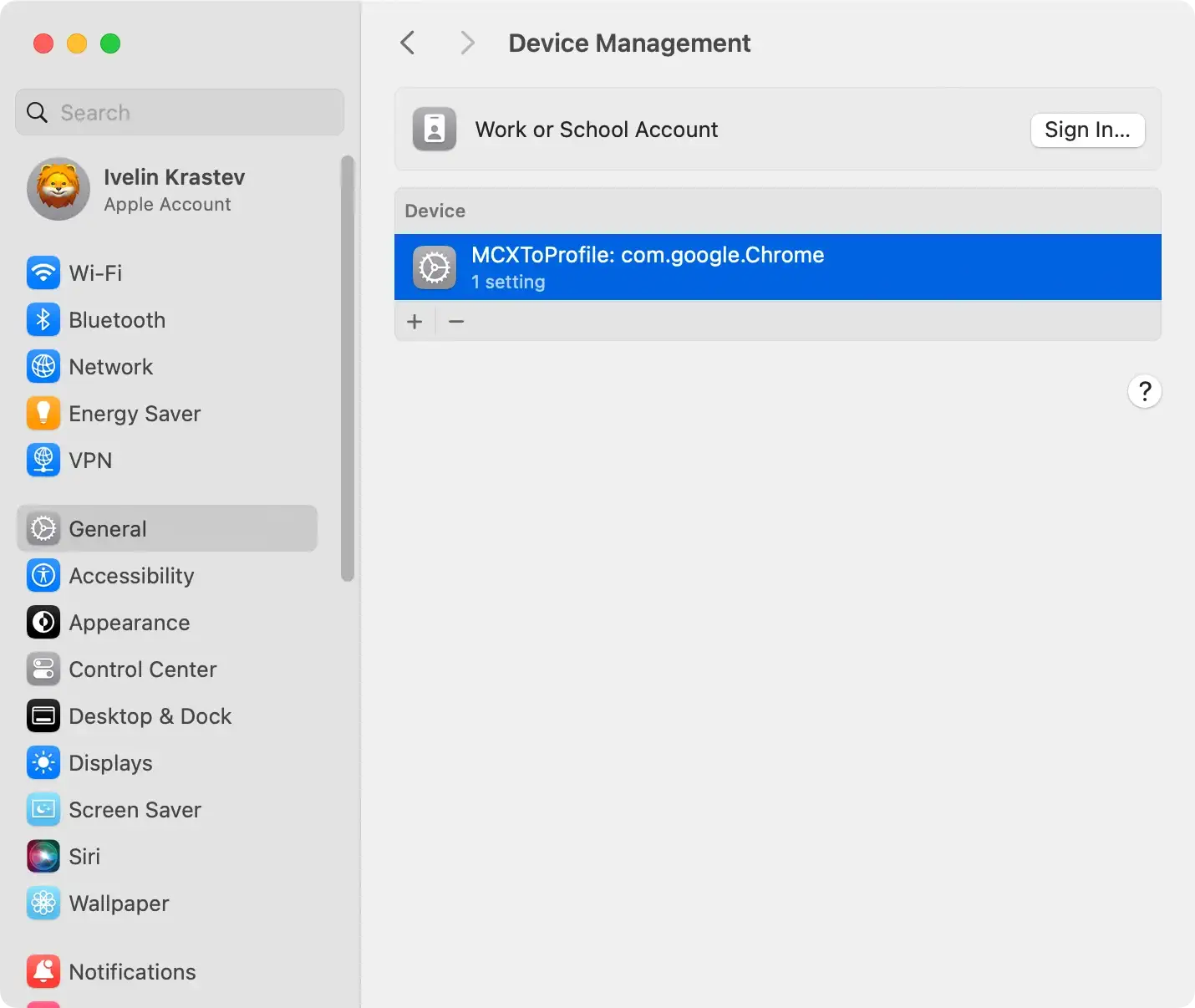
Remove configuration profiles
- Go to
System Settingsand selectProfiles(if available). - Look for any profiles related to SimpleGuideSearch or any unfamiliar profiles.
- Select the suspicious profile and click the (-) button.
- Confirm the action if prompted.
Note: Exercise caution while modifying system settings, especially in the Terminal. Making incorrect changes can affect your Mac’s stability. If you are unsure or uncomfortable with these steps, consider seeking assistance from a knowledgeable individual or professional.
By thoroughly examining and adjusting these system components, you contribute to a more robust cleanup process, reducing the likelihood of SimpleGuideSearch remnants affecting your Mac’s performance and security.
Remove SimpleGuideSearch from Applications
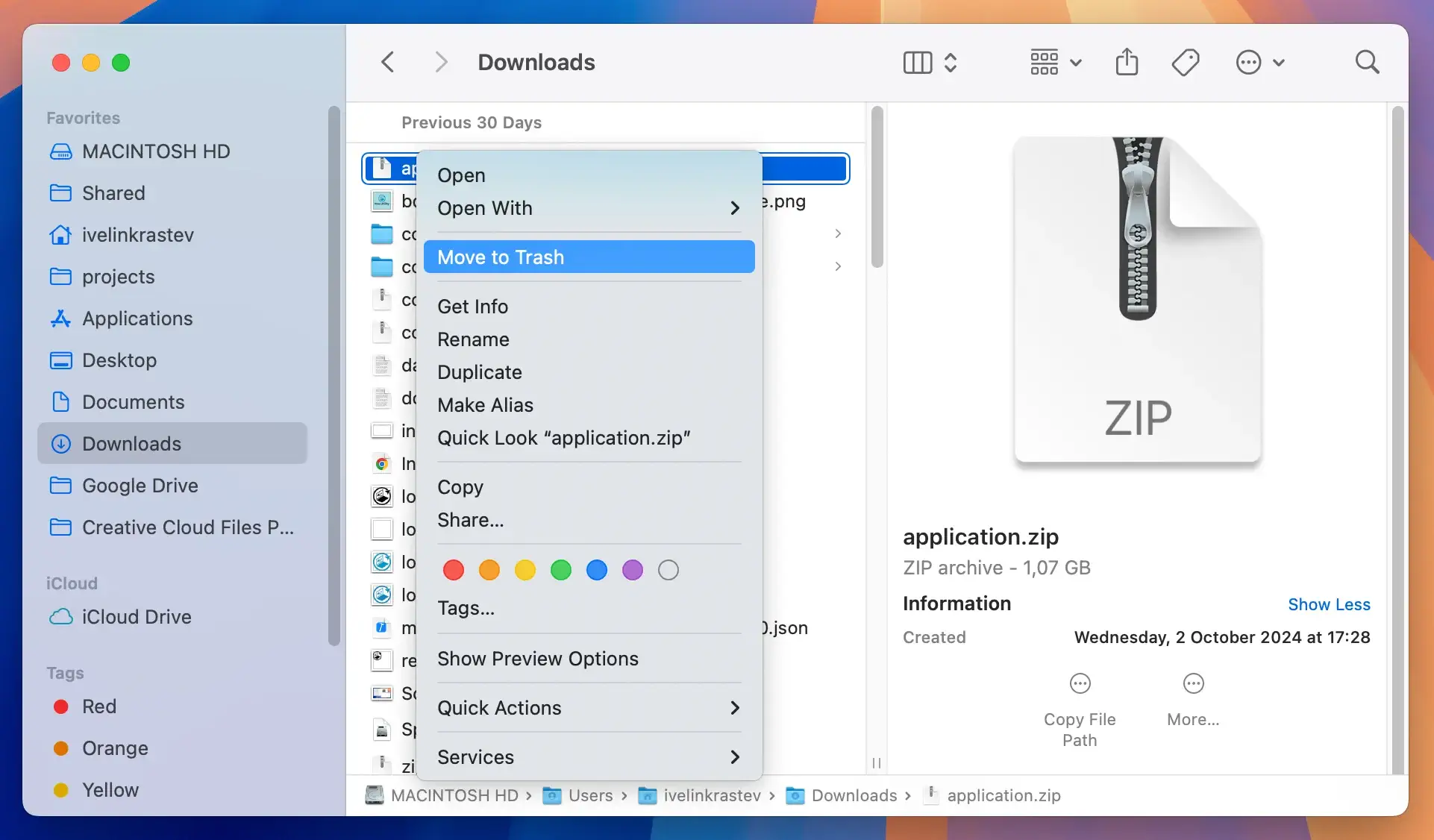
Uninstall SimpleGuideSearch from the Applications folder for a complete removal. To do this, locate the application in the folder, right-click on it, and choose to move it to the trash.
Take your time to carefully inspect the Applications folder, ensuring you don’t overlook any suspicious applications you may not remember installing.

Delete files and folders related to SimpleGuideSearch
After the uninstallation, manually check for any remaining files or folders associated with SimpleGuideSearch.
Adware may leave traces on your system, potentially causing reinfection. Systematically go through your folders, looking for any files or folders related to the adware, and remove them to prevent any lingering presence.
Remove SimpleGuideSearch malicious browser extensions
Proceed to remove any malicious extensions that SimpleGuideSearch may have installed on your internet browsers.
Navigate to the list of extensions in your browser’s settings and carefully remove any unfamiliar or unwanted extensions.
Additionally, consider resetting your browsers to their default settings to eliminate any undesired changes made by the adware.
Use SpyHunter to remove SimpleGuideSearch
Consider utilizing an antivirus or anti-malware scanner like SpyHunter for a more in-depth cleanse.
This software allows you to scan your system for any malicious files or programs that may have been missed during the manual cleanup.
Running a thorough scan with SpyHunter ensures the complete elimination of the adware and any potential threats lingering in your system. Follow the provided instructions for removal to enhance the effectiveness of the antivirus scan.

- Download SpyHunter from here and install the application.
- Once installed, the app will automatically start a scan to detect any traces of SimpleGuideSearch or other threats installed on your Mac.
- Click Next; SpyHunter will effectively quarantine the threats, protecting your Mac.

Preventive measures against SimpleGuideSearch
Prevention is always better than cure. Hence, taking appropriate measures to help protect your system from SimpleGuideSearch and other potential adware infections is essential.
Here are some ways to help you to safeguard your system and prevent infection.
Download from reputable sources
Ensure that you’re only downloading software from official websites and direct links.
Avoid untrusted download channels such as peer-to-peer networks, free file hosting sites, and third-party downloaders, as they are often used to distribute bundled software containing adware, malware, or Potentially Unwanted Programs (PUPs).
Avoid clicking on deceptive ads
Triggering ads provided on third-party sites can be a way for adware to find its way into your system.
Intrusive pop-ups, banners, or deceptive promotions could be potential gateways for SimpleGuideSearch and similar adware.
Hence, practice caution when coming across these ads and avoid clicking on them. More often than not, it’s safer to close out of these ads instead of interacting with them.
Decline unwanted installations
When installing a program, carefully review the terms and conditions and all the installation prompts.
Often, unwanted software is preselected to install alongside the desired ones. Uncheck any boxes that may grant permission to install additional software you don’t recognize or need.
Using options like “Custom” or “Advanced” installation can provide more control over what gets installed on your system.
