

How To Remove Highperformancedformats Ads (Guide)

Before we dive in

Before we dive in, let's make sure you stay safe online. We created SpyHunter because your security matters to us.

Protect your computer today — download SpyHunter right here! Check out our top tips below to keep your computer safe and secure.

Download SpyHunter

Ever clicked on what looked like a harmless ad only to find yourself bombarded with more pop-ups or redirected to a site you had no intention of visiting?

These intrusive experiences often stem from adware and potentially unwanted programs, like those associated with highperformancedformats.com ads.

This guide delves into what Highperformancedformats ads are, the risks they pose to your system, and how they sneakily make their way onto your computer. More importantly, you’ll learn how to remove them from your Mac for good, ensuring a smoother, safer online experience.

What are Highperformancedformats ads?

Highperformancedformats.com ads might seem like just another pop-up window trying to catch your attention, but there’s more going on under the surface.

These ads are usually the product of adware or potentially unwanted programs that have found their way onto your system.

Once installed, these programs don’t just interrupt your browsing experience with unsolicited advertisements; they can also change your browser settings without permission and redirect your searches to misleading and potentially dangerous websites.

user typing on their keyboard with a malware alert sign

This form of adware is particularly sneaky because it often gets installed alongside other software, without the user’s explicit consent. It hides in the fine print of a software installation process or disguises itself as a legitimate program.

The main goal of highperformancedformats.com ads is to generate revenue for their creators through pay-per-click schemes or by collecting and selling user data.

Unfortunately, this means they don’t care much about the content or safety of the ads they show, making some of these pop-ups potentially harmful.

The dangers of adware on your Mac

The pop-ups from highperformancedformats.com come with a set of risks that shouldn’t be taken lightly.

Firstly, these ads can significantly slow down your computer’s performance. They consume valuable system resources and can cause your browser and other applications to lag or crash.

More worryingly, these ads can serve as a conduit for malware. Clicking on one of the ads, even accidentally, can lead to websites that download malicious software onto your device.

Another risk of interacting with these ads is data theft. Highperformancedformats.com ads can employ trackers that monitor your browsing habits, collecting information on the websites you visit and the searches you make.

This data can then be used to target you with more ads or, worse, sold to third parties without your knowledge.

There’s also the danger of phishing attacks, where the ads trick you into entering personal information on fake websites pretending to be legitimate services.

Signs of Highperformancedformats infection

If you’re wondering whether your computer has been affected by Highperformancedformats ads, there are several signs you can look for.

One of the most obvious signs is the sudden appearance of ads in places you wouldn’t normally see them, such as pop-ups or banners on websites that typically don’t have intrusive advertising.

Additionally, if your browser’s homepage has been changed without your direction, or if you notice new toolbars, add-ons, or extensions that you didn’t install yourself, these could be indications of adware infection.

Another telltale sign is the degradation of your computer’s performance. If your device has become noticeably slower or crashes frequently, it could be burdened by unwanted programs running in the background.

Moreover, unexpected redirects to highperformancedformats.com or similar sites while browsing indicate the presence of adware.

Lastly, if you notice new programs on your computer that you don’t remember installing, or if suspicious processes are running in your activity monitor, your computer is likely compromised.

Remove Highperformancedformats using SpyHunter

You can use SpyHunter – a fully-featured anti-malware tool – to remove Highperformancedformats ads from your Mac.

SpyHunter has a sophisticated anti-malware scanner than will search your entire system for malicious files and adware similar to Highperformancedformats, then remove any threats found.

You can download the app here and install it by following the on-screen instructions.

Once installed, launch SpyHunter and perform a full system scan from the main menu. Once the scan is done, you will see a list of all malicious files discovered on your Mac.

remove adware and browser hijackers with spyhunter

Use the app’s interface to automatically remove any threats found and enjoy a safer, cleaner user experience.

remove malware, viruses, and potentially unwanted programs with spyhunter for mac

Step-by-step guide to remove Highperformancedformats ads

To rid your device of the stubborn highperformancedformats.com ads, follow these comprehensive steps.

Step 1: Remove malicious profiles linked to Highperformancedformats

  1. Open your System Settings window from the icon on your Dock.
  2. Navigate to the Privacy & Security section on the left.
  3. Choose Profiles if the option is available.
  4. Remove any unfamiliar or suspicious profiles that were installed by Highperformancedformats.
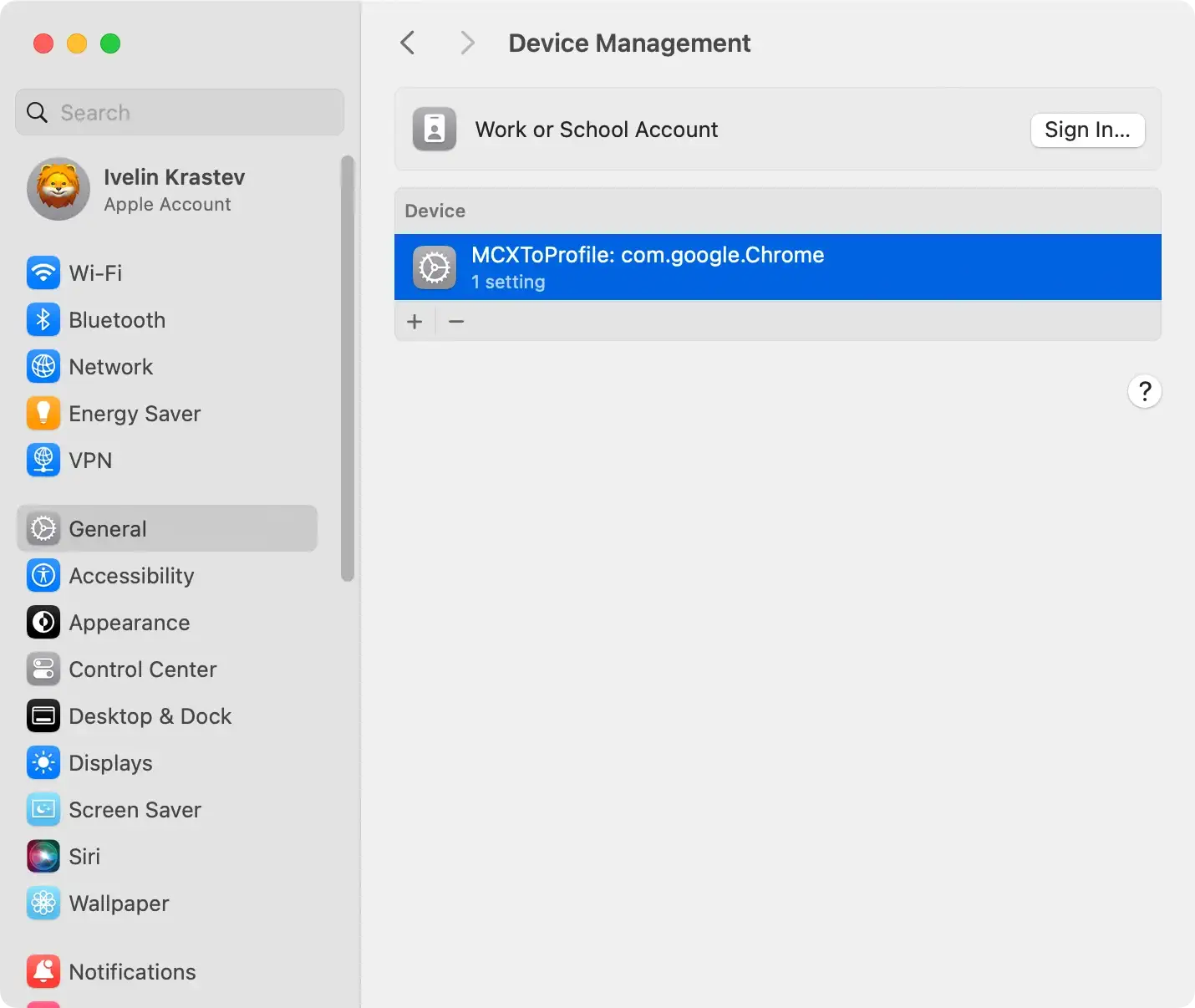
the general configuration profile settings on macos

Step 2: Remove apps related to Highperformancedformats

  1. Navigate to your Applications folder.
  2. Look through the list of installed apps for any you don’t recognize or remember installing.
  3. Drag the suspicious apps into the Trash.
  4. Empty Trash to finalize this step.
delete a program from applications using finder

Step 3: Delete leftover files associated with Highperformancedformats

  1. Open Finder and in the menu click on Go > Go to Folder.
  2. In the dialog that comes up, paste the following path locations in order, hitting Return after each to be able to examine them one after the other:
    • /Library/LaunchAgents/
    • /Library/Application Support/
    • /Library/LaunchDaemons/
    • ~/Library/LaunchAgents/
    • ~/Library/Application Support/
  3. Look through each location and delete any files or folders linked to Highperformancedformats.
  4. Empty the Trash to permanently remove the deleted items.
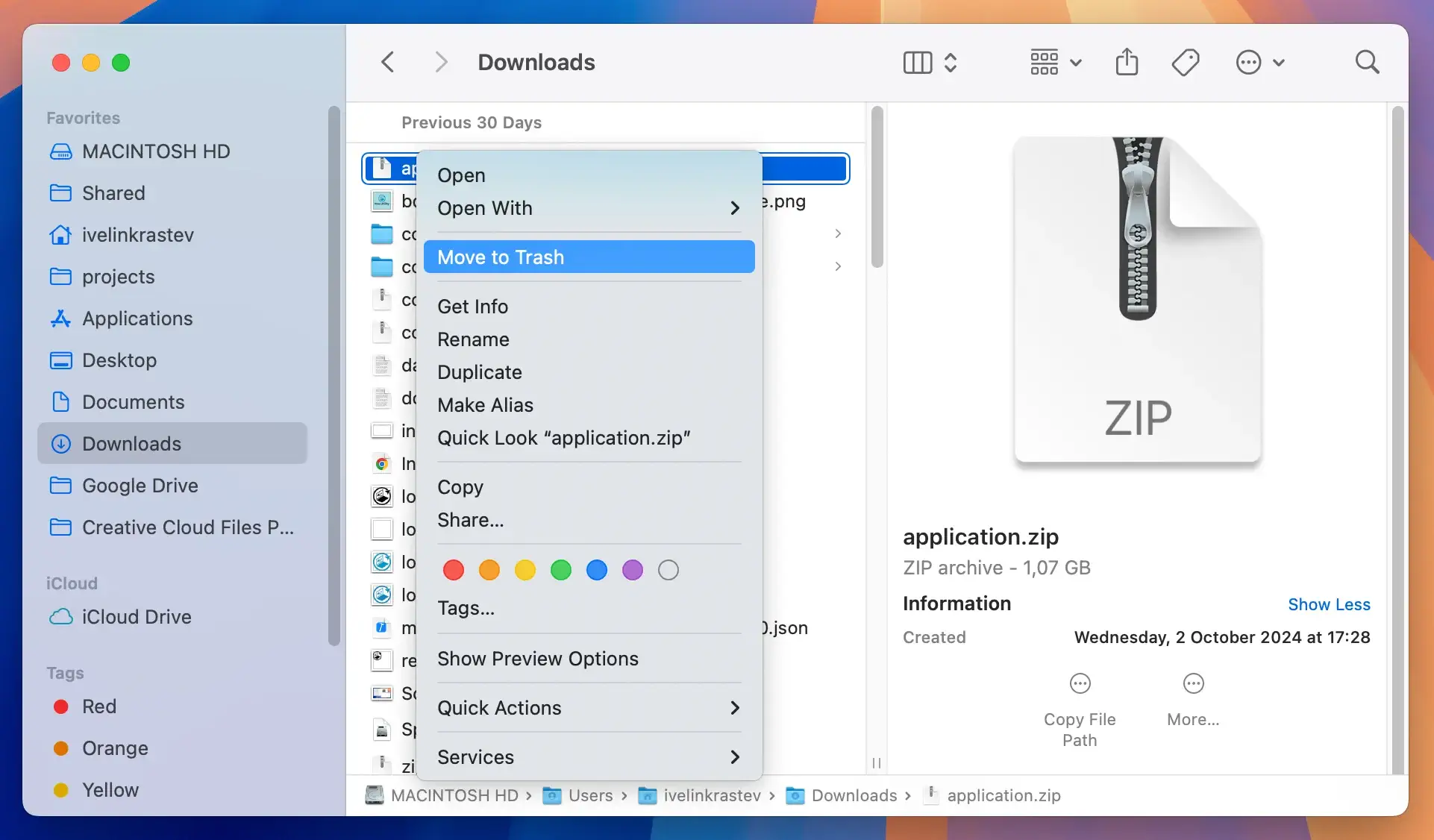
delete downloaded files from the finder app

Step 4: Clear all browsers

For Google Chrome

  • Go to the Chrome three-dots menu and select Settings > Extensions.
  • Find Highperformancedformats or any other suspicious extensions.
  • Remove the unwanted extensions.
  • After removing the extensions, reset Chrome to its default settings to undo any changes made by the adware.

For Mozilla Firefox

  • Open the menu, navigate to Add-ons and themes, then select Extensions.
  • Locate and remove any extensions associated with Highperformancedformats.
  • Reset Firefox to its original settings to ensure all changes made by the adware are reversed.

For Safari

  • Go to Safari, click on Preferences, and then select Extensions.
  • Find unfamiliar extensions and remove them.

Preventing future adware attacks

Keeping your digital life adware-free requires a combination of proactive measures and best practices.

The most effective strategy involves layering your defenses to minimize vulnerabilities. First and foremost, ensure your operating system and all applications are up-to-date.

Developers frequently release updates that patch security holes, making it harder for adware to gain a foothold in your system.

Secondly, be vigilant about what you download and install.

Opt for official sources when downloading software and pay close attention during the installation process to avoid unintentionally agreeing to install additional, potentially unwanted programs.

Another crucial layer of protection is employing strong, unique passwords for all your accounts and enabling two-factor authentication whenever possible.

This can significantly limit the damage if one of your accounts is compromised. Additionally, regular backups of important data can save you from the headaches of data loss in case of an adware attack that spirals out of control.

Share this post on your favorite social media
Keep Your Mac Fast and Secure
Optimize your Mac and stay malware-free with SpyHunter

For a better understanding of our policies, please review our Free Trial Offer below, EULA, and Privacy/Cookie Policy.

SpyHunter Free Trial: Important Terms & Conditions

The SpyHunter Trial version includes, for one device, a one-time 7-day Trial period for SpyHunter 5 Pro (Windows) or SpyHunter for Mac, offering comprehensive malware detection and removal functionality, high-performance guards to actively protect your system from malware threats, and access to our technical support team via the SpyHunter HelpDesk. You will not be charged upfront during the Trial period, although a credit card is required to activate the Trial. (Prepaid credit cards, debit cards, and gift cards are not accepted under this offer.) The requirement for your payment method is to help ensure continuous, uninterrupted security protection during your transition from a Trial to a paid subscription should you decide to purchase. Your payment method will not be charged a payment amount upfront during the Trial, although authorization requests may be sent to your financial institution to verify that your payment method is valid (such authorization submissions are not requests for charges or fees by EnigmaSoft but, depending upon your payment method and/or your financial institution, may reflect on your account availability). You can cancel your Trial by contacting EnigmaSoft’s payment processor (identified in your confirmation email) or EnigmaSoft directly no later than two business days before the 7-day Trial period expires to avoid a charge coming due and being processed immediately after your Trial expires. If you decide to cancel during your Trial, you will immediately lose access to SpyHunter. If, for any reason, you believe a charge was processed that you did not wish to make (which could occur based on system administration, for example), you may also cancel and receive a full refund for the charge any time within 30 days of the date of the purchase charge. See FAQs.

At the end of the Trial, you will be billed upfront immediately at the price and for the subscription period as set forth in the offering materials and registration/purchase page terms (which are incorporated herein by reference; pricing may vary by country per purchase page details) if you have not timely canceled. Pricing typically starts at $72 for 3 months (SpyHunter Pro Windows) and $42 for 3 months (SpyHunter for Mac). Your purchased subscription will be automatically renewed in accordance with the registration/purchase page terms, which provide for automatic renewals at the then applicable standard subscription fee in effect at the time of your original purchase and for the same subscription time period, provided you’re a continuous, uninterrupted subscription user. Please see the purchase page for details. Trial subject to these Terms, your agreement to EULA/TOS, Privacy/Cookie Policy, and Discount Terms. If you wish to uninstall SpyHunter, learn how.

For payment on the automatic renewal of your subscription, an email reminder will be sent to the email address you provided when you registered before your next payment date. At the onset of your trial, you will receive an activation code that is limited to use for only one Trial and for only one device per account. Your subscription will automatically renew at the price and for the subscription period in accordance with the offering materials and registration/purchase page terms (which are incorporated herein by reference; pricing may vary by country per purchase page details), provided that you are a continuous, uninterrupted subscription user. For paid subscription users, if you cancel, you will continue to have access to your product(s) until the end of your paid subscription period. If you wish to receive a refund for your then current subscription period, you must cancel and apply for a refund within 30 days of your most recent purchase, and you will immediately stop receiving full functionality when your refund is processed.

For CALIFORNIA CONSUMERS, please see the notice provisions:
NOTICE TO CALIFORNIA CONSUMERS: Per the California Automatic Renewal Law, you may cancel a subscription as follows:

  1. Go to www.enigmasoftware.com and click the "Login" button at the top right corner.
  2. Log in with your username and password.
  3. In the navigation menu, go to "Order/Licenses." Next to your order/license, a button is available to cancel your subscription if applicable. Note: If you have multiple orders/products, you will need to cancel them on an individual basis.

Should you have any questions or problems, you can contact our EnigmaSoft support team by phone at +1 (888) 360-0646 (USA Toll-Free) / +353 76 680 3523 (Ireland/International) or by email at support@enigmasoftware.com.
How do you cancel a SpyHunter Trial? If your SpyHunter Trial was registered via MyCommerce, you can cancel the trial via MyCommerce by logging into the MyAccount section of MyCommerce (see your confirmation email for further details). You can also contact MyCommerce by phone or email to cancel. To contact MyCommerce via phone, you can call +1-800-406-4966 (USA Toll-Free) or +1-952-646-5022 (24x7x356). You can contact MyCommerce by e-mail at ordersupport@mycommerce.com. You can easily identify if your trial was registered via MyCommerce by checking the confirmation emails that were sent to you upon registration. Alternatively, all users may also contact EnigmaSoft Limited directly. Users can contact our technical support team by emailing support@enigmasoftware.com, opening a ticket in the SpyHunter HelpDesk, or calling +1 (888) 360-0646 (USA) / +353 76 680 3523 (Ireland/International). You can access the SpyHunter HelpDesk from SpyHunter's main screen. To open a support ticket, click on the "HelpDesk" icon. In the window that appears, click the "New Ticket" tab. Fill out the form and click the "Submit" button. If you are unsure of what "Problem Type" to select, please choose the "General Questions" option. Our support agents will promptly process your request and respond to you.

———

SpyHunter Purchase Details
You also have the choice of subscribing to SpyHunter immediately for full functionality, including malware removal and access to our support department via our HelpDesk, typically starting at $42 for 3 months (SpyHunter Basic Windows) and $42 for 3 months (SpyHunter for Mac) in accordance with the offering materials and registration/purchase page terms (which are incorporated herein by reference; pricing may vary by country per purchase page details). Your subscription will automatically renew at the then applicable standard subscription fee in effect at the time of your original purchase subscription and for the same subscription time period, provided you’re a continuous, uninterrupted subscription user and for which you will receive a notice of upcoming charges before the expiration of your subscription. Purchase of SpyHunter is subject to the terms and conditions on the purchase page, EULA/TOS, Privacy/Cookie Policy and Discount Terms.

———

General Terms
Any purchase for SpyHunter under a discounted price is valid for the offered discounted subscription term. After that, the then applicable standard pricing will apply for automatic renewals and/or future purchases. Pricing is subject to change, although we will notify you in advance of price changes.
All SpyHunter versions are subject to your agreeing to our EULA/TOS, Privacy/Cookie Policy, and Discount Terms. Please also see our FAQs and Threat Assessment Criteria. If you wish to uninstall SpyHunter, learn how.
