

How To Remove Dock2Master On Mac (Easy Guide)

Before we dive in

Before we dive in, let's make sure you stay safe online. We created SpyHunter because your security matters to us.

Protect your computer today — download SpyHunter right here! Check out our top tips below to keep your computer safe and secure.

Download SpyHunter

Adware can be a frustrating intrusion, turning your once smooth Mac experience into an endless stream of unwanted pop-ups, intrusive ads, and slowdowns.

Dock2Master is one such adware program that has been reported to impact Mac users, sneaking onto systems through deceptive tactics and disrupting daily activities.

In this guide, we’ll explore what Dock2Master is, how it impacts your Mac, and the exact steps you need to remove it for good.

What is Dock2Master?

Dock2Master is a type of adware, short for “advertising-supported software,” designed to display intrusive advertisements on your Mac.

Classified as a potentially unwanted application (PUA), Dock2Master often sneaks onto devices through deceptive means such as rogue ads, misleading websites, or bundled software installers.

PUAs like Dock2Master are not inherently malicious but can be highly disruptive. They often come with unwanted behaviors such as tracking your browsing habits, slowing down your system, and exposing you to additional security risks.

How Dock2Master is distributed online

Dock2Master and similar adware often make their way onto Macs through:

  • Rogue ads and misleading pages: Visiting an unsafe website may trigger a pop-up urging you to download a supposed “critical update” or a “must-have tool.” These downloads often bundle adware like Dock2Master.
  • Push notification abuse: Some websites trick users into enabling push notifications, which can then flood the screen with ads.
  • Bundled installers: Free software downloaded from unofficial sources often comes with additional programs like Dock2Master hidden in the installation process.

How Dock2Master impacts your Mac

The presence of Dock2Master can significantly degrade your Mac experience. Here’s how:

  • Your browser may flood with pop-ups, banners, and in-text ads that disrupt your workflow.
  • Adware can track your online activities, collect sensitive data, and share it with third parties.
  • Dock2Master runs in the background, consuming system resources and slowing down your Mac.
  • Adware may lead you to unsafe websites or download additional malware.

How to remove Dock2Master adware from your Mac

Follow these steps to get your Mac back to its clean state:

Step 1: Uninstall Dock2Master from Applications

  1. Open the Finder on your Mac and navigate to the Applications folder.
  2. Look for Dock2Master or any suspicious app you don’t recognize.
  3. Right-click the app and select Move to Trash.
  4. Empty your Trash to permanently delete the application.
delete a program from applications using finder

Step 2: Remove leftover files linked to Dock2Master

  1. Open Finder and click Go > Go to Folder from the menu bar.
  2. Enter the following directories one by one, and look for suspicious files related to Dock2Master:
    • /Library/LaunchAgents/
    • /Library/Application Support/
    • /Library/LaunchDaemons/
    • ~/Library/LaunchAgents/
    • ~/Library/Application Support/
  3. Delete any files or folders linked to Dock2Master and empty the Trash.
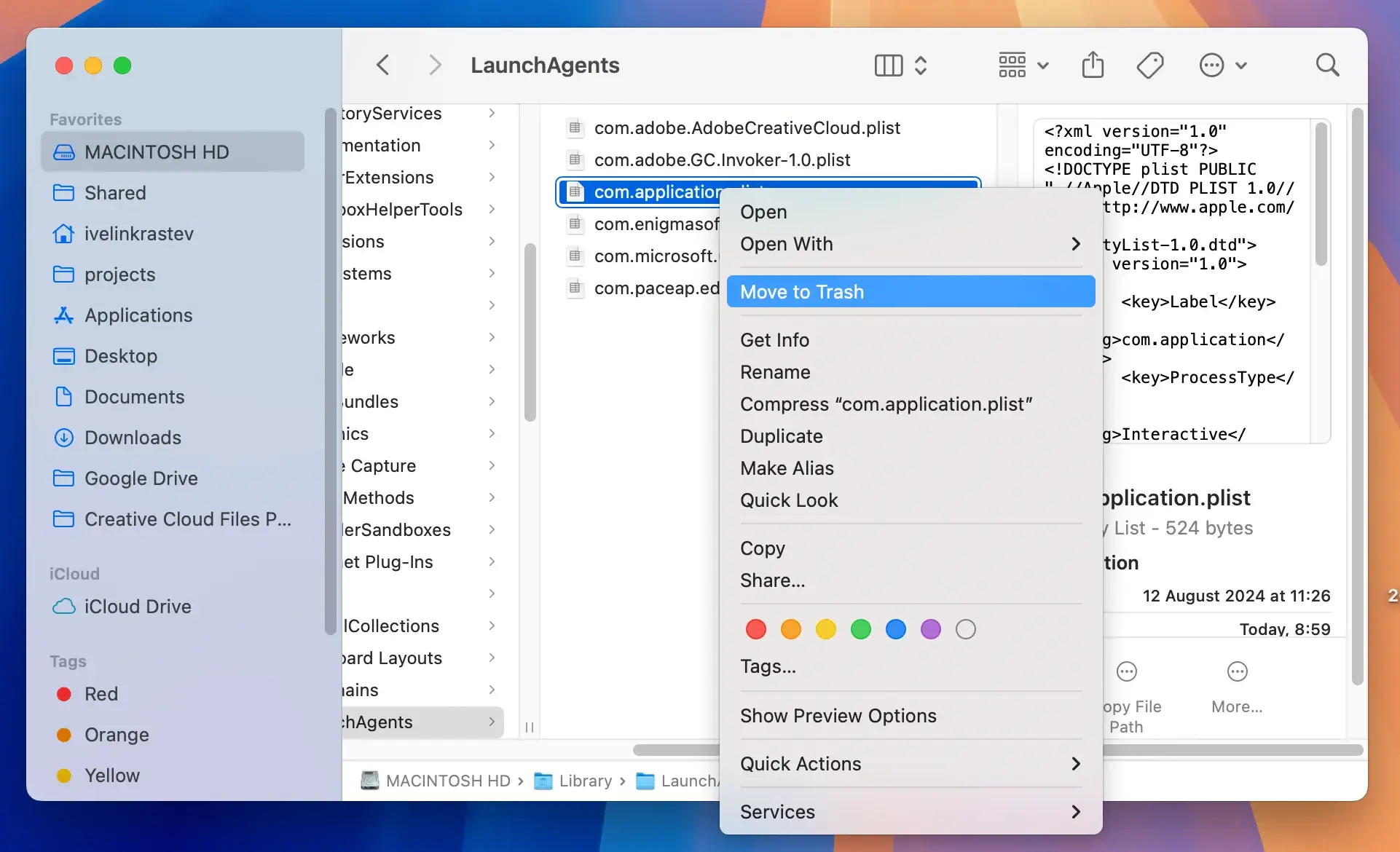
delete files and folders from the library folder

Step 3: Remove unwanted login items

Adware often configures itself to run at startup. Removing it from login items ensures it doesn’t relaunch.

  1. Open System Settings on macOS.
  2. Go to General > Login Items & Extensions.
  3. Look for any items associated with Dock2Master or apps you don’t recognize.
  4. Select the suspicious items and click the minus button to remove them.
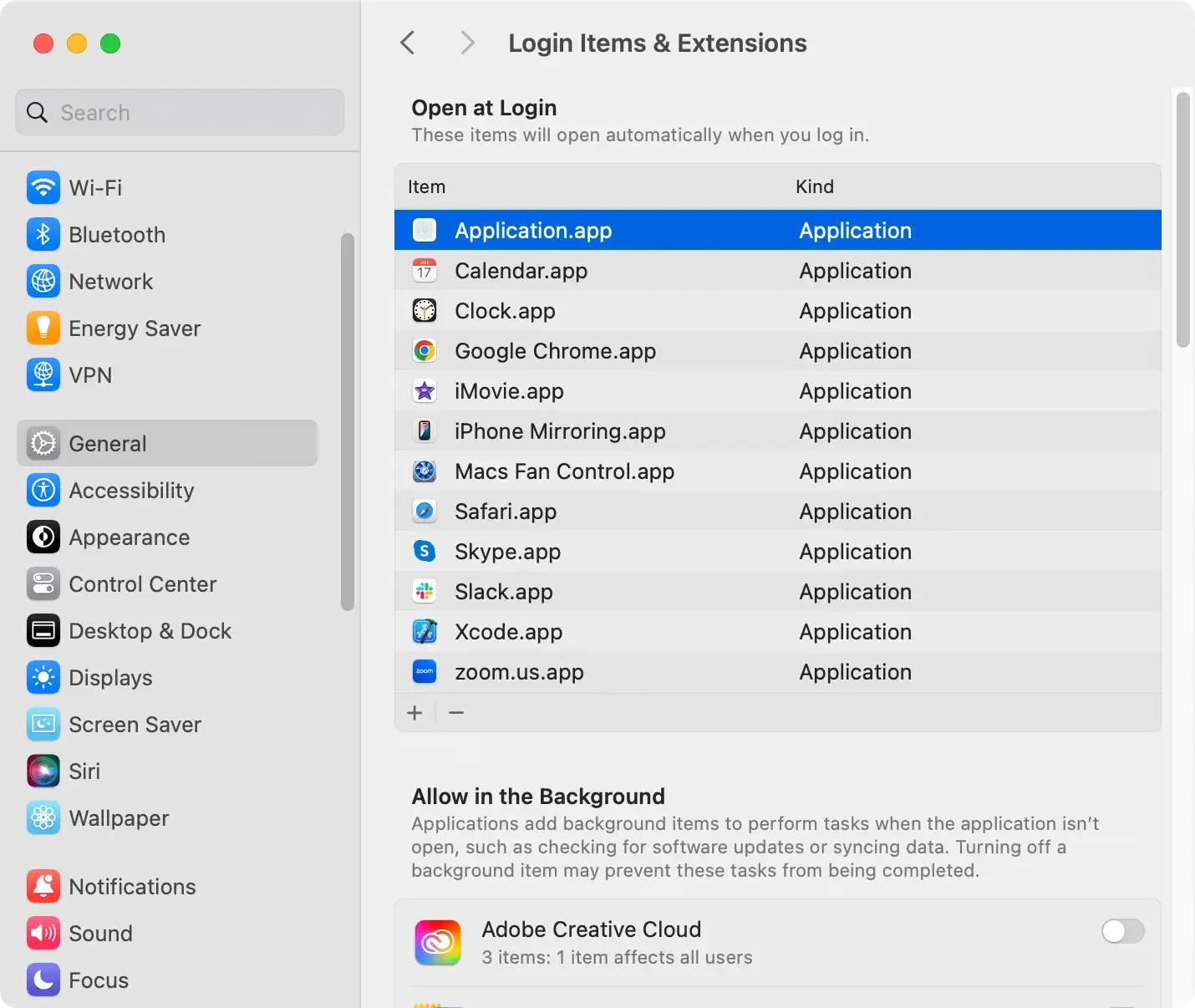
remove malicious login items from macos

Step 4: Use SpyHunter to remove Dock2Master

Manual removal is thorough but may not catch every trace of adware. Using a robust anti-malware tool like SpyHunter ensures complete removal and future protection.

Here’s how to use SpyHunter to clean your Mac:

  1. Download SpyHunter for free here and install it.
  2. Launch the SpyHunter app and run a full malware scan from the main menu.
  3. Wait for the scan to complete and examine the list of detections.

remove Dock2Master with spyhunter

  1. Proceed with the automated cleanup process and enjoy a safe and clean system once again.

remove malware, viruses, and potentially unwanted programs with spyhunter for mac

How to prevent adware like Dock2Master

To avoid adware and PUAs in the future, follow these safety precautions:

  • Download from secure sources: Always use the Mac App Store or trusted developer websites.
  • Be wary of push notifications: Avoid granting notification permissions to unfamiliar websites.
  • Use antivirus software: Tools like SpyHunter can detect and block adware before it installs.
  • Check bundled installers: Choose the custom installation option to uncheck additional programs you don’t want.
  • Update macOS regularly: Keeping your system updated ensures vulnerabilities are patched promptly.
Share this post on your favorite social media
Keep Your Mac Fast and Secure
Optimize your Mac and stay malware-free with SpyHunter

For a better understanding of our policies, please review our Free Trial Offer below, EULA, and Privacy/Cookie Policy.

SpyHunter Free Trial: Important Terms & Conditions

The SpyHunter Trial version includes, for one device, a one-time 7-day Trial period for SpyHunter 5 Pro (Windows) or SpyHunter for Mac, offering comprehensive malware detection and removal functionality, high-performance guards to actively protect your system from malware threats, and access to our technical support team via the SpyHunter HelpDesk. You will not be charged upfront during the Trial period, although a credit card is required to activate the Trial. (Prepaid credit cards, debit cards, and gift cards are not accepted under this offer.) The requirement for your payment method is to help ensure continuous, uninterrupted security protection during your transition from a Trial to a paid subscription should you decide to purchase. Your payment method will not be charged a payment amount upfront during the Trial, although authorization requests may be sent to your financial institution to verify that your payment method is valid (such authorization submissions are not requests for charges or fees by EnigmaSoft but, depending upon your payment method and/or your financial institution, may reflect on your account availability). You can cancel your Trial by contacting EnigmaSoft’s payment processor (identified in your confirmation email) or EnigmaSoft directly no later than two business days before the 7-day Trial period expires to avoid a charge coming due and being processed immediately after your Trial expires. If you decide to cancel during your Trial, you will immediately lose access to SpyHunter. If, for any reason, you believe a charge was processed that you did not wish to make (which could occur based on system administration, for example), you may also cancel and receive a full refund for the charge any time within 30 days of the date of the purchase charge. See FAQs.

At the end of the Trial, you will be billed upfront immediately at the price and for the subscription period as set forth in the offering materials and registration/purchase page terms (which are incorporated herein by reference; pricing may vary by country per purchase page details) if you have not timely canceled. Pricing typically starts at $72 for 3 months (SpyHunter Pro Windows) and $42 for 3 months (SpyHunter for Mac). Your purchased subscription will be automatically renewed in accordance with the registration/purchase page terms, which provide for automatic renewals at the then applicable standard subscription fee in effect at the time of your original purchase and for the same subscription time period, provided you’re a continuous, uninterrupted subscription user. Please see the purchase page for details. Trial subject to these Terms, your agreement to EULA/TOS, Privacy/Cookie Policy, and Discount Terms. If you wish to uninstall SpyHunter, learn how.

For payment on the automatic renewal of your subscription, an email reminder will be sent to the email address you provided when you registered before your next payment date. At the onset of your trial, you will receive an activation code that is limited to use for only one Trial and for only one device per account. Your subscription will automatically renew at the price and for the subscription period in accordance with the offering materials and registration/purchase page terms (which are incorporated herein by reference; pricing may vary by country per purchase page details), provided that you are a continuous, uninterrupted subscription user. For paid subscription users, if you cancel, you will continue to have access to your product(s) until the end of your paid subscription period. If you wish to receive a refund for your then current subscription period, you must cancel and apply for a refund within 30 days of your most recent purchase, and you will immediately stop receiving full functionality when your refund is processed.

For CALIFORNIA CONSUMERS, please see the notice provisions:
NOTICE TO CALIFORNIA CONSUMERS: Per the California Automatic Renewal Law, you may cancel a subscription as follows:

  1. Go to www.enigmasoftware.com and click the "Login" button at the top right corner.
  2. Log in with your username and password.
  3. In the navigation menu, go to "Order/Licenses." Next to your order/license, a button is available to cancel your subscription if applicable. Note: If you have multiple orders/products, you will need to cancel them on an individual basis.

Should you have any questions or problems, you can contact our EnigmaSoft support team by phone at +1 (888) 360-0646 (USA Toll-Free) / +353 76 680 3523 (Ireland/International) or by email at support@enigmasoftware.com.
How do you cancel a SpyHunter Trial? If your SpyHunter Trial was registered via MyCommerce, you can cancel the trial via MyCommerce by logging into the MyAccount section of MyCommerce (see your confirmation email for further details). You can also contact MyCommerce by phone or email to cancel. To contact MyCommerce via phone, you can call +1-800-406-4966 (USA Toll-Free) or +1-952-646-5022 (24x7x356). You can contact MyCommerce by e-mail at ordersupport@mycommerce.com. You can easily identify if your trial was registered via MyCommerce by checking the confirmation emails that were sent to you upon registration. Alternatively, all users may also contact EnigmaSoft Limited directly. Users can contact our technical support team by emailing support@enigmasoftware.com, opening a ticket in the SpyHunter HelpDesk, or calling +1 (888) 360-0646 (USA) / +353 76 680 3523 (Ireland/International). You can access the SpyHunter HelpDesk from SpyHunter's main screen. To open a support ticket, click on the "HelpDesk" icon. In the window that appears, click the "New Ticket" tab. Fill out the form and click the "Submit" button. If you are unsure of what "Problem Type" to select, please choose the "General Questions" option. Our support agents will promptly process your request and respond to you.

———

SpyHunter Purchase Details
You also have the choice of subscribing to SpyHunter immediately for full functionality, including malware removal and access to our support department via our HelpDesk, typically starting at $42 for 3 months (SpyHunter Basic Windows) and $42 for 3 months (SpyHunter for Mac) in accordance with the offering materials and registration/purchase page terms (which are incorporated herein by reference; pricing may vary by country per purchase page details). Your subscription will automatically renew at the then applicable standard subscription fee in effect at the time of your original purchase subscription and for the same subscription time period, provided you’re a continuous, uninterrupted subscription user and for which you will receive a notice of upcoming charges before the expiration of your subscription. Purchase of SpyHunter is subject to the terms and conditions on the purchase page, EULA/TOS, Privacy/Cookie Policy and Discount Terms.

———

General Terms
Any purchase for SpyHunter under a discounted price is valid for the offered discounted subscription term. After that, the then applicable standard pricing will apply for automatic renewals and/or future purchases. Pricing is subject to change, although we will notify you in advance of price changes.
All SpyHunter versions are subject to your agreeing to our EULA/TOS, Privacy/Cookie Policy, and Discount Terms. Please also see our FAQs and Threat Assessment Criteria. If you wish to uninstall SpyHunter, learn how.
