

Remove ActivityInputfld From Your Mac (Full Guide)

Before we dive in
Before we dive in, let's make sure you stay safe online. We created SpyHunter because your security matters to us.
Protect your computer today — download SpyHunter right here! Check out our top tips below to keep your computer safe and secure.

Uncover the dangers of ActivityInputfld, a potentially unwanted program that may infiltrate your Mac, causing disruptive advertising and unwanted browser behavior.
This guide will delve into the symptoms, potential risks, and effective methods to remove ActivityInputfld from your system, ensuring a secure and optimized browsing experience.
ActivityInputfld overview
ActivityInputfld is often mistaken as a virus but operates as a browser hijacker, explicitly targeting Mac users.
Compatible with popular browsers like Chrome, Safari, and Firefox, this adware executes unwarranted changes, disrupting the browsing experience.
Despite its invasive nature, it doesn’t fit the direct characteristics of a virus. Instead, it exhibits traits similar to Potentially Unwanted Programs (PUPs).
Upon installation, ActivityInputfld subtly alters browser settings, introduces additional components like toolbars and extensions, and inundates users with banners and pop-ups.
Origin of ActivityInputfld
ActivityInputfld typically infiltrates systems through user-based installations, often concealed within bundled software or deceptive download links.
Its unassuming installation, marked by constant pop-ups and browser modifications, can make users mistake it for a virus.
Actions performed by ActivityInputfld
Once installed, ActivityInputfld initiates subtle yet intrusive operations. It manipulates default browser settings, introduces additional components, and consistently redirects pages—a characteristic of browser hijackers.
Beyond displaying many ads, the software is analyzed for potential data collection practices, exposing systems to threats like Trojans and ransomware.
ActivityInputfld classification
While not meeting the direct criteria of a virus, ActivityInputfld earns its classification as a browser hijacker and a PUP due to its dubious nature.
Privacy invasion concerns arise from potential data collection, persistent redirection, and the installation of unwanted components.
While not entirely harmful, it poses inconveniences and potential risks, necessitating its removal for a seamless and secure browsing experience.
Understanding its origin, actions, and classification is vital for users seeking to remove ActivityInputfld effectively.
Understanding ActivityInputfld’s Role and Impact on Mac
While not strictly a virus, ActivityInputfld’s intrusive behavior places it firmly in the category of a browser hijacker and potentially unwanted application (PUA), causing significant implications for system performance and user browsing experience.
ActivityInputfld as a PUP
Categorized as a potentially unwanted application, ActivityInputfld tends to slow down your Mac significantly and flood it with unwanted advertisements.
Privacy concerns arise as these apps may use cookies and trackers to extract browsing information, posing a threat to MacOS and disrupting browser functionality.
How ActivityInputfld affects Mac performance
Running in the background, ActivityInputfld and apps like it can significantly hamper system performance by using a substantial amount of system resources.
This results in a slower, less responsive Mac. Additionally, the creators of such unwanted applications don’t particularly care about the content of the ads they serve.
Consequently, they expose the user’s system to risky websites, increasing the susceptibility to other threats.
ActivityInputfld and pay-per-click schemes
ActivityInputfld employs the Pay-Per-Click business model to generate revenue for its creators. The software earns commissions by bombarding users with ads and provoking them to click.
It collects user browsing data and delivers personalized ads to maximize profit, further stoking privacy concerns. This only highlights the need for prompt action and adware removal.
Apple devices vulnerable to malware
Contrary to common belief, Apple computers, including Macs, are not immune to malware.
Instances like ActivityInputfld highlight the vulnerability of Macs to adware, browser hijackers, and other potential threats.
Regular updates on malware definitions and vigilant system health monitoring are essential practices for all Mac users.
Prepare to remove ActivityInputfld
When faced with threatening actions by ActivityInputfld, prompt and comprehensive removal is essential.
However, one must take some precautionary measures before diving into the removal process for an efficient and safe removal experience.
Backup important data
In the presence of adware such as ActivityInputfld on your system, initiating a comprehensive backup of your essential files is paramount before embarking on the removal process.
This precautionary step ensures the safety of your data, regardless of the outcome of the removal procedure.
By backing up your files, you create a protective barrier, mitigating potential risks and providing peace of mind, particularly in worst-case scenarios.
Have the instructions ready
Having a device with the removal instructions on standby would be helpful when dealing with adware. This would aid in navigational changes, especially during the manual removal process.
As ActivityInputfld induces page redirects and changes in browser settings, having the removal instructions handy on another device will help maintain clarity in the process.
Prepare for a long process
The adware removal process requires time and patience, especially when done manually. It isn’t straightforward and may require you to dig through layers of application files and folders in your system.
Therefore, being mentally prepared for a potentially tricky process will help you successfully remove ActivityInputfld.
Steps to remove ActivityInputfld
Having identified the presence and impact of ActivityInputfld on Mac, the immediate step is its removal and subsequent prevention of such threats.
This removal process consists of several essential steps. It is to be noted that following these steps in the sequence provided is crucial for effectively removing this browser hijacker.
Delete malicious profiles from your Mac
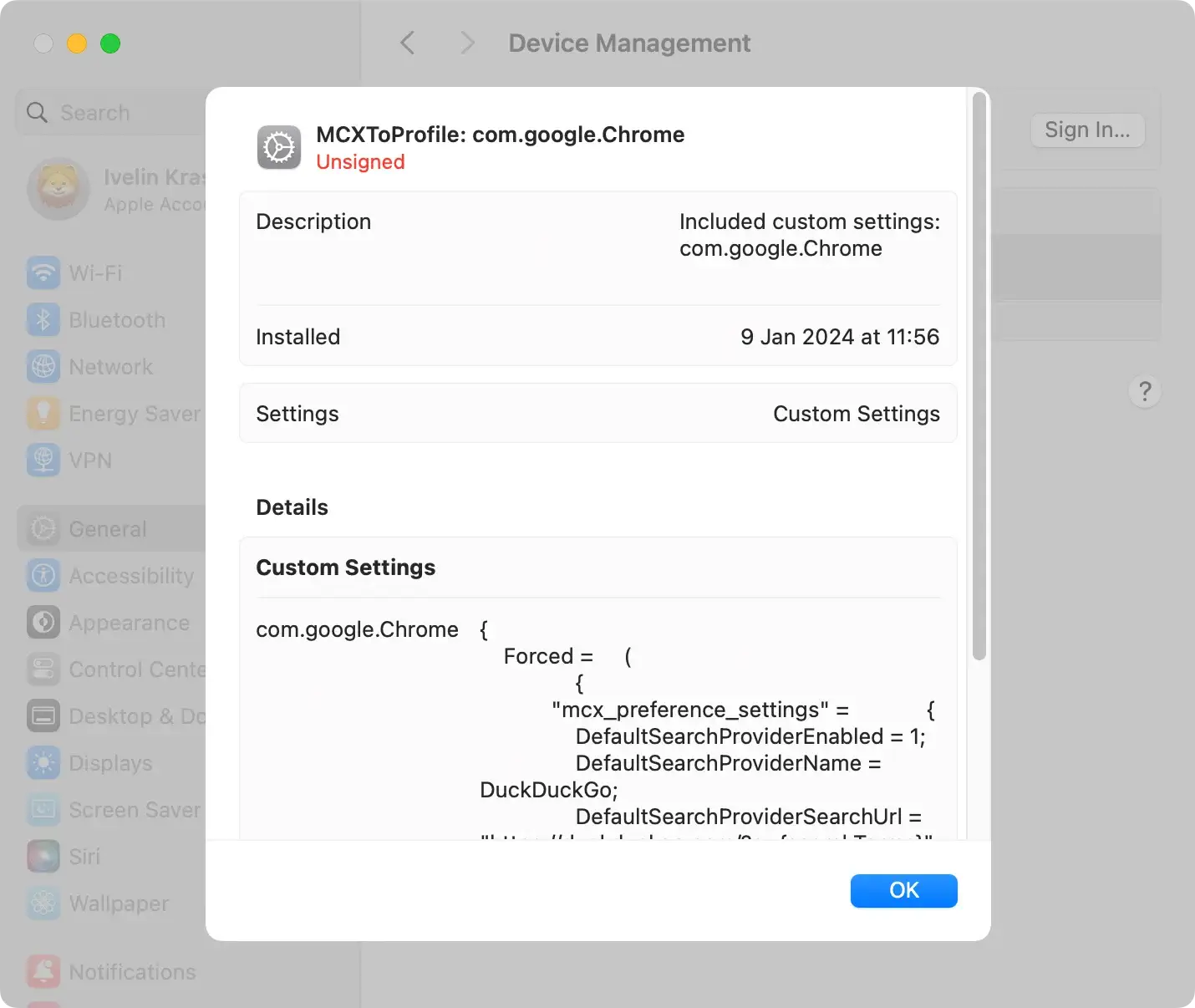
Configuration profiles manage Mac settings and behavior. Adware and browser hijackers manipulate these profiles to prevent users from eliminating malicious programs from their computers.
Follow these steps:
- Navigate to
System Settingsand clickProfiles(if available). - Identify and select any suspicious profiles.
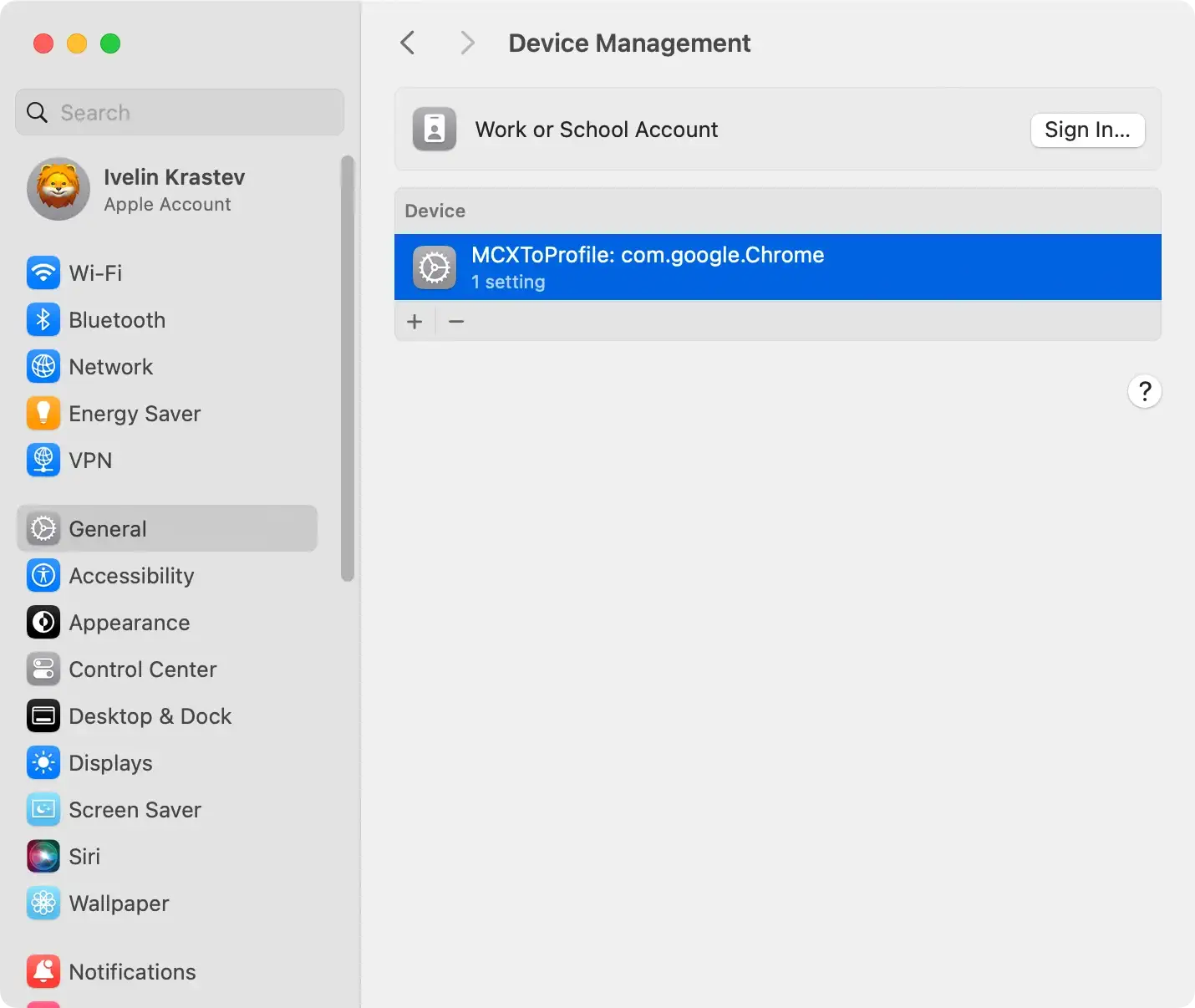
- Click the “-” (minus) button to delete them.
- Enter your administrator password if prompted.
Remove ActivityInputfld application and related files
ActivityInputfld, often disguised as legitimate applications, can infiltrate your Mac, causing disruptions.
Taking steps to uninstall the application and delete associated files is crucial for thorough removal.
Navigate to your applications
Open Finder and locate the Applications folder in the sidebar.
ActivityInputfld and other suspicious applications may be present here. Identify the adware or any unfamiliar applications that could be causing issues.
Move ActivityInputfld to the Trash
Drag the identified adware or suspicious applications to the Trash.
This initiates the removal process. However, moving an application to the Trash may leave behind associated files, contributing to persistent adware behavior.

Find associated files in ~/Library and /Library
ActivityInputfld often leaves residual files in the user and system Library folders. Open Finder and navigate the ~/Library and /Library directories.
Look for folders related to ActivityInputfld, as well as any suspicious files. Exercise caution to avoid deleting essential system files, focusing on those associated with the adware.
Pro tip
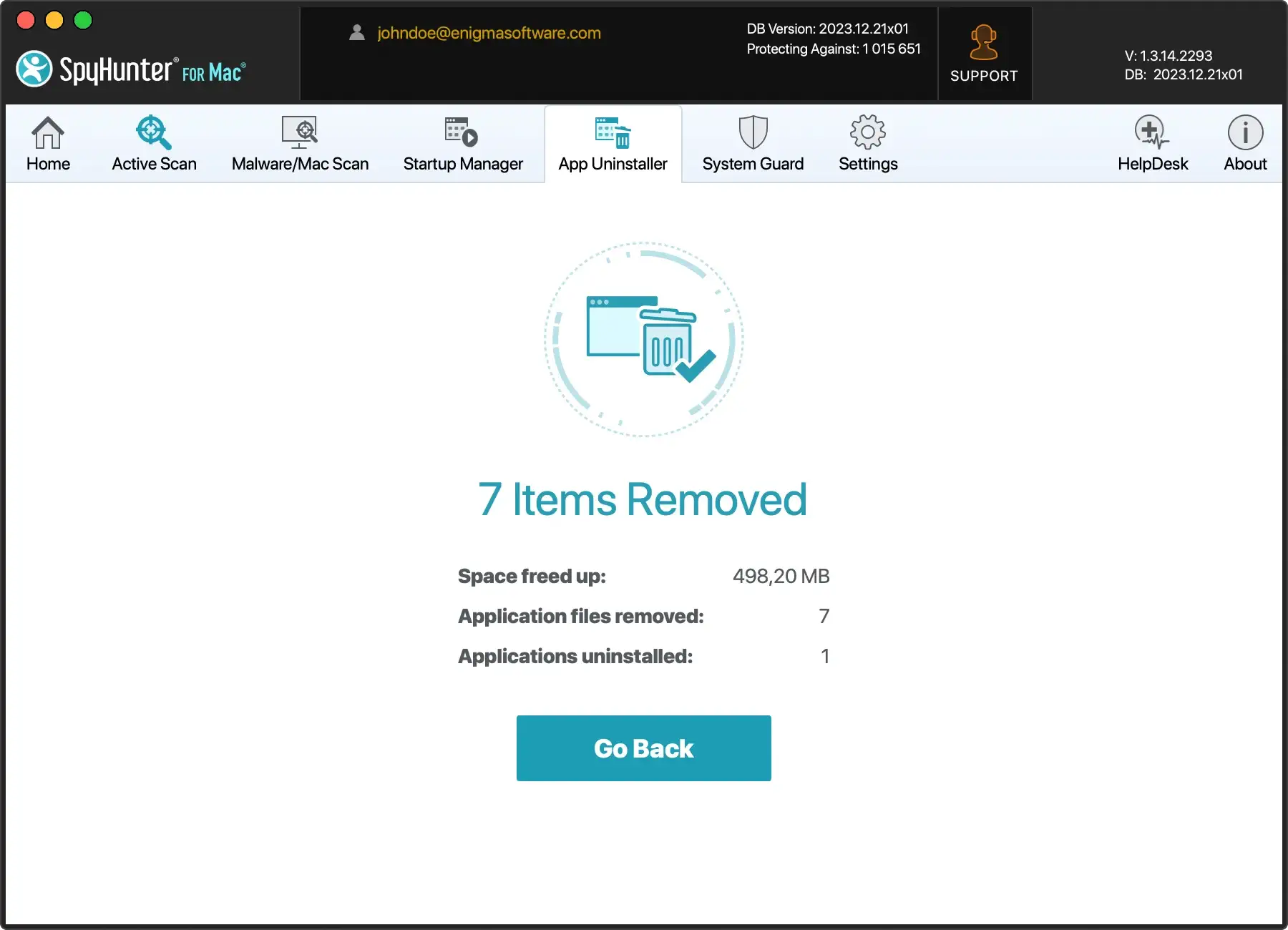
If you prefer a hassle-free and efficient solution to save time and ensure thorough removal, consider leveraging SpyHunter for Mac’s App Uninstaller feature.
This tool streamlines the removal process by identifying and uninstalling unwanted applications and their associated files, sparing you the tedious task of manual searching.
Download SpyHunter from here and install it on your Mac, then, run the App Uninstaller. Let SpyHunter do the work for you, swiftly and comprehensively removing ActivityInputfld and other potential threats from your Mac.
Remove ActivityInputfld from your browser
Uninstalling ActivityInputfld from the Applications folder may only sometimes produce the expected results. Remember that it is a browser extension that could remain active in your browser.
Follow these steps to remove ActivityInputfld from your primary browser manually.
Safari:
- Open Safari and choose
Preferencesfrom the drop-down menu - Click on the
Extensionstab - Locate the ActivityInputfld Safari extension and remove it
Google Chrome:
- Open Google Chrome and type
chrome://extensionsin the address bar - Find the ActivityInputfld extension and uninstall it
Mozilla Firefox:
- Open Mozilla Firefox and type
about:addonsin the address bar. - Find the ActivityInputfld Firefox extension and remove it.
Remove ActivityInputfld using SpyHunter for Mac
SpyHunter is a reliable anti-malware program designed to combat malicious programs like ActivityInputfld.
By conducting a thorough system scan, the app identifies potentially harmful software and provides clear guidance for its removal.
Initiate a Mac scan with SpyHunter
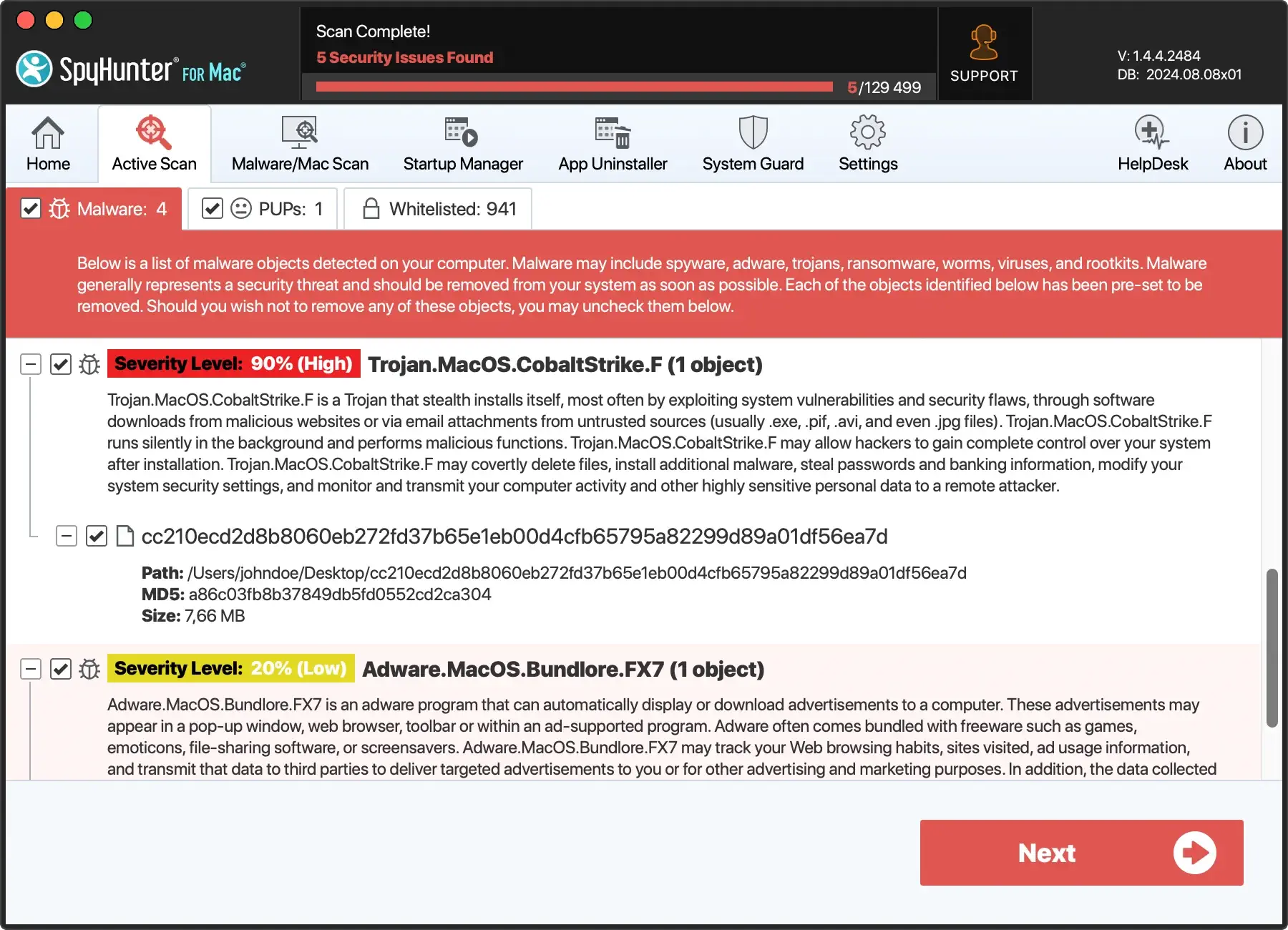
Download SpyHunter from here and follow the installation instructions. The application initiates a comprehensive scan of your Mac, thoroughly examining the system for potential threats.
It is experienced at detecting various types of malware, including browser hijackers like ActivityInputfld and other potentially unwanted programs.

Follow the guided removal steps
Upon completing the scan, SpyHunter generates a detailed report listing all identified threats. Users are then prompted to follow the software’s steps to remove the detected malware.
These steps are designed to be intuitive and user-friendly, ensuring a smooth malware removal process, even for individuals with limited technical knowledge.

Complete the removal procedure
A system restart may be required to eliminate the malware completely. Restarting the computer helps eliminate any residual traces of the malicious software that may linger in the memory.
After the restart, users should no longer experience symptoms associated with the presence of ActivityInputfld on their Macs.
Tips to prevent ActivityInputfld in the future
Download from trusted sources
Obtain software exclusively from recognized and trustworthy sources to minimize the risk of adware infiltration.
Official websites and reputable app stores are safer alternatives than unfamiliar or suspicious download platforms. Exercise caution, especially when tempted by offers from less-known sources.
Install a reliable antivirus program
Deploying a reputable antivirus or anti-malware program is a fundamental proactive measure against adware.
Software like SpyHunter for Mac offers real-time protection, detecting and eliminating potential threats before they compromise your system ( Download SpyHunter for free here ).
Regularly update your chosen security software to ensure it can tackle the latest adware variants.
Keep software updated
Regularly updating your operating system, antivirus software, and other applications is a crucial defense against adware.
These updates often include security patches that address vulnerabilities exploited by adware. Configure automatic updates whenever possible to ensure continuous protection.
Customize installation settings
Opt for custom or advanced settings during software installations rather than the default.
This allows you to review the installation components and deselect any additional programs or toolbars bundled with the software.
Take a moment to scrutinize each installation step and uncheck any boxes related to unwanted extras.
Be cautious with email attachments
Exercise vigilance when handling email attachments, especially from unknown or unexpected senders. Adware can be distributed through malicious attachments, posing a significant threat to your system.
Avoid opening attachments or clicking on links in emails from unverified sources, and use email security settings to filter out potential threats.
