

Remove ActivityConsole From Mac (Complete Guide)

Before we dive in
Before we dive in, let's make sure you stay safe online. We created SpyHunter because your security matters to us.
Protect your computer today — download SpyHunter right here! Check out our top tips below to keep your computer safe and secure.

ActivityConsole is a form of adware that specifically targets Mac users. It is known for its intrusive behavior and potential privacy risks. This article aims to shed light on the nature of ActivityConsole.
We will explore how it infiltrates systems, the symptoms of its presence, and the steps Mac users can take to remove ActivityConsole.
By understanding the threats posed by such adware and employing the proper removal strategies, you can ensure your Mac remains secure and performs optimally. Let’s dive in:
ActivityConsole adware analysis
ActivityConsole serves as a powerful adware tool. It is specifically designed to run aggressive and intrusive advertisement campaigns.
Its modus operandi involves displaying irritating pop-ups, banners, and overlays on websites users visit.
This constant bombardment of ads can significantly hamper the overall browsing experience.
Association with AdLoad malware family
After thoroughly investigating, we ascertained that ActivityConsole is part of the AdLoad malware family.
The AdLoad malware family is recognized for its intrusive nature, specializing in covert infiltration of systems to carry out extensive advertising campaigns.
Like its counterparts within the AdLoad family, ActivityConsole primarily floods users with advertisements without obtaining the necessary permissions or informing users about its actions.

The AdLoad malware family, known for its sophisticated tactics, continuously evolves to evade detection and maintain persistence on infected systems.
It employs various techniques, including deceptive distribution methods, polymorphic coding, and obfuscation, making it challenging for traditional security measures to counteract its activities effectively.
Potential risks of clicking ActivityConsole ads
The potential hazards associated with ActivityConsole cannot be ignored. Its ads are not just annoying; they can also prove harmful if interacted with.
The ads often promote online scams, dubious software, and even malware. An unsuspecting user could inadvertently download and install these potentially harmful components simply by clicking on the ads.
Additionally, the seemingly legitimate content displayed through these ads is not endorsed by official parties and is likely part of a scam.
Characteristics and functionality of ActivityConsole
ActivityConsole stands out due to some defined features, which form a part of its operations as adware.
It has unique characteristics and conducts specific aggressive and potentially dangerous procedures.
How ActivityConsole delivers ads
One distinctive characteristic of the ActivityConsole is its conditions for delivering ads. Unlike some other forms of adware, it does not require a specific trigger or condition to start an advertisement campaign.
Instead, it operates in the background and begins ad promotion unexpectedly, leading to unwanted pop-ups and banners.
Absence of browser hijacking
Surprisingly, unlike many counterparts within the AdLoad malware family, ActivityConsole does not display the typical behavior of browser hijacking.
This distinctive characteristic sets it apart from other adware in the same family, sparing users the immediate disruption of altered browser settings and redirected search queries.
However, it is essential to emphasize that the absence of browser hijacking does not diminish the potential threat of ActivityConsole.
ActivityConsole and data tracking
Beyond its primary role as an adware, ActivityConsole is equipped with data tracking capabilities. This allows it to monitor users’ online activities, track browsing history, and collect confidential information.
This surveillance feature serves to enhance its efficiency in running targeted advertisement campaigns.
Threats to user information
A data-tracking functionality presents an enormous threat to the safety of user information.
The collected data might contain sensitive information such as passwords, credit card details, or other personal details.
Misusing such information can lead to identity theft or other forms of cybercrime.
Steps to Remove ActivityConsole Adware
System contamination by ActivityConsole adware necessitates orderly elimination steps, including manual and automatic processes, to thoroughly purge the system and restore it to its pre-infection state.
Terminate unwanted processes
Before proceeding with removing ActivityConsole, it’s essential to terminate any unwanted processes that might be running on your Mac.
This initial step ensures that adware-related activities are halted, making the subsequent removal process smoother and more effective.
- Launch
Activity Monitorfrom theUtilitiesfolder in theApplicationsdirectory. - Look for any processes associated with ActivityConsole.
- Select the process and click the [X] button to quit it.
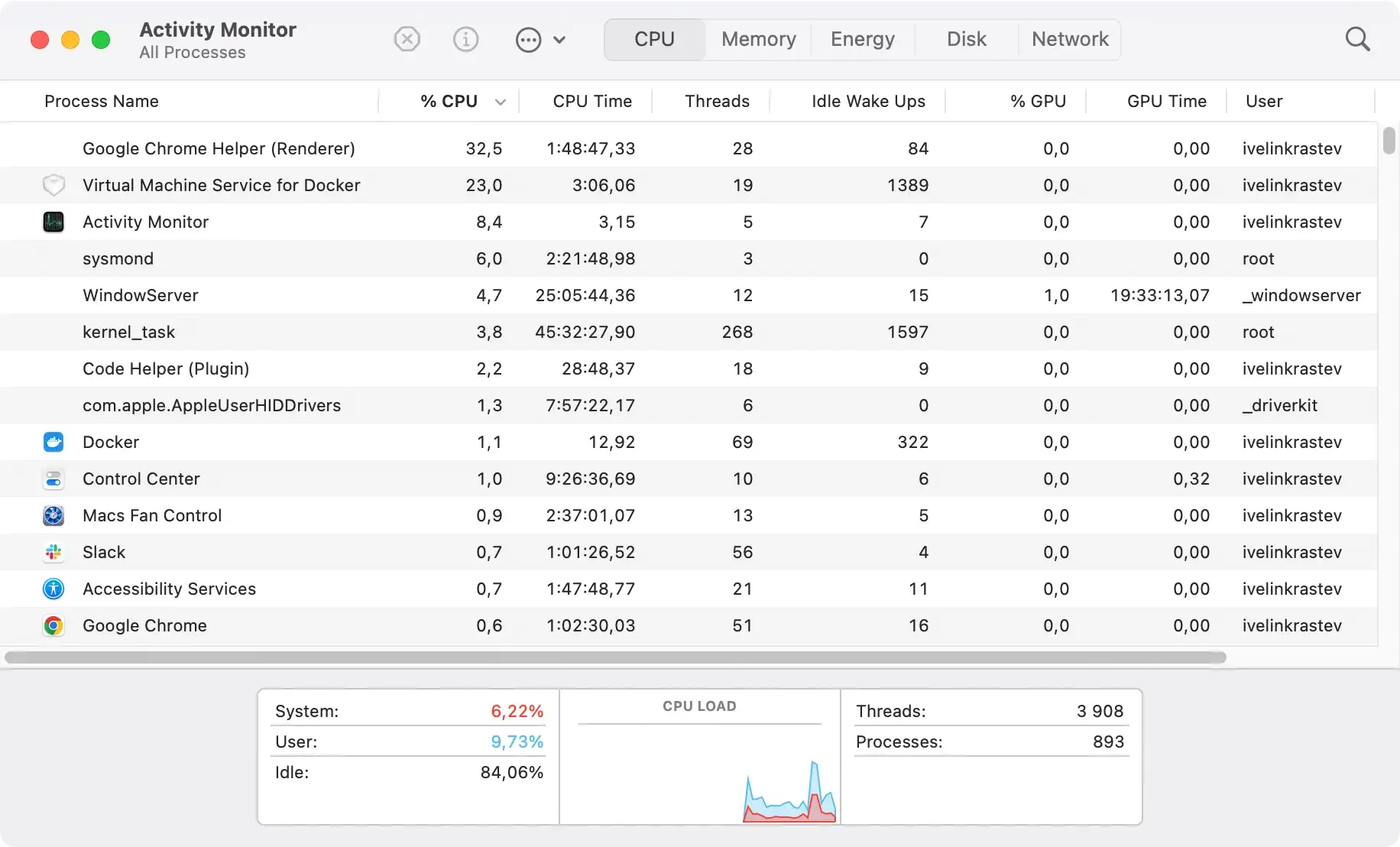
Remove ActivityConsole and related files from your Mac
To eliminate ActivityConsole from your Mac, navigate to the Applications folder. Here, diligently search for ActivityConsole or any other unfamiliar or suspicious applications.
If found, these applications should be moved to the Trash. This action is crucial to ensuring the adware and its components no longer affect your system.

Delve deeper: Targeting related files and folders
ActivityConsole’s reach extends beyond a single application. It often disperses related files throughout the system, aiding its persistence and spread.
Removing these associated files is vital to cleanse your Mac of ActivityConsole thoroughly.
Begin with the Finder application, methodically searching the following directories for any traces of the adware:
/Library/LaunchAgents//Library/Application Support//Library/LaunchDaemons/~/Library/LaunchAgents/~/Library/Application Support/~/Downloads/
Upon locating files linked to ActivityConsole, right-click and move them to the Trash, ensuring their permanent removal by emptying it afterward.
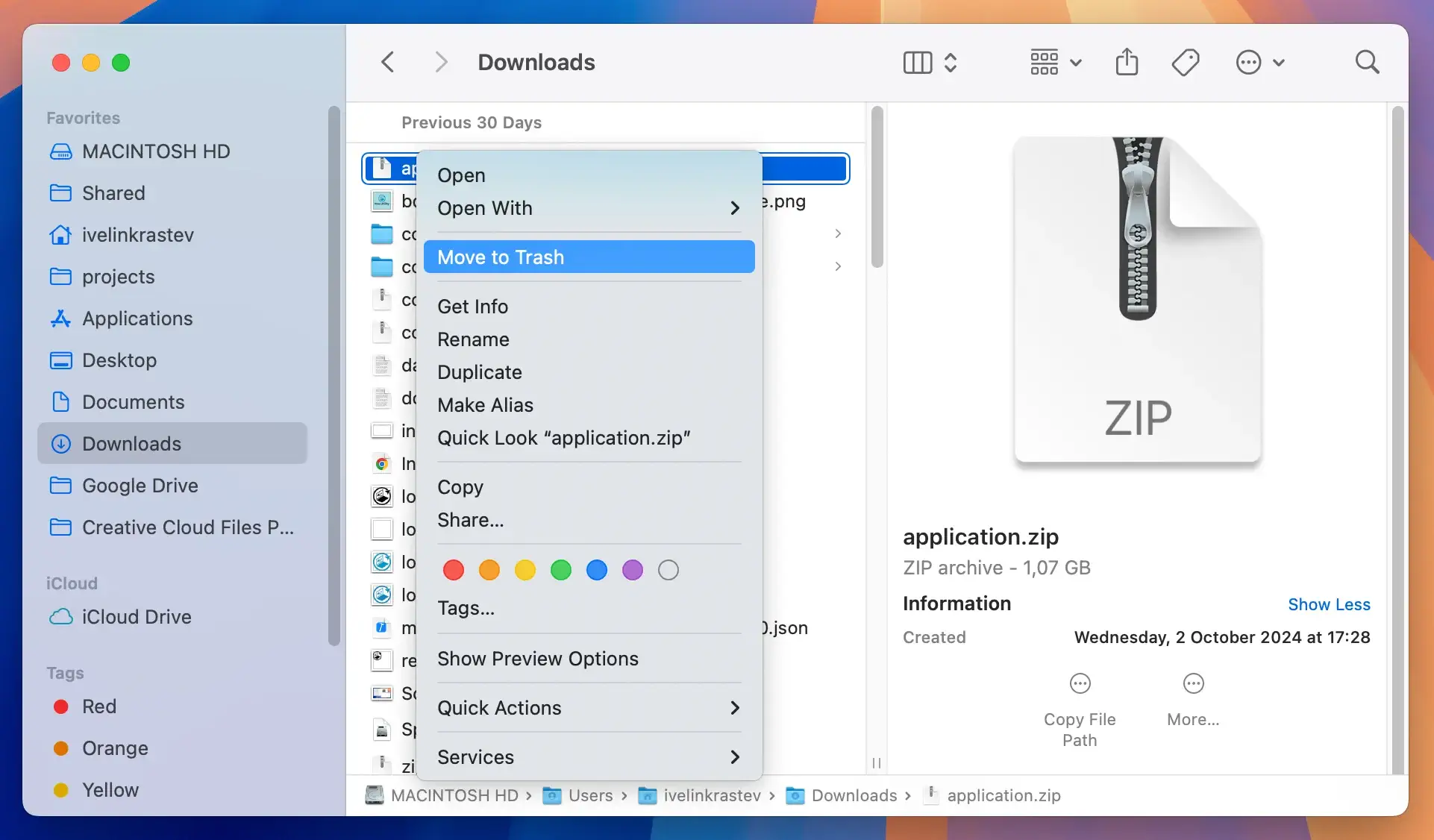
Simplifying removal with SpyHunter
For those seeking a streamlined and thorough removal process, SpyHunter offers a comprehensive solution. This advanced anti-malware program features an app uninstaller designed to detect and eradicate unwanted applications and residuals easily.
- Download SpyHunter for free here and complete the installation following the guidelines.
- Please navigate to the App Uninstaller tab to start a scan for applications, including ActivityConsole and its related components.
- Select the detected applications you wish to eliminate and click the remove button to conclude the cleanup process.
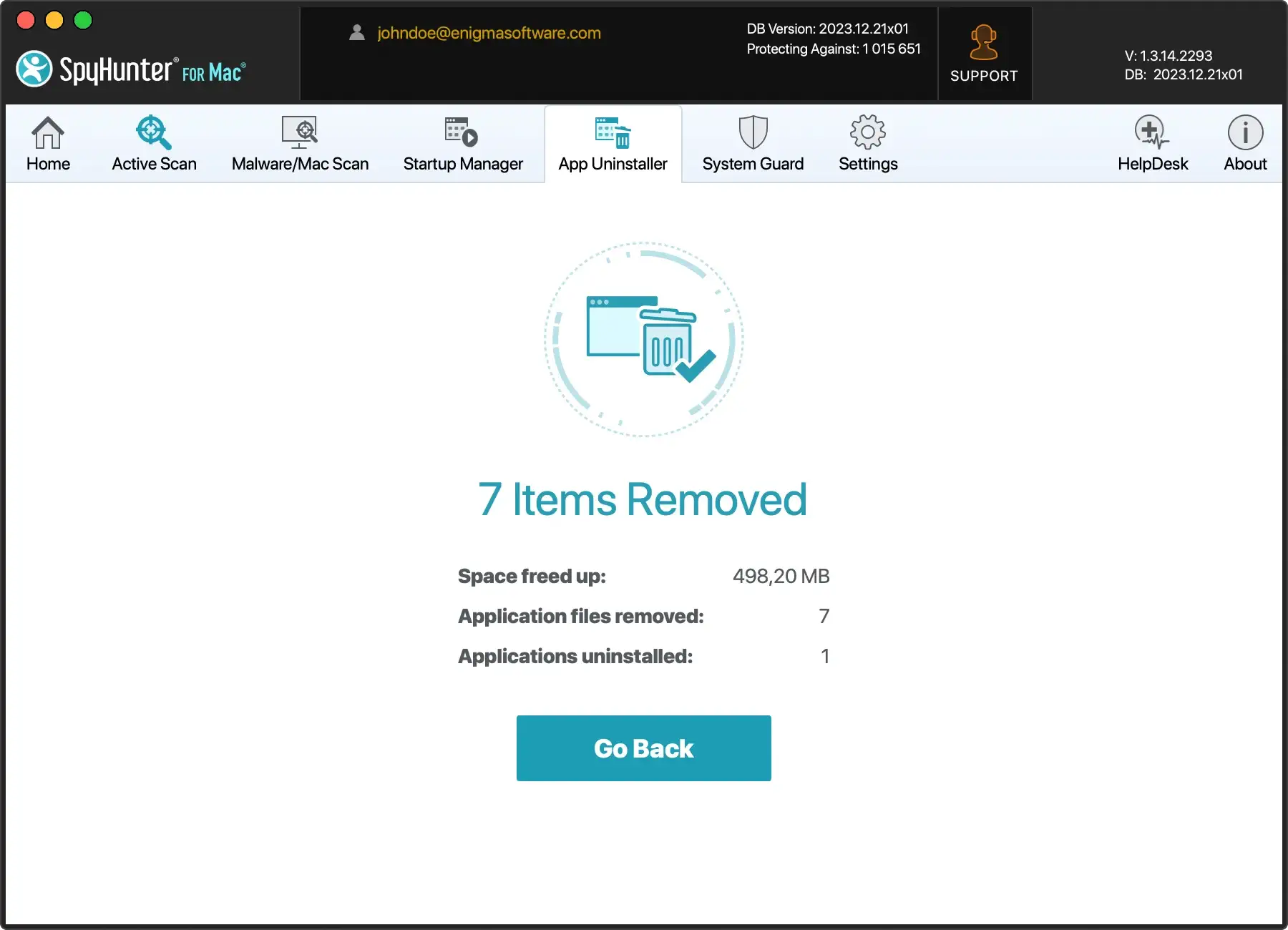
Following these steps, you can confidently remove ActivityConsole and its associated files from your Mac, reinstating the device’s performance and security.
Remove ActivityConsole from browsers
Аdware like ActivityConsole infiltrates popular web browsers, including Safari, Google Chrome, and Mozilla Firefox.
As a result, it’s crucial to execute specific removal steps for each browser to get rid of adware-related extensions comprehensively.
Following these processes will help restore the affected web browsers to normal functioning:
Safari
- Open Safari and click on Safari in the top menu.
- Choose
Preferencesand go to theExtensionstab - Locate the ActivityConsole extension and click
Uninstall - Navigate to the
Generaltab and set your preferred homepage - Check the
Searchtab to ensure your desired search engine is selected
Google Chrome
- Launch Chrome and click on the three-dot menu in the top-right corner
- Select
More toolsand thenExtensions - Locate the ActivityConsole extension and click
RemoveThis action will remove ActivityConsole - In the same menu, go to
Settings - Under
On startup, ensureOpen a specific page or set of pagesis selected, and set your choice page - In the
Search enginesection, choose your desired search engine
Mozilla Firefox
- Open Firefox and locate the
Add-onsmenu - Find the ActivityConsole extension and click
Remove - Navigate to
Optionsand go to theHometab - Set your preferred homepage and ensure the selected search engine aligns with your choice
After performing these steps, clearing browsing data is advisable to eliminate any remnants of ActivityConsole.
Restart your browsers to finalize the removal process.
Use SpyHunter to remove ActivityConsole automatically
If you still see the presence of ActivityConsole after the manual removal, applying an automatic removal tool like SpyHunter for Mac is advisable.
This application performs a scan and automatically eliminates the identified adware, reducing the hassle and the potential for overlooking any components.

- Download SpyHunter from here and follow the installation steps.
- Once installed, the app will start a scan to detect malware on your Mac.
- Follow SpyHunter’s recommendations to quarantine the selected threats, keeping your device safe.

By diligently following these steps, you can effectively remove ActivityConsole from your macOS system, safeguarding your device from potential risks associated with this adware.
Adware distribution methods and prevention measures
Understanding how adware, such as ActivityConsole, gets into systems can provide vital information about how to prevent its entry in the first place.
Several methods are used for its distribution, each requiring a different prevention strategy.
Software bundling and other distribution modes
Bundling is a common approach used to distribute adware. This involves packing ordinary program installers with unwanted or malicious additions.
The risk of inadvertently allowing such bundled content into the system increases when downloading software from unreliable channels, such as freeware or free file-hosting websites, Peer-to-Peer sharing networks, etc.
Moreover, adware might also get distributed via ‘official’ promotional web pages, often accessed through redirects caused by
- rogue advertising networks
- misspelled URLs
- spam browser notifications
- intrusive ads
- already installed adware with browser force-opening abilities.
Red flags during software installation
When installing software, sure signs should alert users to potential adware presences, such as terms that permit adware installation or the option for ‘Easy’ or ‘Quick’ installation.
Paying careful attention to installation procedures and thoroughly reading all terms and conditions can significantly reduce the risk of unintentionally installing adware.
Software research and mindful downloading
Analyzing prospective software before downloading and installing it onto your system is crucial.
While some advertising-supported software may appear harmless and offer many functionalities, these features are often misleading and non-operational.
Even if the software operates as promised, there must be more definitive proof of its legitimacy or safety. Therefore, it’s essential only to download software from trusted sources and to vet it beforehand.
Persistent problems related to adware
If you’re dealing with persistent adware-related issues, it’s advisable to seek professional help or use reputable malware removal tools.
Persistence often signifies that the adware has ingrained itself more profoundly in the system and might require more than basic removal tactics.
Protecting your system starts with vigilant browsing habits, cautious downloads, and a reliable security system.
