

macOS Sequoia Vs Sonoma: Upgrade Or Not? (Full Review)

Before we dive in
Before we dive in, let's make sure you stay safe online. We created SpyHunter because your security matters to us.
Protect your computer today — download SpyHunter right here! Check out our top tips below to keep your computer safe and secure.

Are you wondering whether to stick with macOS Sonoma or upgrade to the latest macOS Sequoia?
With each new version, Apple introduces impressive features and updates that can significantly enhance the Mac user experience.
However, it can be tricky to weigh the new features against compatibility and performance concerns, especially if you’re on an older device.
In this post, we’ll compare macOS Sequoia and macOS Sonoma feature by feature to help you make the best decision for your needs.
Read on to discover whether upgrading to macOS Sequoia is the right choice or if macOS Sonoma still has everything you need.
Key differences in macOS Sequoia vs macOS Sonoma
Here’s a comparison table for macOS Sequoia vs macOS Sonoma that will help for a better understanding and direct comparison of these two macOS versions:
| Feature | macOS Sonoma | macOS Sequoia |
|---|---|---|
| Release Date | June 2023 | Late September 2024 |
| System Requirements | Compatible with most models since 2017 | May require newer Macs, possibly reducing support for older models |
| User Interface | Updated look with new desktop wallpapers | Enhanced design, adding more customization options and more desktop widgets |
| Safari | Support for web apps, improved Reader, new video player | Advanced Reader, upgraded video player with added functions, potential AI integration |
| Notes | PDF improvements, integration with Pages | Audio transcription, equation-solving, customizable headers and highlights |
| Continuity | Handoff, Continuity Camera, AirDrop | Improved Handoff, expanded Continuity Camera features, iPhone mirroring |
| Privacy | Focus Modes, Mail Privacy Protection | Expanded privacy options, more refined controls |
| Performance | Optimized for M-series processors | Expected AI-powered performance improvements |
| Accessibility | Features like Live Text and Voice Control | Likely to include more accessibility with AI-driven support |
| Additional Features | Game Center, FaceTime upgrades | New Passwords app, Window tiling, potential for AI-driven features like predictive text and intelligent search |
This table captures the core distinctions and anticipated enhancements in macOS Sequoia, making it a likely step up in terms of functionality and personalization compared to macOS Sonoma.
New features in macOS Sequoia
Apple’s latest operating system releases—Sonoma and Sequoia—both include features to enhance productivity, privacy, and device compatibility across Mac devices, especially those with Apple silicon.
Here’s what each OS brings to the table and how Sequoia takes it further.
Apple Intelligence
One of the standout features distinguishing macOS Sequoia from Sonoma is Apple Intelligence.
Designed to bring advanced AI-powered enhancements across Apple devices, this innovation offers unprecedented personalization and contextual assistance.
Though initially only available in beta, Apple Intelligence promises transformative capabilities that are projected to evolve over time, especially for Apple silicon Macs.
With Apple Intelligence features:
- Users can summarize lengthy documents and receive contextual suggestions, making it easier to find relevant articles, images, and data points in real time.
- Siri is enhanced with natural language processing improvements, offering more precise assistance for tasks and productivity needs. With Private iCloud Compute, Siri’s AI responses are protected, ensuring privacy while maintaining functionality.
- Creative tools allow users to generate personalized images based on contacts or specific themes, adding a unique touch to shared photos and social media graphics.
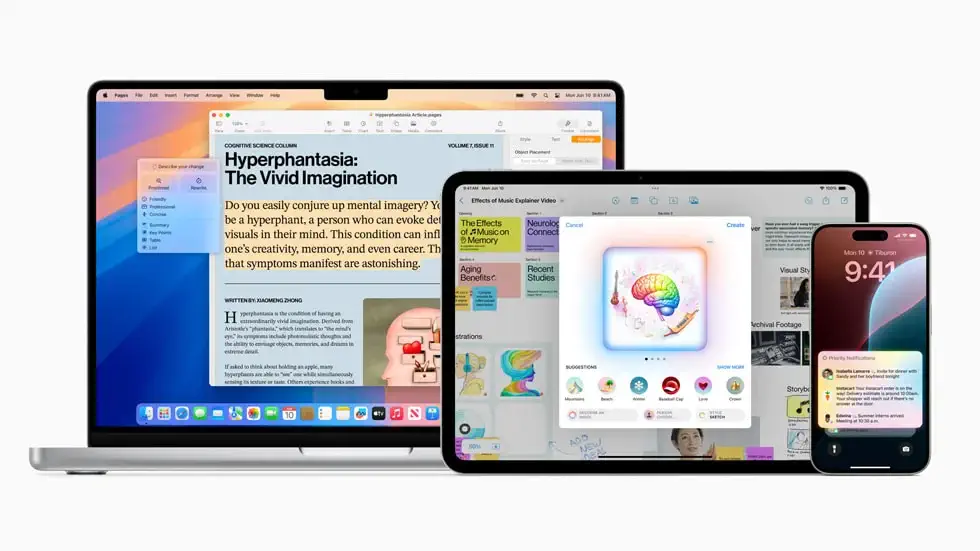
Apple Intelligence requires the latest hardware to perform optimally, which means it’s available only on M-series Mac computers:
- iMac (2021 and later)
- MacBook Pro, MacBook Air, and Mac Mini (late 2020 and later)
- Mac Pro (2023)
- Mac Studio (2022 and later)
iPhone Mirroring
With macOS Sequoia, iPhone Mirroring takes Continuity a step further, making interactions between your Mac and iPhone almost completely seamless.
Unlike previous versions, Sequoia allows you to mirror your iPhone’s entire screen on your Mac, so you can manage tasks without picking up your phone.
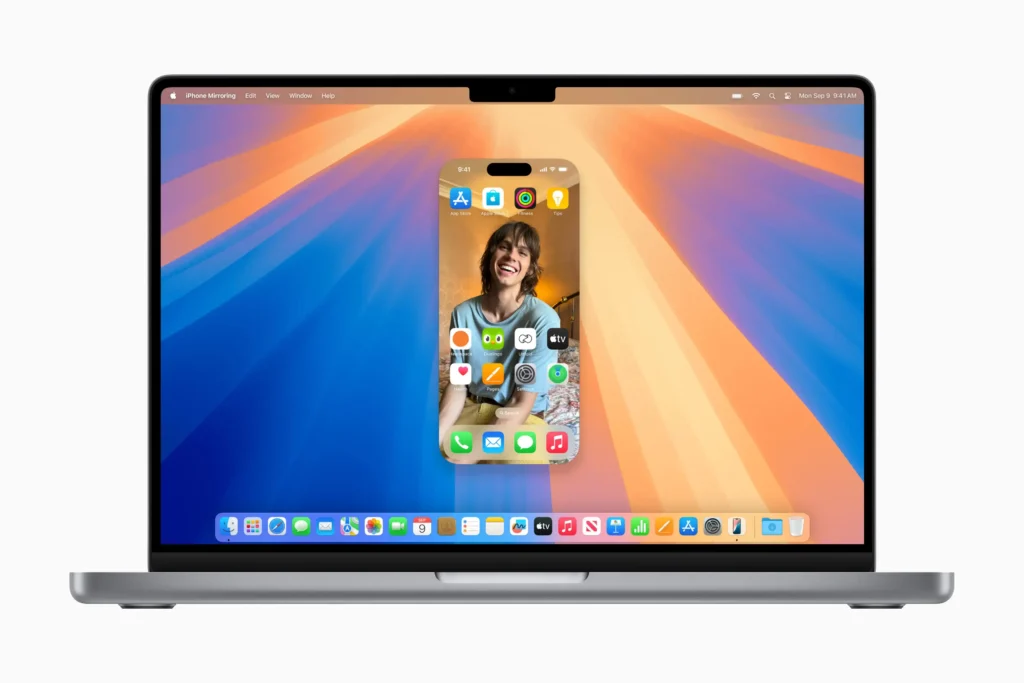
This feature goes beyond simply using the iPhone as a webcam or microphone; you can now fully control your iPhone using your Mac’s keyboard, mouse, or trackpad.
Key functionalities of iPhone Mirroring include:
- Access iPhone apps directly on your Mac screen, which is ideal for quickly checking messages or social media without switching devices.
- View and manage iPhone notifications on your Mac, keeping alerts in one place and minimizing device-switching.
- Effortlessly transfer files between your iPhone and Mac with drag-and-drop functionality (expected in future updates), designed for smoother productivity across devices.
This advanced integration is supported on Macs with M1 or later chips (or Intel Macs with the T2 chip), bringing true multi-device functionality to Apple users.
Passwords app
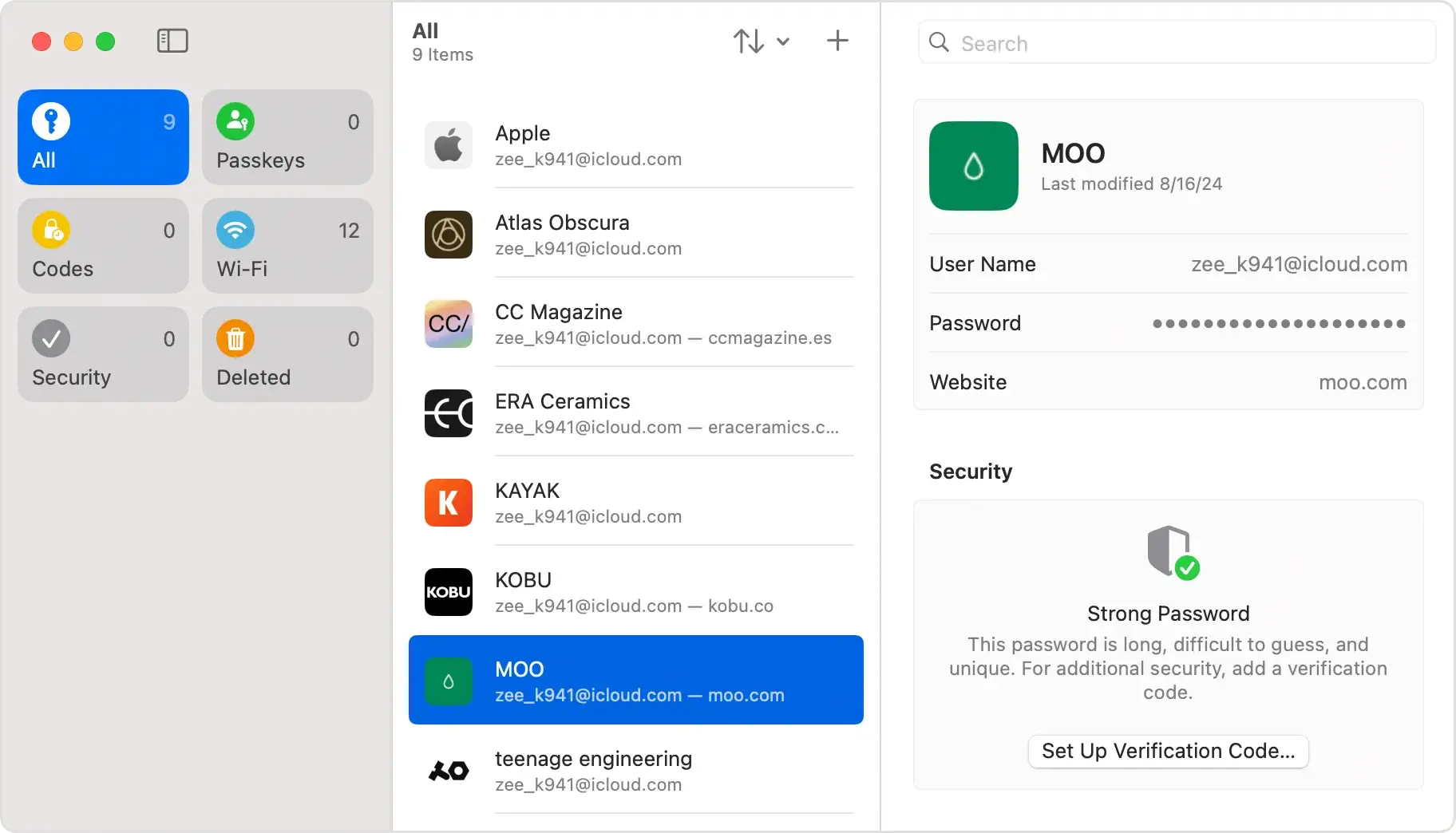
With macOS Sequoia, Apple introduces a dedicated Passwords app that significantly enhances password management by centralizing all your credentials in one easy-to-access place.
Unlike previous macOS versions, where passwords were stored and managed through Safari or System Settings, the new Passwords app offers a single interface on your Mac for managing not only website logins but also passkeys, Wi-Fi passwords, and authentication codes.
Key features of the app include:
- Strong password suggestions and alerts for potentially compromised passwords, helping you maintain secure and unique credentials.
- Support for passkeys is an advanced security feature Apple aims to replace passwords altogether, making logins safer and easier across devices.
- Seamless synchronization with iCloud, so all your login details are securely available on your Apple devices, keeping your information up to date wherever you are.
While the new app does not yet support auto-fill for data like credit card numbers, its streamlined, highly integrated design simplifies managing your credentials across Apple devices.
Window tiling and customization
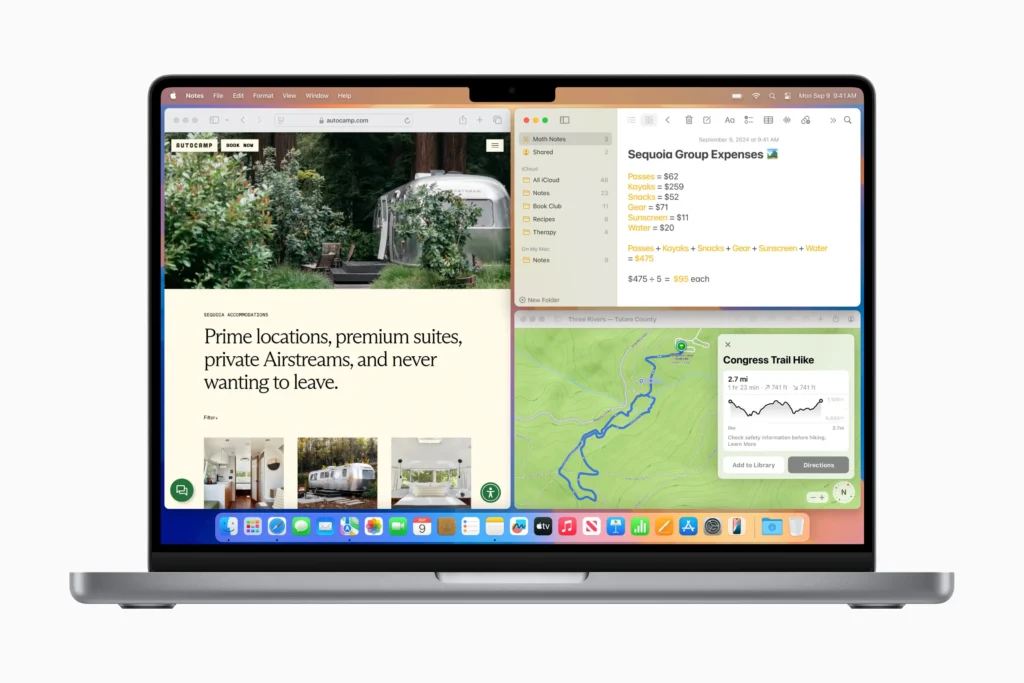
In macOS Sequoia, Apple elevates desktop organization with the new Window Tiling feature, solving a longstanding challenge for users managing multiple windows.
Gone are the days of manually resizing and juggling apps across your screen. With Sequoia, you can effortlessly arrange windows by simply dragging them to the screen edges or corners, which automatically resizes and positions them in tiles.
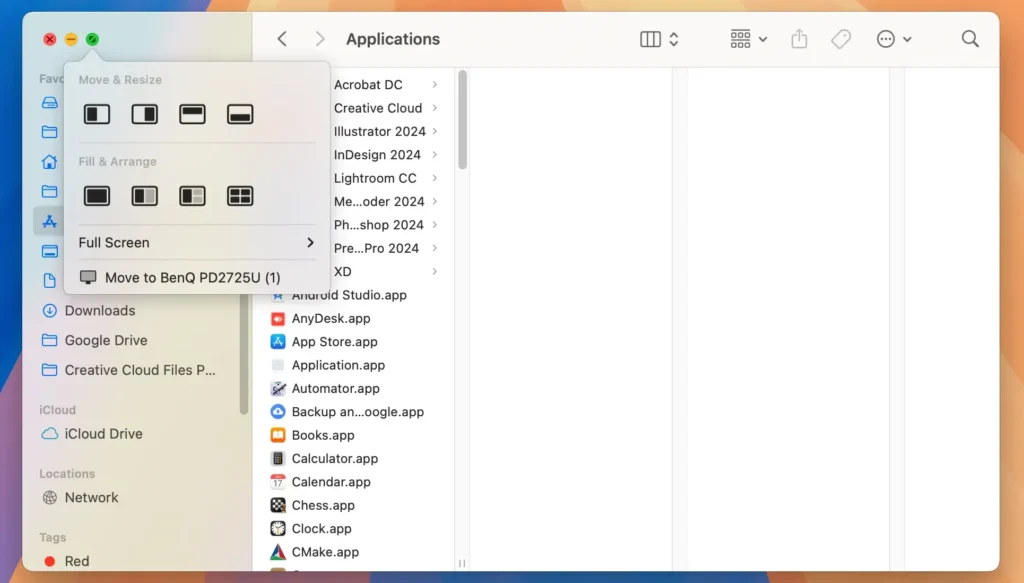
Key highlights of Window Tiling in macOS Sequoia:
- Flexible Layouts: Windows can be snapped into halves, quarters, or grid-like formations with ease, creating an organized workspace without the hassle of third-party tools.
- Enhanced Multitasking: Perfect for users who need multiple applications open at once, as tiling makes it easy to view and interact with several apps side-by-side.
- Keyboard Shortcuts: For those who prefer quick actions, Sequoia also supports keyboard shortcuts to instantly set up your preferred window layout, giving you a streamlined, hands-free setup.
Safari
Safari in macOS Sequoia offers significant improvements for browsing and productivity.
Building on the web app functionality in macOS Sonoma, which allowed saving any webpage directly to the Dock, Sequoia refines the experience further.
Notable upgrades include:
- Enhanced Reader View: Now, with summaries and a table of contents, it is easier to navigate long articles.
- Video Viewer: A new component that automatically centers when playing videos, offering better control over media.
- Information Button: A small button next to the URL provides instant details, like Maps directions or reviews, when browsing locations.
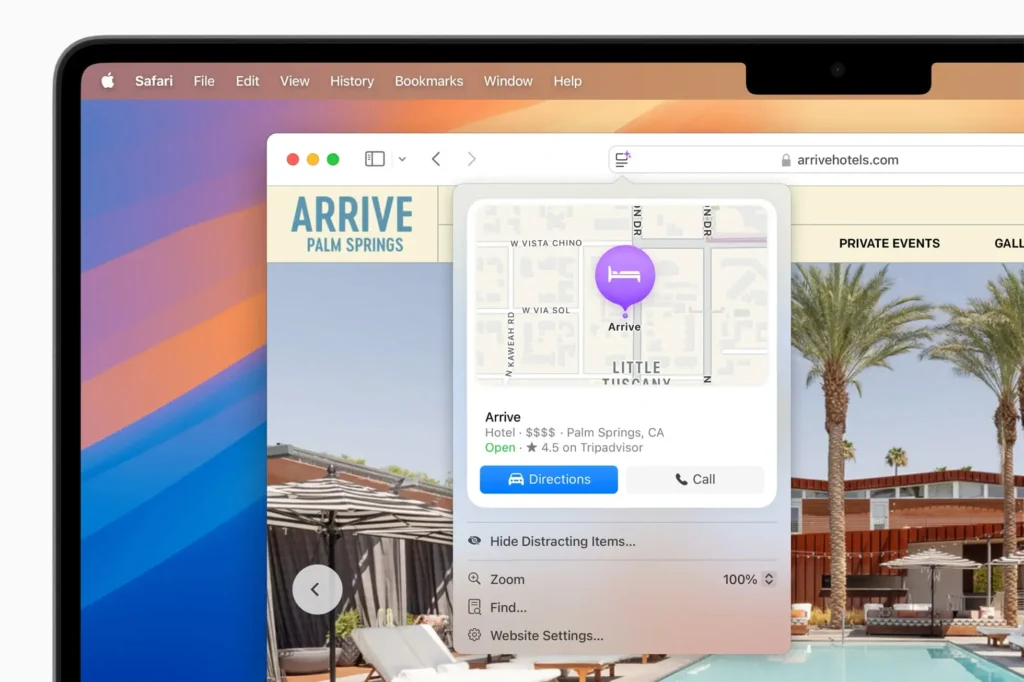
These updates, also available for some previous macOS versions, make Safari more user-friendly and effective for various browsing needs.
Enhanced Notes and productivity tools
macOS Sequoia introduces a major update in the Notes app, with advanced productivity tools designed for academic and professional use.
Building on Sonoma’s PDF improvements and Pages integration, Sequoia adds powerful new capabilities:
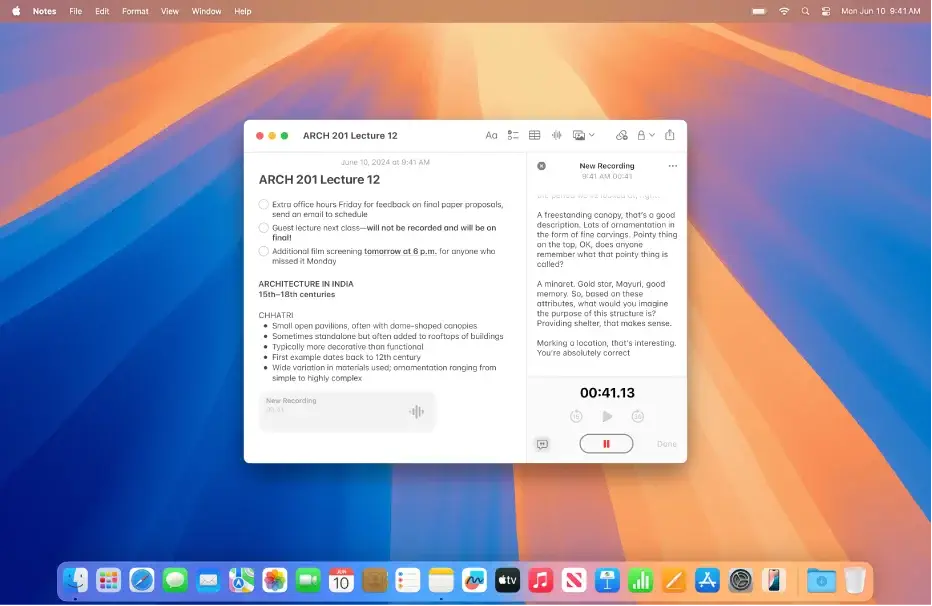
- Transcription: Users can record audio, such as a lecture, directly in Notes and instantly transcribe it into text. This transcription can then be merged with other note content, like checklists or attached documents.
- Math Notes: A dedicated functionality for entering complex equations, creating interactive graphs, and visualizing concepts within Notes, making it ideal for students and professionals working with mathematical data.
- Enhanced PDF Handling: Users can store multiple PDFs within a note, navigate them page by page, and even fill out forms with suggested data from Contacts for quick and accurate completion.
- Collapsible Headers and Custom Highlights: Organize notes with collapsible headers for better structure and use customizable highlights to emphasize key details, creating a tailored and easy-to-navigate note layout.
Video conferencing and Presenter Preview
Video conferencing in macOS Sequoia brings a fresh level of interactivity and polish to virtual meetings, building on the video call features introduced in Sonoma.
With Sequoia, Presenter Preview lets you see exactly what you’re about to share, ensuring smooth transitions. Whether you’re sharing slides or a document, you can keep tabs on your presentation flow.
For customization, you can adjust your background to feature an Apple design or one of your photos.
For M1 or later Macs, Presenter Overlay offers two modes—large and small. The large mode centers you on the display with your slides behind, while the small mode makes you a floating head that can be repositioned for clarity.
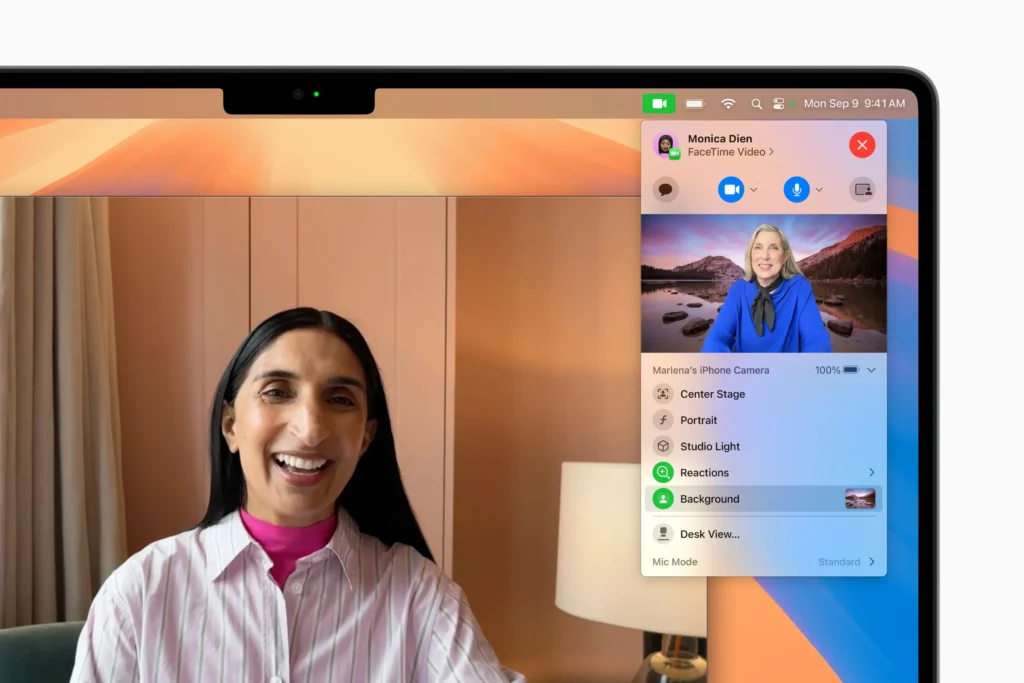
Participants can even react in real-time with hand gestures that trigger animations like confetti or thumbs-ups, adding a layer of engagement to every presentation.
Gaming Mode and new video player
Gaming Mode in macOS Sequoia brings gaming on Mac to new heights, especially for Apple Silicon users.
The Immersive Gaming Mode leverages M-series chips, enhancing visuals, frame rates, and audio to make games more engaging and lifelike.
With support for ray tracing and haptic feedback, macOS Sequoia optimizes resource-heavy games for smooth responsiveness while keeping battery consumption in check.
New AAA titles, such as Assassin’s Creed Shadows, Control, and Prince of Persia: The Lost Crown, will soon be available in the Mac App Store, showcasing the platform’s growing appeal for serious gamers.
System performance and battery life
This latest version of macOS focuses on optimizing resource usage across Apple silicon, enhancing both speed and efficiency, especially for Macs with M1 or later chips.
By refining background processes and integrating smarter power management, Sequoia delivers better battery life for MacBook Air and MacBook Pro customers.
These improvements are especially noticeable when multitasking or running resource-heavy applications.
Mac users will experience reduced battery drain and faster response times, even with multiple apps and background tasks active.
For most Macs, this translates to longer usage and lower energy consumption, making Sequoia an ideal upgrade for maximizing performance and battery efficiency.
macOS Sequoia vs Sonoma – Should you upgrade?
Upgrading to macOS Sequoia brings a range of benefits, but it’s important to weigh these against potential drawbacks, especially for those with older Macs.
Here’s a look at the pros and cons to help you decide:
Pros
- Optimized for M-Series Chips: Sequoia runs efficiently on newer hardware, like M1, M2, and M3 Macs, resulting in faster app launches and better battery duration.
- Enhanced Multitasking: Sequoia’s Window Tiling allows for seamless organization of multiple apps, making it an excellent choice for productivity.
- New Capabilities: Apple Intelligence features and iPhone Mirroring bring powerful AI-driven personalization and Continuity, creating a more unified experience across Apple devices.
- Improved Security: The new Passwords application centralizes and secures your credentials, while advanced security features ensure greater privacy and protection for your data.
- Future-Proofing: Upgrading ensures you’re receiving the latest features, performance improvements, and security patches, keeping your Mac up-to-date and secure.
Cons
- Compatibility Limitations: Sequoia is optimized for newer models, and many of its standout features require M1 or later chips, so Intel-powered and older Macs cannot fully benefit from it.
- Higher Resource Requirements: Sequoia may demand more storage space and RAM, which could impact responsiveness on older machines.
- Peripheral and App Compatibility: Some older applications or peripherals may not work as expected or might need updates to function smoothly on Sequoia.
If you have a newer Mac with Apple silicon, upgrading to macOS Sequoia can significantly enhance your Mac’s capabilities and future-proof it with all the new features.
However, if you’re on an older model or prefer simplicity, staying with macOS Sonoma might be the right choice for now.
macOS Sequoia vs. Sonoma FAQs
Explore the answers to common questions about macOS Sequoia vs Sonoma to help you determine if an upgrade is the right move.
How can I check if my Mac is compatible with macOS Sequoia?
To confirm compatibility, go to the Apple menu, select About This Mac, and note your model and year.
Compare this information with Apple’s official system requirements for macOS Sequoia to ensure your device can run the latest operating system.
Is macOS Sequoia better than macOS Sonoma?
macOS Sequoia builds on Sonoma with enhanced AI-driven features, advanced productivity tools, and improved performance.
While Sequoia is designed to leverage newer Mac hardware, choosing between the two depends on your device compatibility and specific productivity needs.
Will updating to macOS Sequoia slow down my Mac?
Sequoia is optimized for speed and efficiency, but it may demand more resources than Sonoma, particularly on older Macs. Ensuring your device has sufficient RAM and storage space will be essential for a smooth experience.
