

Are App Store Apps Safe? [Myths & Facts Included]

Before we dive in
Before we dive in, let's make sure you stay safe online. We created SpyHunter because your security matters to us.
Protect your computer today — download SpyHunter right here! Check out our top tips below to keep your computer safe and secure.

Exploring the safety of applications from the Mac App Store is a concern for many users. This article aims to clarify misconceptions and present the facts about app security.
With Apple’s strict review standards and the changing landscape of digital protection, it’s essential to understand both the safeguards provided and the responsibilities of users.
Delve into the security behind the Mac App Store to confidently navigate and utilize its offerings on your Mac.
Understanding the Mac App Store’s safety measures
The Apple App Store represents a cornerstone of app safety and integrity on iOS, iPadOS, and macOS platforms.

Given the vast array of apps available—numbering in the hundreds of thousands—it’s crucial for users and developers alike to understand the depth and breadth of security measures Apple employs.
These measures protect against known threats and unauthorized access and ensure the stability and performance of apps and the safeguarding of user data.
How Apple verifies applications before approval
Apple’s approach to maintaining the App Store’s defense is multifaceted, involving rigorous manual review processes, application sandboxing, and other protective measures. It doesn’t matter whether the review process concerns iOS apps or Mac ones.
Every app submitted to the Apple Store undergoes scrutiny by Apple’s team, from popular games to niche utilities. This manual review ensures that apps follow Apple’s stringent cyber defense standards and are malware-free.
Apple’s review team examines apps for adherence to privacy and security guidelines, functionality, and quality before approval. Apple’s review documentation tells us that around 90% of submissions are reviewed in less than 24 hours.
When apps use new hacking techniques or exploit vulnerabilities, Apple mitigates such issues.
The role of sandbox environments
Sandboxing is a crucial protective feature that Apple implements across its platforms. It acts as a safeguard by isolating apps from each other and the system.
All iPhone, iPad, and iPod touch apps are sandboxed, meaning they operate in a restricted environment with limited access to the system and other apps’ data.
This insulation prevents malicious apps from compromising user data and system integrity and enforces privacy by design. With macOS, the sandboxing concept extends further, providing robust security while accommodating apps downloaded from the internet.
By enforcing such environments, Apple ensures that even if an app were compromised, the potential damage would be confined to its sandbox, vastly limiting the impact on the entire system.
Regular security updates and patch management
Maintaining the integrity of apps doesn’t stop at the download point. Apple monitors for new threats and vulnerabilities, releasing regular updates and patches to its operating systems.
These updates often contain fixes for newly discovered vulnerabilities, enhancements to protection features, and improvements to existing systems like XProtect and Gatekeeper on Mac.
Through systematic patch management, Apple addresses security issues that could affect apps, providing another layer of protection against cyber threats.
Apple users and developers are encouraged to update their software to ensure they enjoy the latest improvements.
Common myths about viruses in the App Store
The App Store is surrounded by various myths about its susceptibility to malicious threats. Given the popularity of Apple devices and the store, it’s no surprise that misconceptions thrive, especially about the safety of apps for iOS.
These myths often arise from misunderstanding how Apple’s ecosystem works, the nature of iOS malware, and the risks involved.
Here, we aim to dispel some of these common myths by exploring the reality of App Store protection.
Can apps for iOS carry viruses?
One prevalent myth is the belief that iPhone apps can easily carry viruses, like software found on other platforms.
Yet, the architecture of iOS, along with the stringent review process employed by the App Store, makes the presence of viruses in apps rare.
Apple’s prone operating system operates in a sandbox environment that restricts app access to the system and other apps’ data, limiting the potential for harmful software to spread.
While an app can contain a virus, Apple’s defense mechanisms and review processes minimize this risk, making it uncommon.
Debunking the myth about the impossible malware
Another common myth is that the App Store could harbor ‘impossible malware.’ These are viruses or other malicious software that bypass every security measure in place.
The reality is that while no system can be 100% secure, the combination of Apple’s manual app review, sandboxing techniques, regular software updates, and patch management creates a formidable barrier against malware.
Cases where threats have been discovered on the App Store are notable precisely because they are exceptional. These instances typically involve sophisticated tactics that are quickly addressed once identified.
As such, while users should remain vigilant and follow best practices for safety, fears of widespread ‘impossible malware’ on the App Store are significant.
Confirmed cases of malware in the App Store platform
Despite Apple’s solid defensive mechanisms, there have been instances where malware sneaked into the App Store.
For instance, a group in China created seven fake apps, including PDF readers and video players. These apps hid their harmful purposes in encrypted databases, revealing their true colors only after Apple approved them.

Another app, pretending to be a speedometer, stole and sent away user information.
These incidents are concerning because they show that even with strict checks, some malicious apps can get through and become famous, sometimes even topping the App Store download charts.
Apple’s response to past breaches
Apple’s response to identified security breaches has been swift and decisive, aiming to mitigate potential user harm.
Upon discovering malicious apps, Apple has taken immediate action to remove them from the App Store. However, these apps may remain on devices that have already been downloaded until users delete them.
In addition to removing offending apps, Apple reviews its app vetting processes to prevent similar incidents in the future.
This includes enhancing detection measures for sophisticated malware techniques and updating developers’ security guidelines.
Nevertheless, these incidents highlight the ongoing arms race between cybercriminals and digital platforms, with new threats continuously emerging and safety measures evolving in response.
Practices to ensure your device is safe
Even with Apple’s comprehensive safety protocols, users play a critical role in maintaining their device’s safety.
By incorporating a few simple practices into your download routines, you can significantly reduce the risks of human error when installing a new app.
Maximize the security on your Mac
Ensuring your Mac remains safe involves more than just cautious downloading; it requires comprehensive protection.
SpyHunter offers a robust solution to identify and eliminate malicious software that can bypass conventional security measures.
With its advanced scanning technology, SpyHunter detects a wide range of malware, from adware to more insidious forms, ensuring your device’s integrity.
Why choose SpyHunter?
- Thorough protection: SpyHunter scans deep into your system, uncovering hidden threats.
- Real-time safeguards: Its active monitoring system prevents new infections before they take root.
- User-friendly: Designed for ease of use, it’s suitable for tech-savvy users and those less familiar with cyber defense.
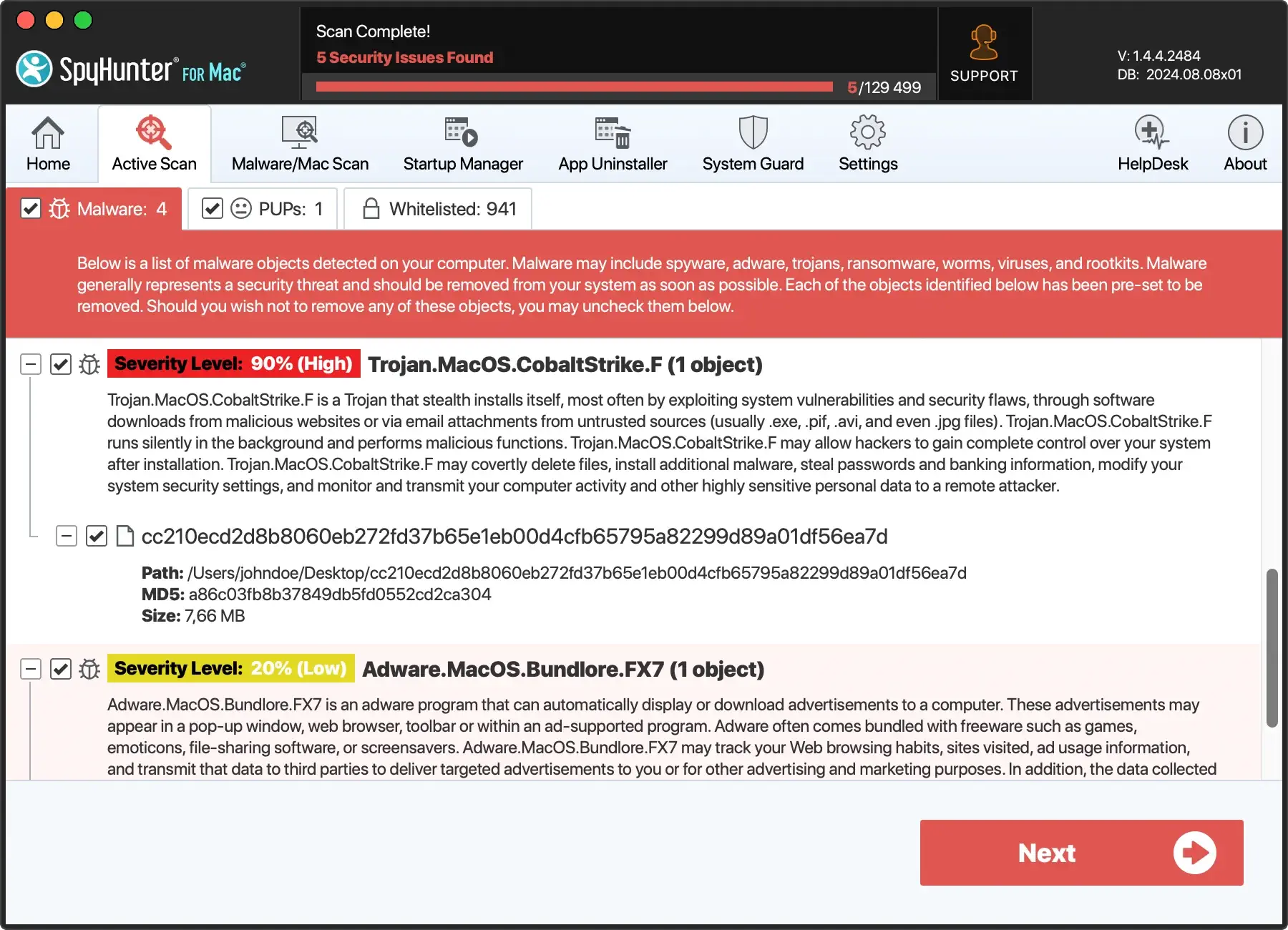
- Download SpyHunter for free here and follow the prompts to set up SpyHunter on your device.
- Run a scan to detect threats and use SpyHunter’s features to secure your device.

By incorporating SpyHunter into your protection strategy, you enhance your device’s defense against the ever-evolving landscape of digital threats, keeping your personal information and digital life safe.
Verify developer credentials and reviews
One of the first steps in evaluating an app’s safety is to examine the developer’s credentials and the reviews the app has received.
Look for established developers with a history of creating well-known apps. Checking the developer’s website, privacy policies, and social media presence can provide insights into their legitimacy and the quality of their products.
Furthermore, read through app reviews and ratings on the App Store. While some high-quality apps may have mixed reviews, consistent negative feedback or mentions of suspicious behavior should raise red flags.
Be cautious of fake reviews, which may be overly optimistic and lack detail.
Read app descriptions & permissions carefully
An app’s description and the permissions it requests can reveal much about its functionality and how it may impact your device’s security. The description should clearly outline the app’s features and how it operates.
Vague or poorly written descriptions could indicate a lack of professionalism or an attempt to obscure malicious functionalities. Similarly, an app’s requested permissions should align with its stated purpose.
For example, a simple calculator app should not require access to your contacts or location. Taking the time to read and understand these aspects of an app can help you avoid inadvertently compromising your device.
Update your Apple devices regularly for optimal cyber defense
Updating your Apple device with the latest software is critical to device protection. Apple periodically releases updates that introduce new features and patch known vulnerabilities.
These updates protect your device from emerging threats and ensure protective actions remain effective against sophisticated exploits.
To check for updates:
- Go to the Settings app
- Select General
- Tap on Software Update
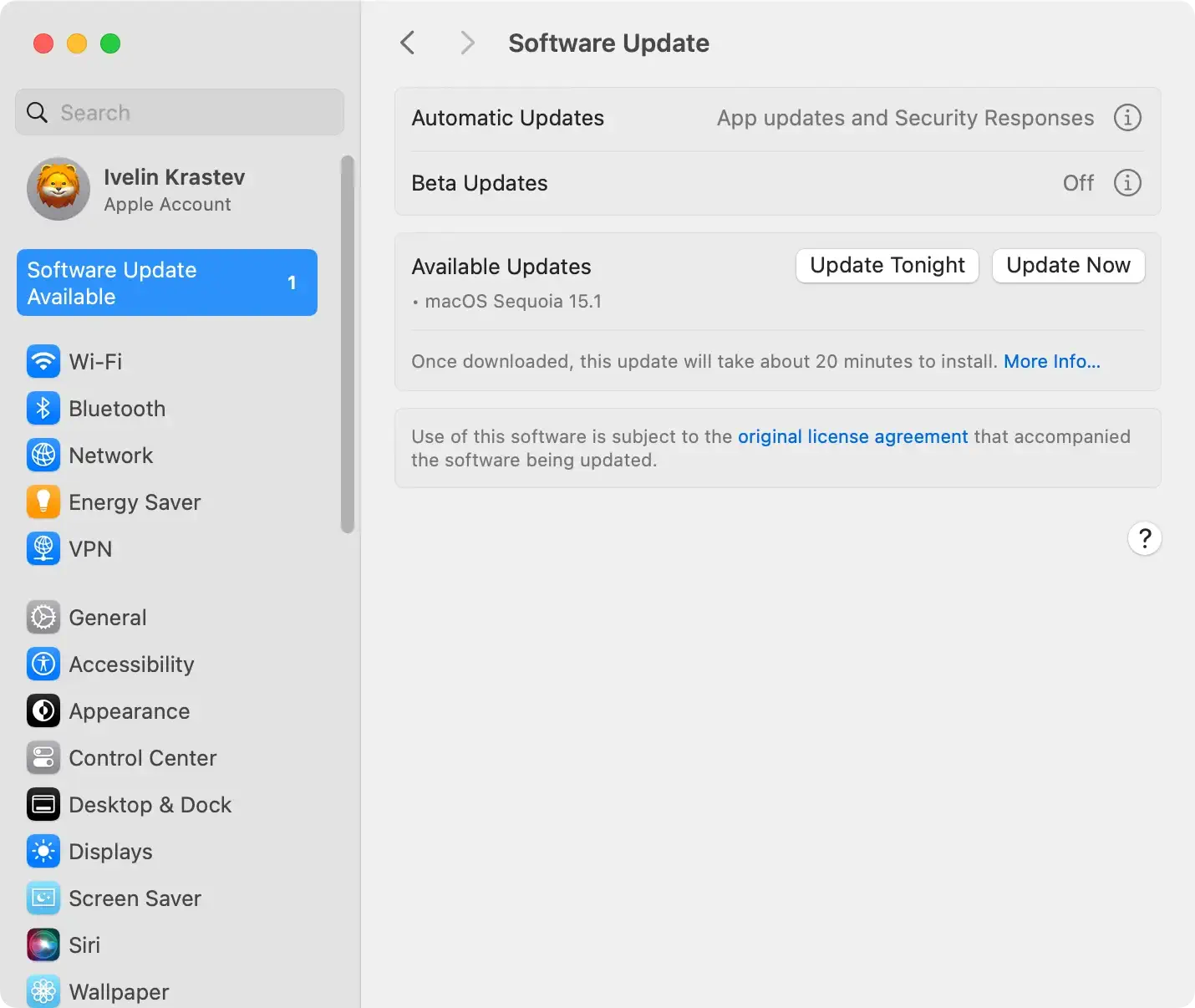
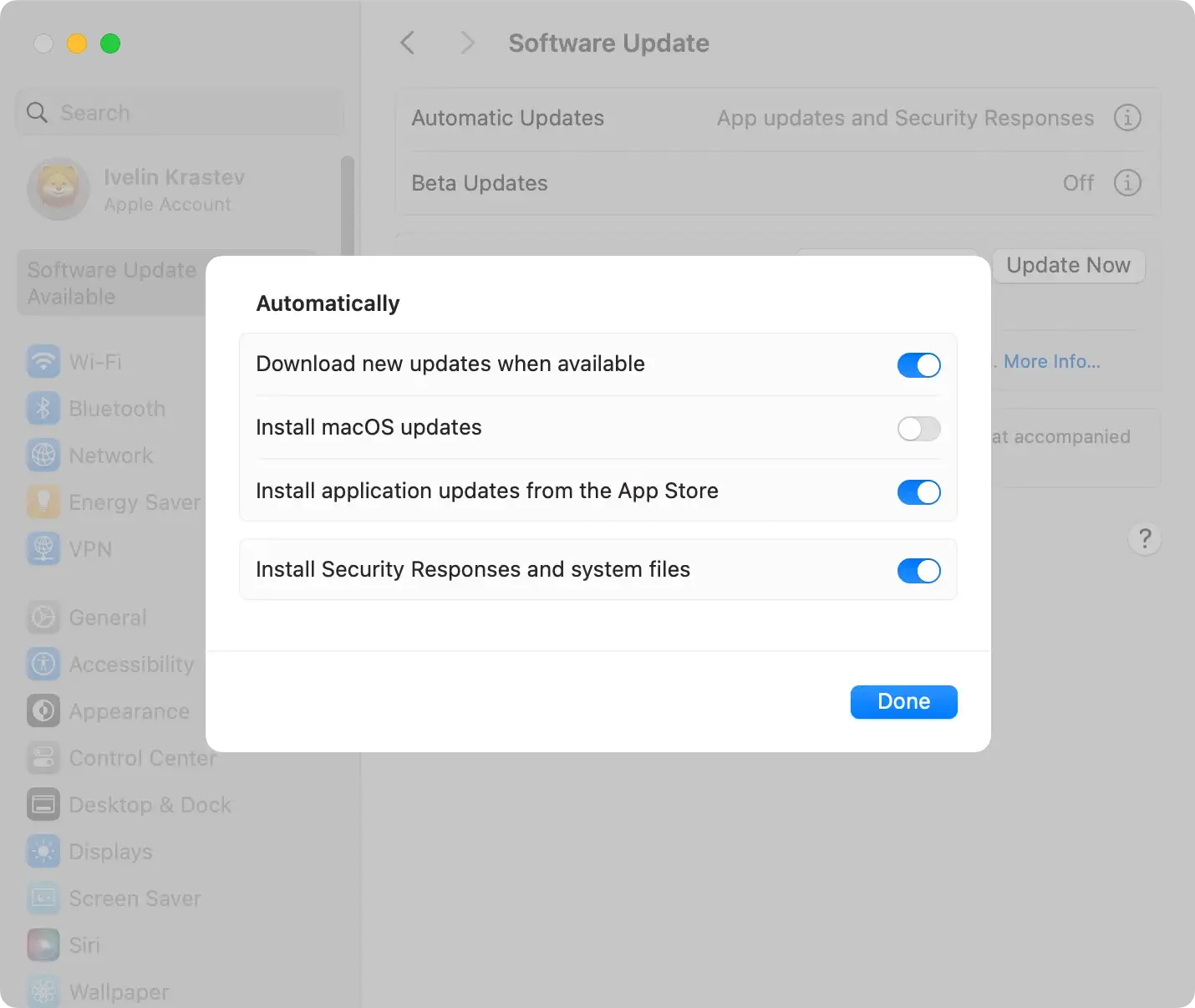
Enabling automatic updates can also ensure that your device always benefits from the latest protections without requiring manual oversight.
How to react if you suspect an app is malicious
When you download an app from the Apple App Store or another source and later suspect it may be malicious, protecting your device and personal information is crucial.
Recognizing and reacting to the signs of a potentially harmful app can mitigate the risk and impact of malware or other cyber threats.
Immediate actions for malicious apps
Discovering a malicious app on your device requires swift action to minimize risks. Here’s a concise guide on what to do:
- Remove the app:
- iOS: Press and hold the app icon until it jiggles, then tap the ‘X’ to delete it.
- macOS: Drag the app to the Trash and empty it to eliminate the app permanently.
- Change your passwords: Immediately change these passwords to protect your accounts. Especially if the app can access sensitive information (like email or banking details).
- Run an antivirus scan: Use good antivirus software to look for any harmful files or dangers on your computer. SpyHunter for Mac is a great choice because it can scan your computer and remove harmful apps.
- Update your Mac: Ensure your macOS and all installed apps are up-to-date. This helps close any vulnerability gaps that the malicious app might have exploited.
By following these steps, especially utilizing SpyHunter for Mac for a thorough cleanup, you can effectively address the threat posed by a suspicious app and safeguard your digital environment.
Report unsafe apps to Apple
If you encounter an app that you suspect is malicious or unsafe, reporting it to Apple is helpful and a responsibility to the broader community.
Apple provides specific channels for users to report problematic apps, allowing their security team to investigate and take necessary action.
You can report a concern via the Apple Store by selecting the app in question, scrolling down to “Ratings & Reviews,” and tapping “App Support” to find contact information or a reporting feature.
Alternatively, you can directly visit the Report a Problem website. You can even email Apple’s App Review team at appreview@apple.com with details about the app.
Conclusion
Understanding app store safety is vital. Apple goes to great lengths to keep its environment secure for everyone, setting up strict guidelines for app reviews and using sandboxing to lower the risks. Despite these efforts, the rare appearance of malicious or unsafe apps reminds us to stay alert.
To protect your digital life, it’s wise to install apps only from official stores, like the App Store or Google Play Store. Checking an app’s privacy policy, scrutinizing its version history, and verifying the developer’s credibility are intelligent moves.
If you ever doubt an app’s safety, remove it and inform Apple to help keep the App Store safe for others. Remember that you can also search for an alternative app with similar functionality.
It’s not just about avoiding new or unknown apps but engaging smartly and cautiously with all digital content. By following best practices and staying informed, users can enjoy the vast offerings of the Apple Store and other official app stores without compromising their defense.
This balanced approach to digital exploration ensures that the Mac Store remains a trusted platform for innovation and connection, supported by the collective vigilance of Apple, developers, and users.
