

Remove RecordMapperfld: Protect Your Mac Now

Before we dive in
Before we dive in, let's make sure you stay safe online. We created SpyHunter because your security matters to us.
Protect your computer today — download SpyHunter right here! Check out our top tips below to keep your computer safe and secure.

RecordMapperfld is a persistent adware that poses a significant threat to the optimal functioning of your Mac. Understanding its nature and impact and implementing effective removal strategies are crucial to maintaining a secure Mac.
In this article, we delve into the details of RecordMapperfld, its actions, and steps to eradicate it from your system.
Introduction to RecordMapperfld
RecordMapperfld is a non-malicious program specifically designed for Mac machines. Although this software is not inherently dangerous to your Mac, it can interrupt your web browsing experience in various ways.
These interruptions may occur on some of the most commonly used web browsers, including Safari, Chrome, and Firefox.
Users installing this program on their systems may deal with unexpected and potentially troubling changes to their regular web browsing routine.
Characteristics of RecordMapperfld
Understanding the characteristics of RecordMapperfld helps shed light on the invasive and unwanted manners it exhibits.
Despite being non-malicious, this software disrupts web browsing experiences and strains system resources, often leading to undesired consequences.
RecordMapperfld as a browser hijacker
Given its effects and characteristics, security professionals categorize RecordMapperfld as a browser hijacker.
Such programs do not harm the hardware or other software in the system. This distinguishes them from dangerous threats like Ransomware and Trojans.
Yet, RecordMapperfld can hamper the user’s web surfing experience, making it an undesirable program for most Mac users.
Thus, most people go ahead and uninstall RecordMapperfld without any regrets despite it not being harmful to their systems.
Altering browser settings without permission
RecordMapperfld can modify your web browser settings without obtaining explicit consent. This includes changes to your homepage, default search engine, and new tab page settings.
Reverting these alterations to their original state can take time, causing frustration and impacting your web browsing experience.
Additionally, these unauthorized adjustments disrupt your online activities and raise concerns about the invasion of personal privacy.
Distraction from typical web browsing
RecordMapperfld introduces significant disruptions by displaying unwanted ads, pop-ups, and banners during internet browsing.
These intrusive elements hinder smooth web navigation and provoke annoyance and frustration. Clicking on some of these ads may lead to harmful content or trick users into downloading additional malicious software.
The risk of unintentionally visiting potentially dangerous sites is a significant concern when dealing with RecordMapperfld.
Utilization of system resources
Operating discreetly in the background, RecordMapperfld consumes valuable system resources, resulting in a noticeable slowdown in your computer’s performance.
Symptoms include sluggishness, unresponsiveness, and occasional crashes, significantly impacting productivity and overall enjoyment of your device.
This strain on resources is a tangible consequence of this adware, often causing sub-optimal performance in the affected machine.
RecordMapperfld impact on Mac computers
The unpleasant influence of RecordMapperfld extends beyond simple annoyances. This software can disrupt web browsing, cause system slowdowns, and risk online privacy.
Exploring these impacts further helps underline why such programs are generally considered undesirable and swiftly uninstalled when discovered.
Effects on user experience
- Disturbance to regular web surfing: RecordMapperfld has the potential to disturb normal web surfing. It alters browser settings, modifies the default search engine, and introduces new, unwelcome tabs. This disrupts the user’s typical web surfing routine, limiting efficiency and enjoyment.
- Potential system slowdowns and browser failure: The impact of RecordMapperfld extends beyond browsing ventures to the overall performance of the user’s system. The adware runs in the background and consumes vital system resources. This leads to slowdowns, unresponsiveness, and browser failures. These consequences are concerning and highlight the urgency of removing such software.
Effects on Mac browsers
RecordMapperfld, a persistent adware, can impact your Mac web browsers’ performance and user experience. Here are the essential effects:
- Homepage and search engine alterations: RecordMapperfld is notorious for modifying the homepage and replacing the default search engine without user consent. This unwarranted change can lead to disruptions in your browsing sessions.
- Unwanted advertisements: The adware excels in generating intrusive ads, pop-ups, and redirects. This diminishes the overall user experience and risks exposing users to harmful content.
Understanding these effects is essential for Mac users to recognize the presence of RecordMapperfld and take prompt action to remove it from their systems.
Remove RecordMapperfld from your Mac
Eliminating RecordMapperfld from your Mac system can be done through two primary processes: manual or automatic removal using specialized software like SpyHunter.
Each approach has pros and cons, but fundamentally, the goal remains to eliminate the adware and restore the system to normal entirely.
Manual vs. Automatic removal process
Attempting to remove RecordMapperfld manually can be time-consuming and demands considerable technical expertise. This method involves locating and deleting each related file or folder individually.
Unfortunately, the downside of manual removal is that RecordMapperfld has a built-in mechanism to restore itself after a system restart.
In contrast, automatic removal using specialized software like SpyHunter streamlines the process ( Download SpyHunter for free here ).
This approach ensures a more thorough cleanup and prevents the adware from reappearing after a system restart.
Automatic removal is recommended for its efficiency and effectiveness in handling persistent threats like RecordMapperfld.
Remove RecordMapperfld manually
Removing RecordMapperfld manually requires explicit adherence to each step to ensure a thorough elimination of the adware.
Be cautious, as the manual process involves navigating through system folders, handling hidden files, and adjusting permissions.
Additionally, there is a risk of re-infection if any steps are skipped or not executed accurately. Follow the instructions meticulously to safeguard your Mac from the persistence of RecordMapperfld.
Note: This manual removal process demands careful attention to avoid accidentally deleting essential system files. Exercise caution and double-check each file to ensure the targeted removal of RecordMapperfld components.
Remove RecordMapperfld-related files and apps
This step involves hands-on navigation through different folders on your Mac system. Find and manually delete files linked to RecordMapperfld.
Locate and uninstall any applications linked to the adware. Additionally, search for related files in different directories and delete them.

- Open the
Finderapp and go to theApplicationsfolder. - Identify and delete any apps related to RecordMapperfld.
- Manually explore various folders on your Mac. Search for RecordMapperfld-related files and remove them.
Remove malicious configuration profiles
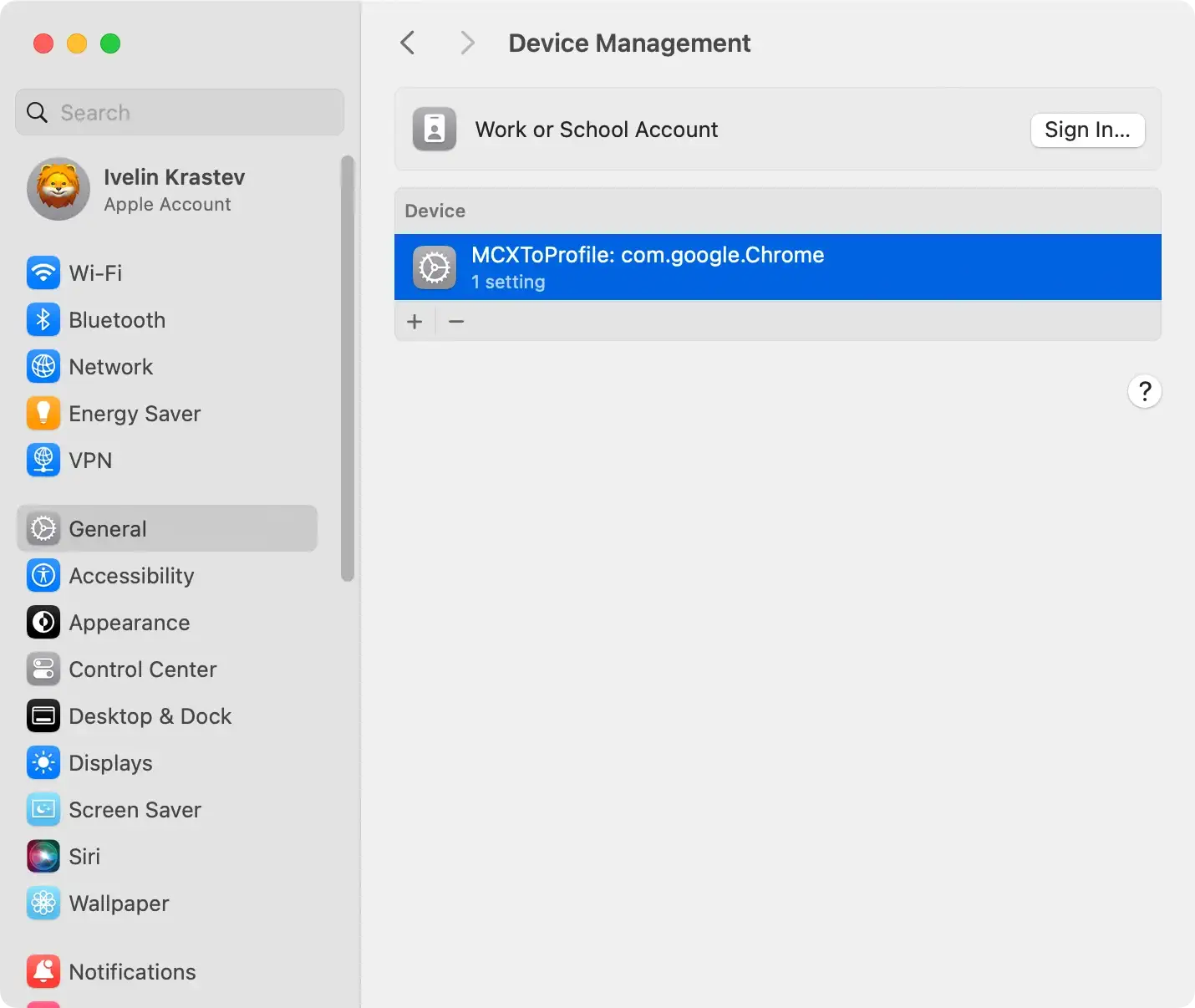
Adware like RecordMapperfld may install configuration profiles to control system behavior. Remove any potentially harmful profiles to eliminate the influence of adware.
- Open
System Preferencesfrom the Apple menu. - Look for the
Profilesicon; if present, review and delete any suspicious profiles.
Remove RecordMapperfld from browsers
Adware often integrates with browsers. Remove RecordMapperfld extensions to prevent further interference with your browsing experience.
- For Safari: Open Safari, go to
Preferences, select theExtensiontab, and uninstall any RecordMapperfld-related extensions. - For Chrome: Type
chrome://extensionsin the address bar, locate RecordMapperfld extensions and remove them. - For Firefox: Type
about:addonsin the address bar, find RecordMapperfld extensions, and uninstall them.
Handle hidden RecordMapperfld files
Adware components may attempt to hide, making them harder to spot. Change your system settings to reveal hidden files.
Then, identify and delete any hidden files associated with the adware. This will ensure a more comprehensive manual removal process.
These manual removal steps aim to thoroughly eliminate RecordMapperfld from your Mac, covering various aspects of the system affected by the adware.
Remove RecordMapperfld automatically using SpyHunter
The automatic removal process is less complicated and particularly more suitable when dealing with reoccurring adware like RecordMapperfld.
SpyHunter for Mac is recommended for the efficient and complete removal of RecordMapperfld. It has been reported that this software and other similar threats were eliminated successfully.

By performing an in-depth scan of your system, SpyHunter can identify and delete all the related files of the adware more effectively than a manual approach, thus saving you significant time and effort.
Below are the steps to help you download, install, and run a scan with SpyHunter for Mac:
- Download SpyHunter from here and follow the installation instructions.
- Once installed, the app will start an automatic scan to detect RecordMapperfld or any other potentially unwanted programs installed on your Mac.
- Click Next; SpyHunter will effectively quarantine the threats, making your Mac malware-free.

Frequently asked questions
What is RecordMapperfld, and how did it get on my Mac?
RecordMapperfld is an adware known for displaying unwanted ads and altering browser settings. It often infiltrates Mac systems through deceptive software bundling or malicious websites.
To prevent its entry, exercise caution when downloading applications from unfamiliar sources.
Why is it essential to remove RecordMapperfld promptly?
Prompt removal of RecordMapperfld is crucial to prevent further disruptions to your browsing experience, potential exposure to harmful content, and system performance issues.
The adware’s continuous presence can lead to an increased risk of security threats and compromise your Mac’s efficiency.
Can I remove RecordMapperfld manually without using anti-malware software?
While manual removal is possible, it can be complex, time-consuming, and may not guarantee complete elimination.
RecordMapperfld has mechanisms to restore itself, making manual removal less effective. Using reputable anti-malware software like SpyHunter ensures a thorough cleanup and prevents re-infection.
How can I protect my Mac from adware and similar threats in the future?
To safeguard your Mac, avoid downloading software from untrustworthy sources, keep your operating system and applications updated, and use a reliable ad blocker.
Additionally, perform regular system scans with anti-malware software, maintain backups, and stay cautious while browsing to prevent future infections.
