

Remove PlatformDeploy On Mac (Protect Your Mac Today)

Before we dive in
Before we dive in, let's make sure you stay safe online. We created SpyHunter because your security matters to us.
Protect your computer today — download SpyHunter right here! Check out our top tips below to keep your computer safe and secure.

PlatformnDeploy is a harmful software designed to exploit the macOS operating system. Once installed, it injects unwanted advertisements into the websites you visit and alters your browser settings, impacting your online experience.
Remove PlatformDeploy to safeguard your macOS system and prevent further disruptions caused by this malicious program.
What is PlatformDeploy?
PlatformDeploy is a malicious browser hijacker software designed for the macOS operating system. It is a potentially unwanted application (PUA) that primarily promotes the search.rktz9.com fake search engine.
PlatformDeploy is known to interfere with the user’s internet browsing experience by manipulating web browsers and causing unwarranted redirects.
Description of PlatformDeploy
PlatformDeploy is a program that targets Mac computers and infiltrates browsers through an extension or a program.
It modifies the default search engine and diverts browsers’ search queries through PlatformDeploy Search, which leads to search results on search.yahoo.com.
This activity likely aims to generate advertising revenue utilizing Yahoo Search. Furthermore, PlatformDeploy can open new tabs on the browser displaying advertisements for software sales, fraudulent software updates, and tech support scams.
The software is considered potentially unwanted due to the dubious distribution methods used to expand it.
Harmful activities performed by PlatformDeploy
Once installed on a computer, PlatformDeploy performs several intrusive activities. Primarily, it alters the browser settings and redirects search queries to use PlatformDeploy Search.
This results in a redirection to search.yahoo.com results pages, a move geared towards generating advertising revenue.
In addition, PlatformDeploy opens new browser tabs displaying various advertisements. These ads may attempt to sell software, peddle fake software updates, and propagate tech support scams.
The malicious program may also have data-tracking capabilities. This entails spying on the user’s browsing activities, which may violate the user’s privacy and potentially lead to data breaches.
Symptoms of PlatformDeploy infection
Symptoms of PlatformDeploy infection may manifest in various noticeable ways, indicating potential threats to your system.
Here are several signs to be aware of:
- Changes in your browser’s default search engine to PlatformDeploy.
- Browser search queries redirect through PlatformDeploy Search.
- Presence of the “PlatformDeploy” browser extension or program on your Mac.
- Frequent opening of new tabs displaying ads selling software or promoting fraudulent software updates.
If you observe any of these signs, you must take prompt action to remove PlatformDeploy and protect your system from further harm.
Guide to remove PlatformDeploy
Getting rid of the PlatformDeploy browser hijacker from your Mac requires a systematic approach.
Following is a step-by-step guide to help you remove PlatformDeploy effectively:
Remove malicious profiles from Mac
The first step in removing the PlatformDeploy malware involves clearing malicious profiles from your Mac.
The malicious application has added these configurations and can control some parts of your system.
Finding and deleting these profiles deprives the malware of its control points on your computer system.
- Open the Apple menu in the top-left corner of your screen and select
System Settings(namedSystem Preferenceson older OSX versions). - Look for the
Profilesicon in the newly opened window. No configuration profiles are installed if there’s no such icon.
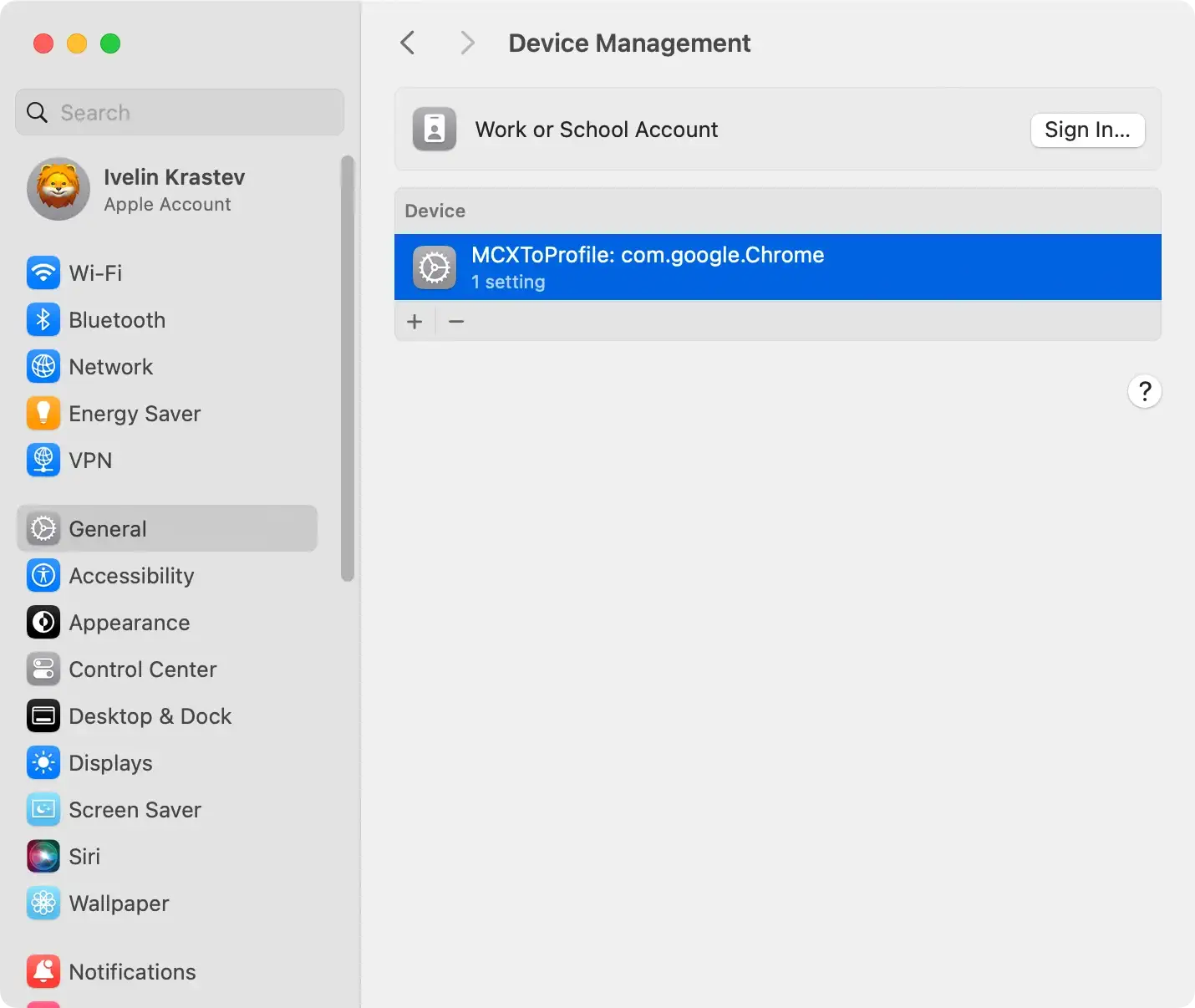
- Examine the list of profiles to identify any that seem dubious or that you didn’t intentionally install. Pay attention to the profile names and the organizations associated with them.
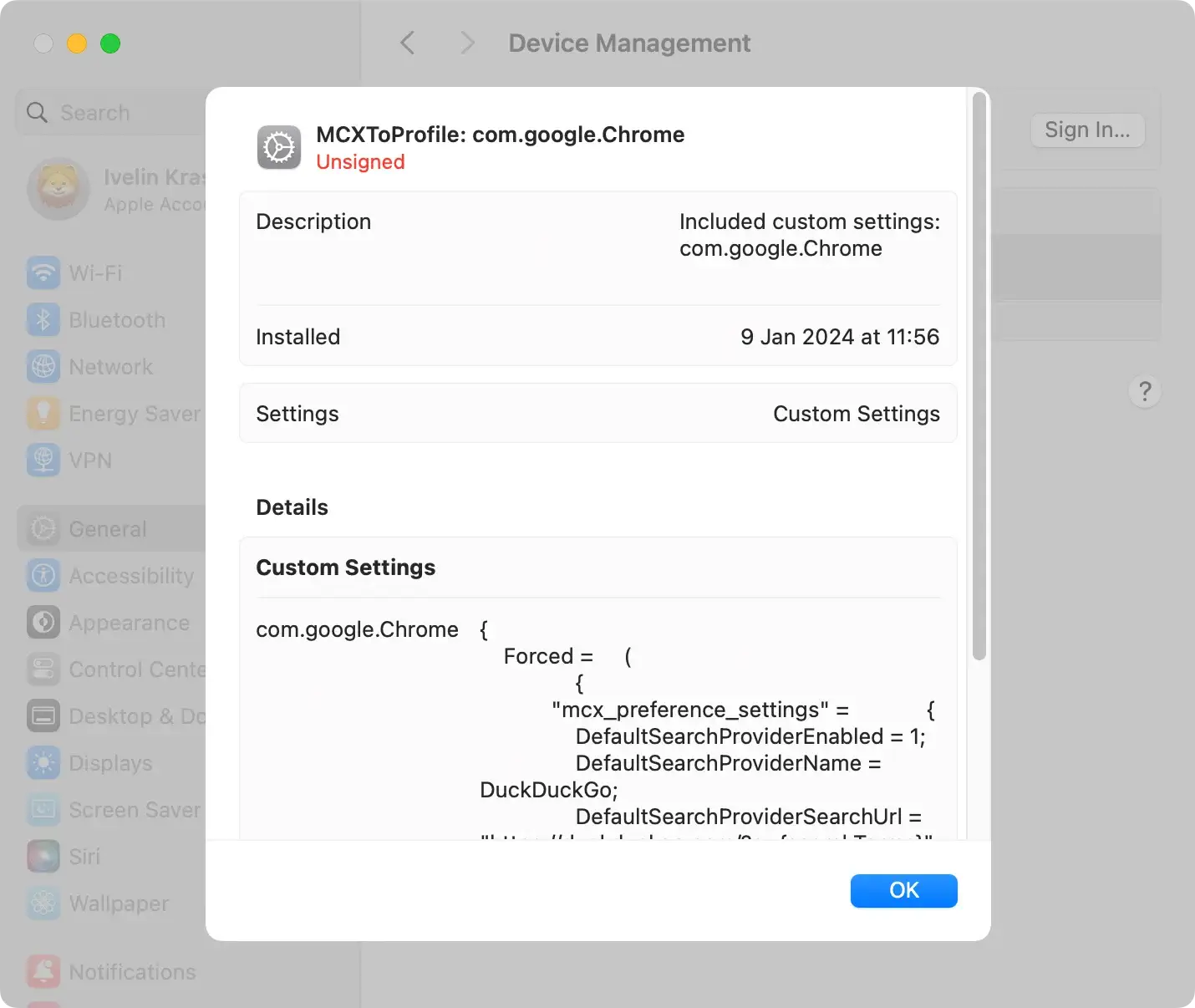
- Select a profile and click the “Minus” (-) button to remove it.
- A confirmation dialog will appear. Provide your administrative password to confirm that you want to remove the selected profile.
- After removing the profiles, it’s reasonable to restart your Mac to ensure the changes take effect.
Remove PlatformDeploy from Mac
Next, you need to search for PlatformDeploy on your Mac and uninstall it.
Check both the list of applications and the system library files, as this malicious software might create hidden files or folders in those areas.
Be thorough in this step, as leaving behind any browser hijacker component can result in re-infection.
Bonus tip
Consider leveraging dedicated security software like SpyHunter for Mac. It can locate the applications and identify all the files and folders created by that application.
- Download SpyHunter and install it on your Mac.
- Run the App Uninstaller, allowing it to scan your system for applications and their related files and folders.
- Select the applications you want to remove and instruct SpyHunter to uninstall them.
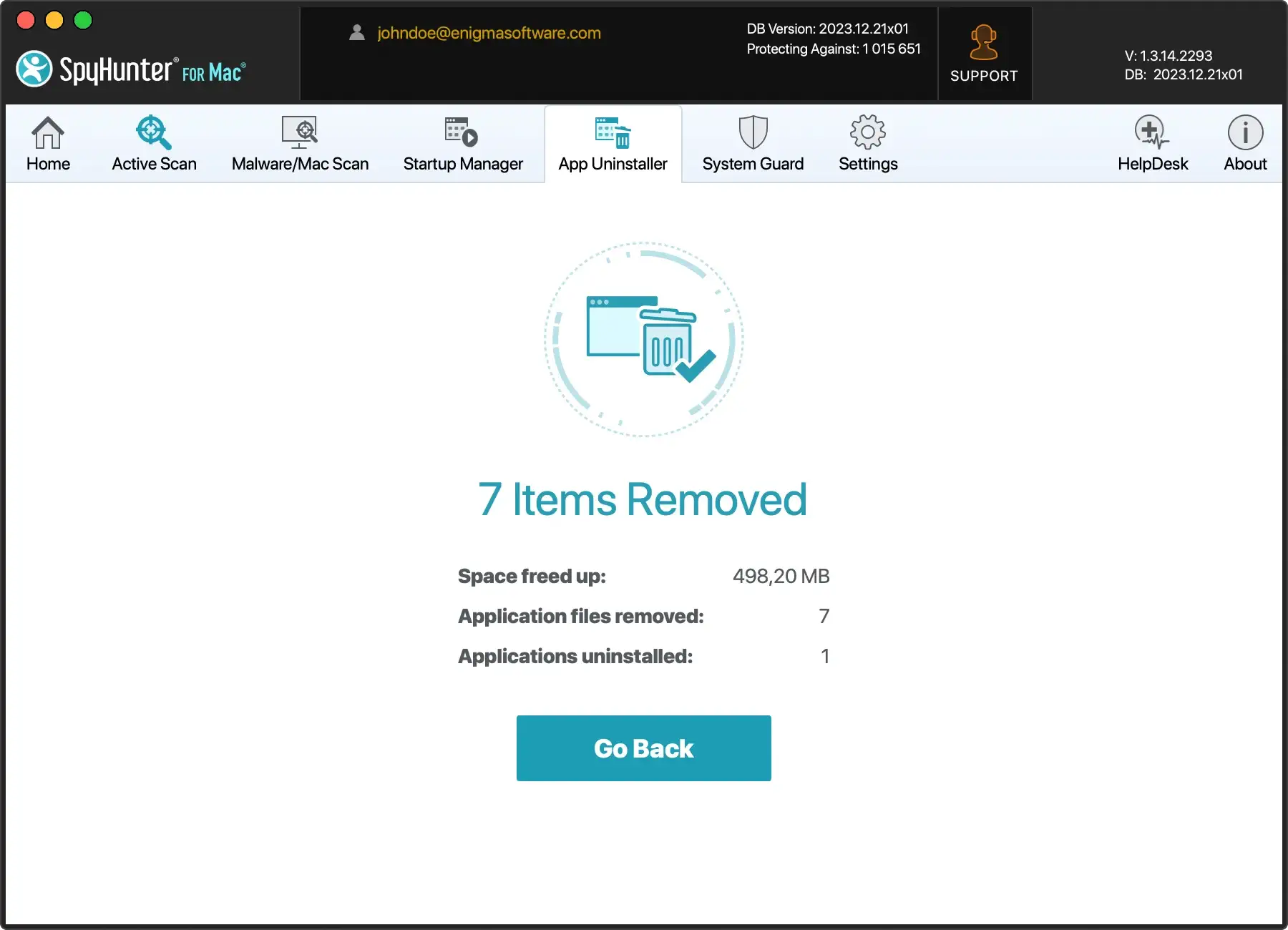
Use SpyHunter to remove PlatformDeploy
While manual removal might be effective, a trusted anti-malware tool like SpyHunter is advisable to ensure a comprehensive cleanup.
SpyHunter can help you scan your system for any traces of PlatformDeploy and other potentially unwanted programs and remove them effectively.
Remember to update the anti-malware software before running a scan to ensure it can detect and delete the latest malware strains.
Below are the steps to help you download, install, and run a scan with SpyHunter for Mac:

- Download SpyHunter from here and follow the installation steps.
- Once installed, the app will initiate an automatic scan to detect PlatformDeploy or any other potentially unwanted programs installed on your Mac.
- Click Next; SpyHunter will effectively quarantine the threats, protecting your Mac and making it malware-free.

Remove PlatformDeploy from your browser
Finally, since PlatformDeploy primarily operates as a browser hijacker, it’s also critical to clean your browsers.
The approach may vary slightly depending on whether you use Safari, Chrome, or Firefox. Still, it typically involves removing unfamiliar extensions, clearing the cache, and resetting the browser to default settings.
This helps ensure your browser is free of PlatformDeploy’s influence and prevents potential re-infections.
Safari
- Open Safari and select Safari from the top menu
- Choose
Preferencesand navigate to theExtensionstab - Locate the PlatformDeploy extension and click
Uninstallto remove it - Go to the
Generaltab and set your preferred homepage - Check the
Searchtab to confirm your desired search engine selection
Google Chrome
- Launch Chrome and click on the three-dot menu in the top-right corner
- Select
More toolsand thenExtensions - Find the PlatformDeploy extension and click
Removeto delete it - In the same menu, go to
Settings - Under
On startupensureOpen a specific page or set of pagesis selected - In the
Search enginesection, choose your preferred search engine
Mozilla Firefox
- Open Firefox and click on the three horizontal lines in the top-right corner
- Choose
Add-onsand go to theExtensionstab - Locate the PlatformDeploy extension and click
Removeto uninstall it - Navigate to
Optionsand go to theHometab - Set your preferred homepage and ensure the selected search engine aligns with your choice
Troubleshooting after removal
After diligently following the steps to remove PlatformDeploy, consider additional troubleshooting strategies to ensure a thorough resolution if issues persist.
Reset and reinstall browsers
Resetting your browser to its default settings is a crucial step after the hijacker removal. This helps eliminate any lingering traces of the hijacker that might still affect your browser’s functionality.
If problems persist, you may need to take the extra step of uninstalling and reinstalling your browser.
This ensures a clean slate, removing remnants that may have embedded deeply within your browser’s settings or extensions.
Clear cache and cookies
In some cases, residual data in your browser’s cache or cookies may contribute to persistent issues. Clearing these data points can often resolve lingering problems.
Navigate to your browser’s settings and find the option to remove browsing data. Then select cache and cookies. Restart your browser to see if the issues have been resolved.
Check browser extensions
Examine your browser extensions for any unfamiliar or suspicious additions. Some remnants of the hijacker might still be present as unwanted extensions.
Remove any extensions you didn’t intentionally install or those that seem questionable.
The final recommendation for future protection
After successfully removing the PlatformDeploy browser hijacker and addressing any lingering issues, proactive steps to prevent future infections are essential.
Regularly updating your system software ensures that you have the latest security patches. Use a reliable anti-malware application like SpyHunter for Mac, which offers real-time protection against evolving threats.
Exercise caution during software installations and downloads, opting for official sources. Avoid clicking on suspicious links, and practice safe browsing habits to fortify your system against potential malware attacks.
Maintaining a vigilant approach is crucial for a secure and trouble-free online experience.
Prevention and caution against PlatformDeploy
Preventing PlatformDeploy infections requires a keen eye and attentive behavior, especially when browsing the internet or installing new software.
The following are some strategies for stopping this potentially unwanted program and similar browser hijackers from infiltrating your system.
Vigilance during software installation
PlatformDeploy can sneak into your computer through covert methods such as being bundled with other software products or through deceptive advertisements.
Consequently, it’s crucial to pay extra attention when installing new applications. Software installers may often include optional installs that can carry potentially unwanted programs like PlatformDeploy.
To protect your system, always choose the custom installation setting. This option allows you to monitor and deselect any unfamiliar elements in your software installation, helping you avoid unintentionally installing programs you don’t need or trust.
Avoid untrustworthy software
Avoiding software from unverified sources or software that appears untrustworthy is another intelligent way to prevent a PlatformDeploy infection.
It’s always a wise decision not to install any applications that don’t seem reliable. No matter how attractive or valuable a software program appears, steer clear if it is unverified or arouses suspicion.
Detect PlatformDeploy in time
Timely detection of PlatformDeploy and similar unwanted applications is vital for maintaining the security and functioning of your browser and computer.
If you have noticed any unusual changes in your browser settings, such as a change in the default search engine or unwarranted redirection of search queries, it could be a sign of PlatformDeploy infection.
Immediate detection allows for swift action, thus minimizing any potential damage.
Follow this reliable malware removal guide to remove PlatformDeploy and any accompanying malicious programs.
