

How To Remove LoyalReader From Mac (Complete Guide)

Before we dive in
Before we dive in, let's make sure you stay safe online. We created SpyHunter because your security matters to us.
Protect your computer today — download SpyHunter right here! Check out our top tips below to keep your computer safe and secure.

LoyalReader is a potentially unwanted program designed to inject advertisements into the websites you visit and redirect your browser’s search queries.
To remove LoyalReader and ensure a clean browsing experience, follow specific steps to eliminate this intrusive software.
What is LoyalReader?
LoyalReader is identified as malicious software that tends to hijack your online browsing experience.
This is achieved by redirecting your homepage and default search engine to its platform, LoyalReader Search.
Users who find this software in their computers commonly report experiencing unwanted pop-up advertisements and abnormal search engine redirection; these are all part of the software’s essential functions.
Description of LoyalReader
It is essential to understand that LoyalReader is different from your typical software. It is a browser hijacker commonly installed on your computer as a browser extension or program.
This software aims to generate advertising income by redirecting your search queries through LoyalReader Search to search results from search.yahoo.com.

Undesirable as it may be, LoyalReader is also known for opening new browser tabs and displaying ads that market various software, propagating fake software updates, and potentially harmful tech support scams.
Common symptoms of LoyalReader installation
Identifying whether your computer has been infected with LoyalReader can be done by looking for common symptoms:
- LoyalReader Search replaces your browser’s default search engine.
- All your browser’s searches are routed through LoyalReader Search.
- The conspicuous “LoyalReader” browser extension or program is installed on your Mac.
With these apparent changes, spotting an infection should be relatively straightforward.
Ways LoyalReader can be installed
Interestingly, users themselves install LoyalReader, albeit not always knowingly. It often finds its way onto computers through advertisements or gets bundled with other software, leaving users puzzled about its origin.
Unfortunately, some free downloads do not clarify that other software will also be installed as part of the package, resulting in users discovering they installed LoyalReader unknowingly.
Once suspicions arise about unwanted programs or extensions installed on your Mac, consider consulting this detailed removal guide for further action.
Remove LoyalReader (step-by-step guide)
While inconvenient and intrusive, LoyalReader can be manually removed. This removal process consists of several essential steps.
Following these steps in the sequence is crucial for effectively removing this browser hijacker.
Delete malicious profiles
To begin with, it becomes imperative to remove any malicious profiles installed on your Mac. Primarily, IT admins utilize profiles in business contexts to manage and control the behaviors of Macs.
Adware and browser hijackers manipulate these same profiles to prevent users from eliminating malicious programs from their computers.
Therefore, the first order of business is to check if any configuration profiles have been installed.
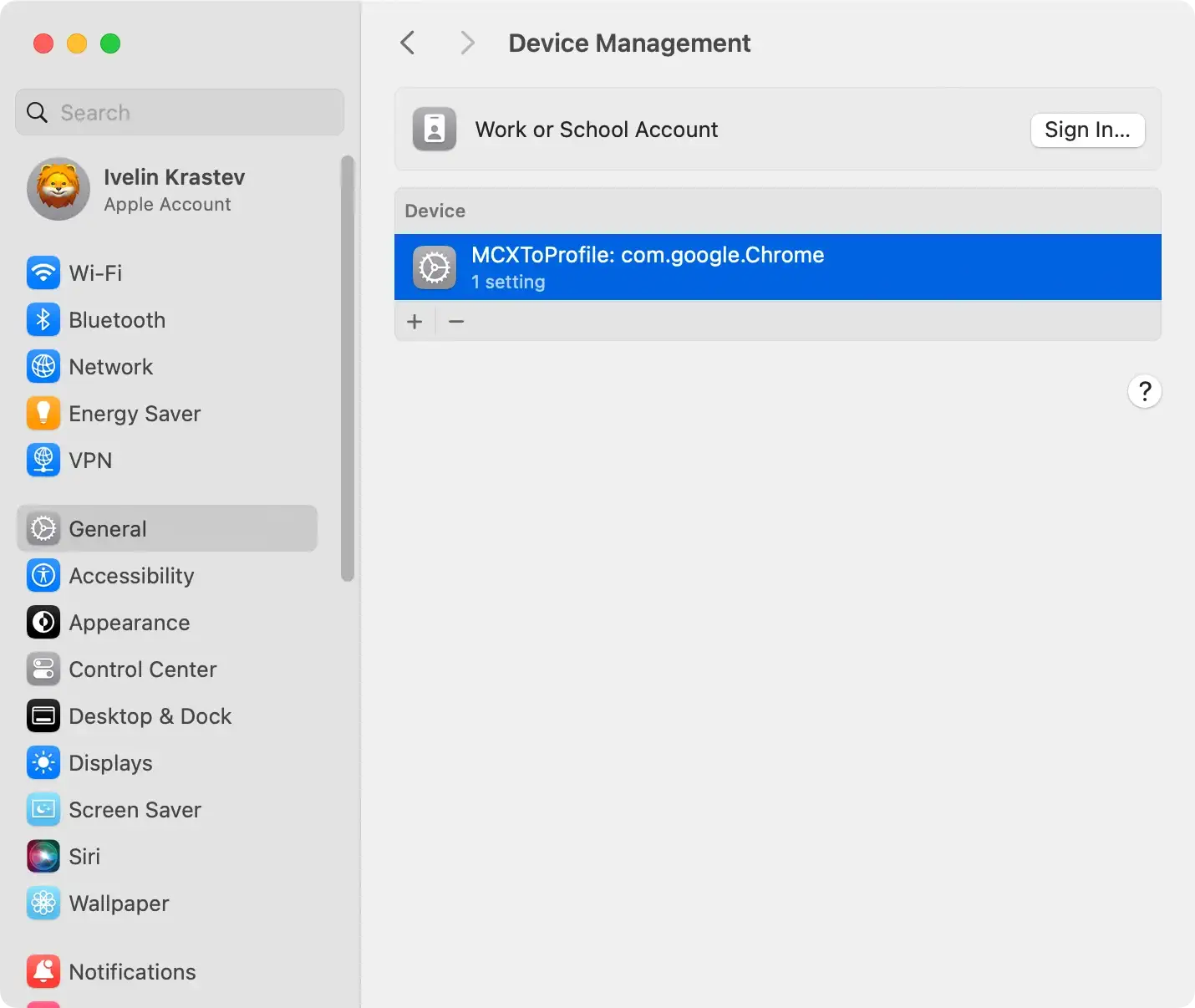
This is achieved by opening the System Settings from the Apple menu and searching for the Profiles icon.
If no such icon is present, no profiles have been installed, and you can continue with the following steps. If there is – click on it.
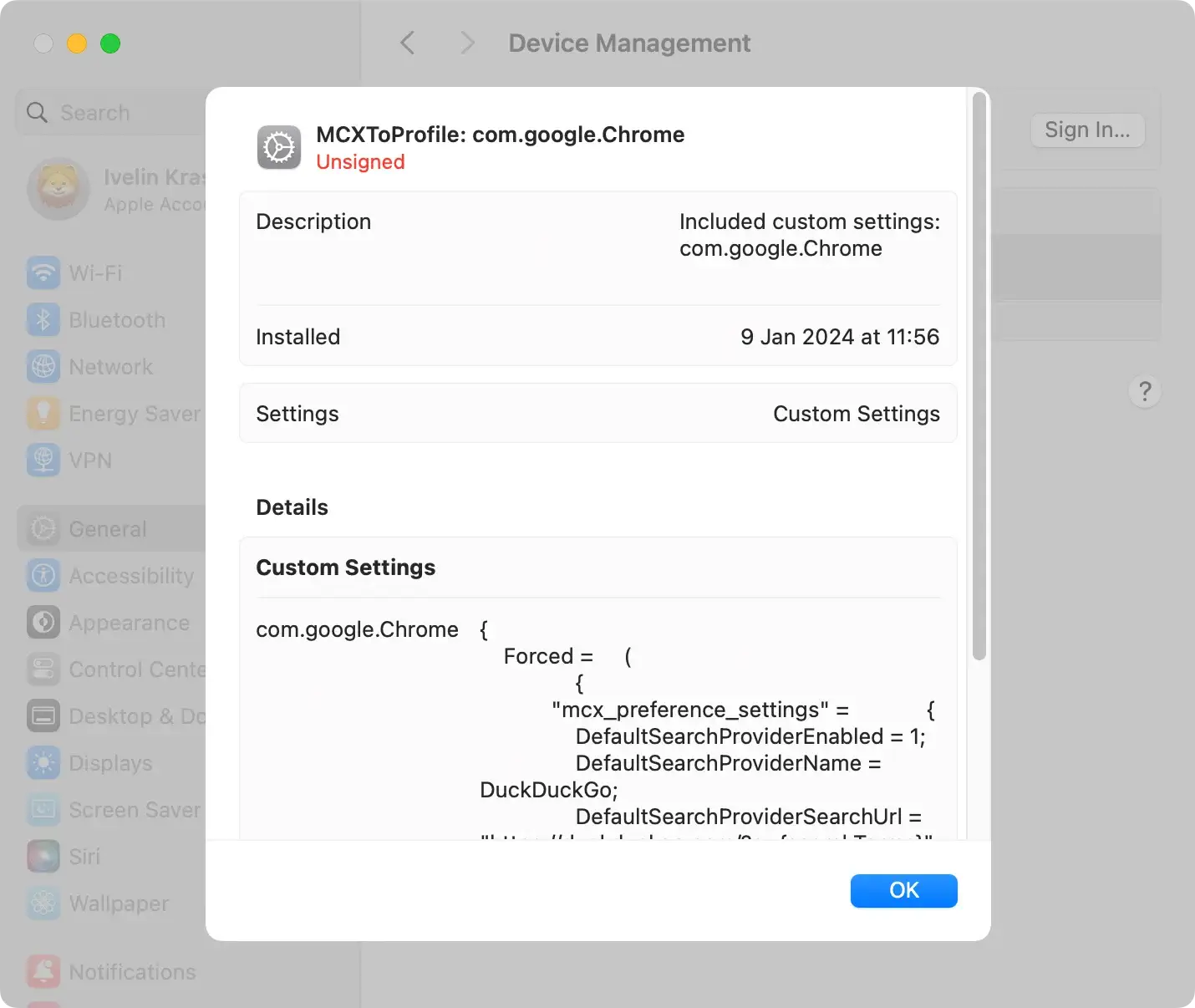
Review the list of profiles to pinpoint any that seem dubious. Please pay attention to the profile names and the organizations associated with them.
To remove a profile, select it and click the “Minus” (-) button, usually located at the bottom of the profiles list.
Remove LoyalReader application
After successfully removing all suspicious profiles, the next step is to delete any malicious apps that may be present on your computer.
This is yet to be described in detail.
- Open the
Finderapp and navigate to theApplicationsfolder in the sidebar. - Review the list of installed applications and look for LoyalReader or any other questionable apps you did not install.
- Right-click on the app you want to remove and select
Move to Trashor drag it into the Trash. - Empty the Trash to remove LoyalReader permanently.

Remove LoyalReader from your browser
Uninstalling LoyalReader from the Applications folder may only sometimes produce the expected results. Remember that it is a browser extension that could remain active in your browser.
Follow these steps to manually remove LoyalReader from Safari, Google Chrome, or Mozilla Firefox.
For Safari:
- Open Safari and choose
Preferencesfrom the drop-down menu. - Click on the
Extensionstab. - Locate the LoyalReader Safari extension and remove it.
For Google Chrome:
- Open Google Chrome.
- In the address bar, type in
chrome://extensions - Find the LoyalReader extension and uninstall it.
For Mozilla Firefox:
- Open Mozilla Firefox.
- In the address bar, type in
about:addons - Find the LoyalReader Firefox extension and remove it.
Tip: For a more reliable outcome, you can use SpyHunter’s malware scanner. It can catch and remove the LoyalReader browser hijacker entirely from your Mac. Download SpyHunter for free here and experience its significance for yourself.
Reset browsers to default settings
Resetting your browsers to their default settings is a crucial step in the aftermath of dealing with LoyalReader.
By initiating this process, you not only undo any unauthorized alterations made by the intrusive program but also restore your browser’s settings to their original state, providing a clean slate for secure and uninterrupted browsing.
This action helps eliminate any lingering traces of LoyalReader’s impact, promoting a more stable and protected online environment for your everyday activities.
Remove LoyalReader using SpyHunter for Mac
SpyHunter is a trustworthy anti-malware software that can help users confidently tackle malicious programs such as LoyalReader.
The application scans the computer, identifies potentially harmful software, and then guides the user through removal.
Scan your Mac with SpyHunter
Download SpyHunter from here and follow the installation instructions. The app begins by running a scan of the system.
It comprehensively investigates the data on your Mac to identify potential threats. These threats might include browser hijackers like LoyalReader, malware, or potentially unwanted programs.

Follow the prompted removal steps
Upon completing the scan, SpyHunter produces a report detailing all found threats. Users should then follow the software’s prompts to remove the detected malware.
The steps are intuitive and user-friendly, designed to ensure seamless malware removal even for non-tech-savvy users.

Finalize the removal process
Lastly, a computer restart might be needed to remove the malware. A system restart helps eradicate any residual traces of the malicious software that might persist in the memory.
Upon restarting, users should no longer encounter any symptoms caused by the presence of LoyalReader on their machines.
Post-removal measures and support
Once the LoyalReader malware has been successfully removed, it is vital to consider steps to avoid future malware infections and receive support for any persistent issues.
Consider SpyHunter’s Full-Featured Version
One way to stay secure is by considering the purchase of a full-featured version of SpyHunter.
This premium version offers real-time scanning and automatic updates, which helps prevent malware infections before they cause damage.
This equips users with robust, proactive protection rather than relying upon reactive measures post-infection.
Leverage SpyHunter’s Spyware HelpDesk
Users can turn to SpyHunter’s Spyware HelpDesk for personalized and efficient support.
This dedicated customer support service is designed to address any persistent issues or questions related to malware removal.
The Spyware HelpDesk connects users with experienced professionals, providing tailored guidance and solutions to ensure a thorough and effective resolution to any challenges encountered during or after the removal process.
