

How To Remove Baseauthenticity.co.in Pop-ups (Quick Guide)

Before we dive in
Before we dive in, let's make sure you stay safe online. We created SpyHunter because your security matters to us.
Protect your computer today — download SpyHunter right here! Check out our top tips below to keep your computer safe and secure.

Pop-ups can be frustrating, especially when they’re linked to suspicious websites like Baseauthenticity.co.in.
This misleading site is often associated with browser hijackers—a type of potentially unwanted app (PUA) that disrupts your browsing experience, creates security risks, and compromises your privacy.
If you’ve been dealing with persistent Baseauthenticity.co.in pop-ups, this guide will help you identify the source and remove it from your Mac entirely.
What is Baseauthenticity.co.in?
Baseauthenticity.co.in is linked to a browser hijacker that manipulates web browsers, often without the user’s explicit consent.
Once installed, browser hijackers redirect your searches, change homepage settings, and flood your screen with intrusive ads or pop-ups.
These programs are designed to generate revenue for their creators, usually through rogue advertisements or phishing schemes.
How does it get on your Mac?
Browser hijackers like Baseauthenticity.co.in are commonly distributed through deceptive methods, including:
- Rogue ads: Pop-ups or banners on shady websites urging you to “download updates” or “fix issues.”
- Bundled software: Legitimate-looking free programs that secretly include unwanted apps.
- Misleading pages: Sites prompting users to enable push notifications, disguising them as essential permissions.
How Baseauthenticity.co.in affects your Mac
The Baseauthenticity.co.in browser hijacker can have a range of negative impacts on your Mac, such as:
- Pop-ups interrupt workflows and make normal browsing nearly impossible.
- Hijackers can collect browsing habits, search history, and even sensitive data.
- Clicking on pop-ups may lead to malicious downloads or phishing sites.
- These apps consume resources, causing your Mac to lag or overheat.
If you’re noticing any of these symptoms, it’s critical to act quickly and remove the hijacker.
How to remove Baseauthenticity.co.in pop-ups on Mac
Follow these steps to completely remove Baseauthenticity.co.in and its associated files from your Mac.
1. Remove the suspicious app from Applications
- Open
Finderand go to theApplicationsfolder. - Look for unfamiliar apps, especially recently installed ones.
- Right-click on the suspicious app and select
Move to Trash. - Empty your Trash to ensure the app is fully deleted.

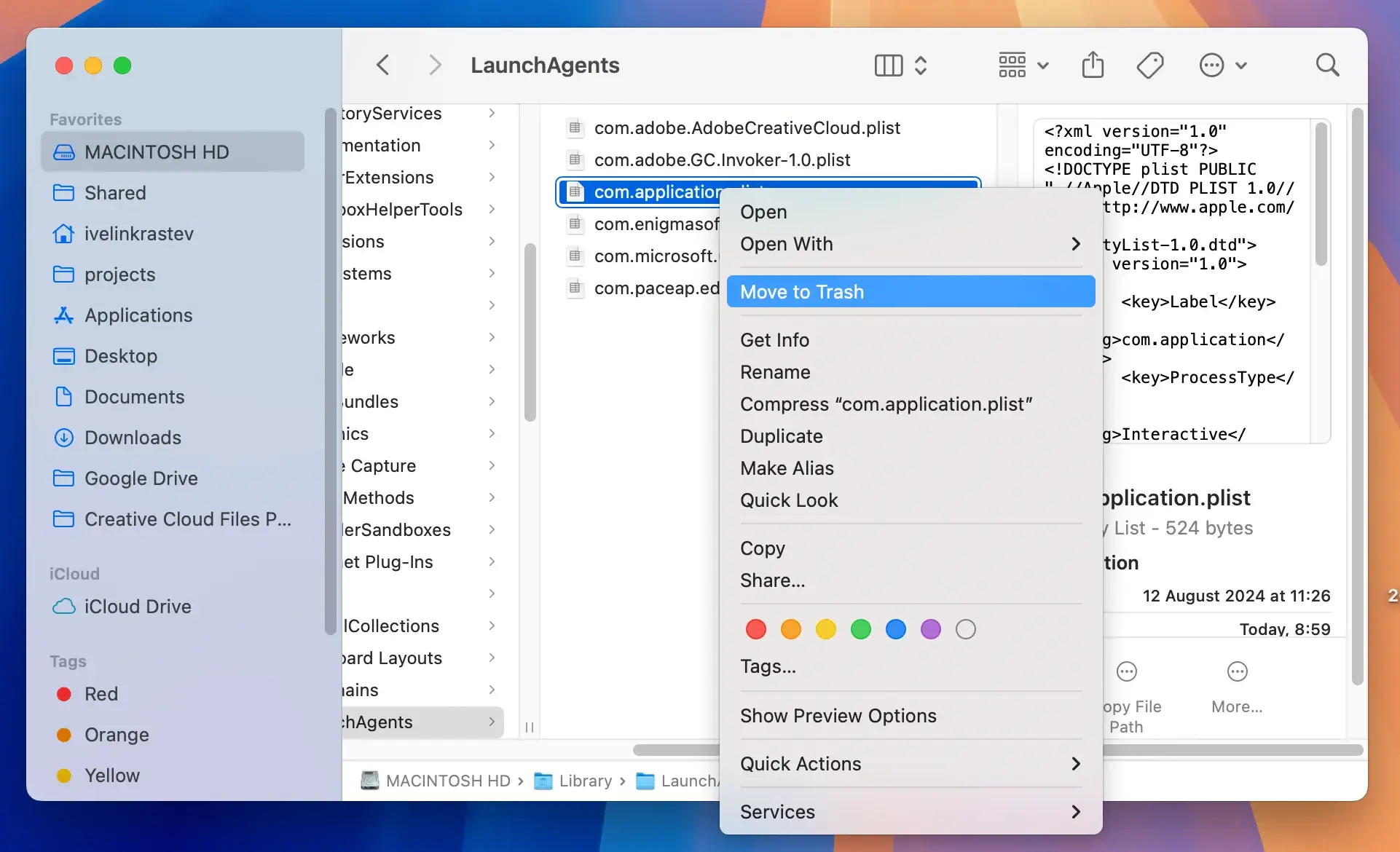
2. Remove residual files
- Open Finder and press
Command + Shift + Gto open theGo to Folderwindow. - Search the following directories for suspicious files and remove them:
/Library/LaunchAgents//Library/Application Support//Library/LaunchDaemons/~/Library/LaunchAgents/~/Library/Application Support/
- Delete any files or folders associated with Baseauthenticity.co.in or suspicious apps you removed.
- Empty your
Trashto remove the leftover files completely.
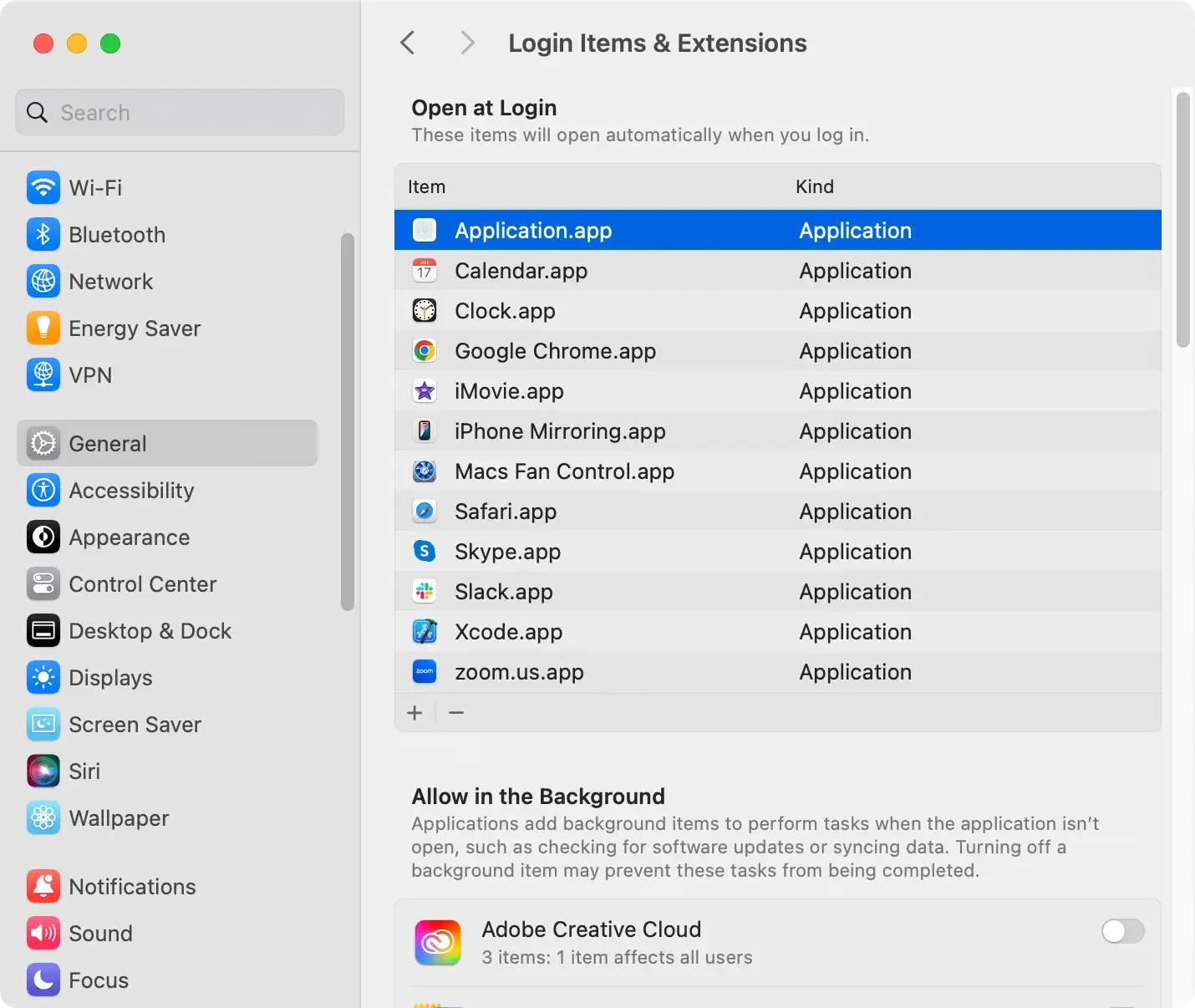
3. Remove suspicious login items
- Go to
System Settings > General > Login Items & Extensions. - Review the list and remove anything unfamiliar or unnecessary by clicking the minus button.
4. Reset your web browsers
Reset Google Chrome:
- Open Chrome and click the three-dot menu in the top-right corner.
- Go to
Settings > Reset Settings. - Select
Restore settings to their original defaultsand confirm.
Reset Safari:
- Open Safari and go to
Preferences > Privacy. - Click
Manage Website Data, select all items, and clickRemove All. - Return to
Preferences > Extensions, disable suspicious extensions, and uninstall them.
Reset Mozilla Firefox:
- Open Firefox and click the three-line menu in the top-right corner.
- Go to
Help > More Troubleshooting Information. - Click
Refresh Firefoxand confirm.
5. Use SpyHunter to remove Baseauthenticity.co.in completely
For thorough removal of malware and browser hijackers, anti-malware software like SpyHunter is highly effective. Follow these steps:
- Download the app from here and install it on your Mac.
- Open SpyHunter and run a full system scan.
- Review the scan results to identify Baseauthenticity.co.in and related files.

- Proceed to remove all malicious items.

SpyHunter not only removes the current infection but also protects your Mac from future threats.
How to stay safe in the future
To prevent similar issues and privacy and security hiccups related to browser hijackers, follow these safety precautions:
- Stick to reputable sources like the Mac App Store.
- Close pop-ups and avoid interacting with rogue ads.
- Regular scans with SpyHunter can keep your system clean.
- Use browser settings or extensions to block intrusive pop-ups.
