

Remove Pled.dylib Malware: Protect Your Mac Today

Before we dive in
Before we dive in, let's make sure you stay safe online. We created SpyHunter because your security matters to us.
Protect your computer today — download SpyHunter right here! Check out our top tips below to keep your computer safe and secure.

Pled.dylib is a sophisticated cyber threat targeting macOS systems. It is classified as a dynamic library file that can significantly compromise system security and user privacy.
This article delves into the intricate workings of Pled.dylib, exploring its methods of infiltration, the risks it poses to users, and practical strategies for its detection and removal.
By understanding the nature of this threat, macOS users can better safeguard their devices against potential vulnerabilities and ensure a secure digital environment. Let’s dive in:
Understanding Pled.dylib: What you need to know
Pled.dylib is emerging as a dubious process that Mac users should be cautious of.
Its occurrence on a system can signal the presence of a potentially unwanted application (PUA) or other threats, which could be detrimental to the functionality and security of the system.
What does Pled.dylib malware do to your Mac?
The Pled.dylib malware can perpetrate a variety of malicious actions.
It is experienced at accessing and stealing data, which risks the confidentiality of your personal information. This includes details like usernames, passwords, and possibly financial data.
Additionally, Pled.dylib can use any system weaknesses to establish unauthorized remote connections or take control of affected systems, often dodging detection protocols.
This insidious behavior can lead to disrupted system operations, altered or manipulated files, and, in severe cases, may cause a Mac to become unresponsive or completely unusable.
How does Pled.dylib sneak into your Mac?
Pled.dylib usually enters Mac systems secretly through various deceptive tactics.
It can hitch a ride with insecure downloads, including pirated software or files from untrustworthy sources. Users may also inadvertently download and install it when visiting malicious or misleading websites that disguise the malware as legitimate software.
Another common entry point for Pled.dylib is through software bundles, where the malware is bundled with legitimate software, and users unintentionally install it alongside the intended program.
Mac users must be vigilant when downloading and installing software to ensure they do not inadvertently invite this malware into their system.
Is Pled.dylib a Mac virus?
Although Pled.dylib isn’t categorized as a typical virus, it’s important not to underestimate its potential dangers. As software with adware-like tendencies, this program can undertake many high-risk activities on your Mac.
Embedded with backdoor capacities that could bypass security barriers, Pled.dylib places users in a vulnerable position where their personal information and system integrity are at risk. Real-time monitoring and reactions to any unusual behavior related to this program are essential to maintain cybersecurity.
Malicious activities of Pled.dylib
Users must differentiate between the Pled.dylib malware and legitimate software to maintain a secure Mac environment. Some critical indicators of Pled.dylib, being a malicious entity, includes:
- Unrequested advertisements.
- Random page redirects.
- Unusual system performance issues.
Legal software, in contrast, should not exhibit these intrusive behaviors and is typically accompanied by clear user agreements and privacy policies.
Regular system scans with trusted anti-malware solutions like SpyHunter can assist in distinguishing harmful processes from legitimate ones and aid in the prompt removal of any risks identified ( Download SpyHunter for free here ).
Steps to remove Pled.dylib from your Mac
Pled.dylib represents a significant threat to macOS users, capable of compromising system integrity and user privacy. Addressing this threat requires a systematic approach to removal, encompassing both manual and automatic strategies.
This guide outlines the steps necessary to remove Pled.dylib effectively, ensuring your Mac remains secure and performs optimally.
Prepare your Mac before the removal
Before initiating the removal process, it’s essential to safeguard your data through a complete backup. Disconnecting from the internet can prevent further data breaches or communication with external servers by the malware.
Manual vs. Automatic removal of Pled.dylib
When confronting the Pled.dylib malware, users have two primary removal options: manual and automatic.
Manual removal offers direct control over the process, allowing users to identify and eliminate specific threats without relying on external software.
This method is cost-effective and can be immediately initiated. However, it requires significant technical expertise and meticulous attention to detail to avoid accidentally deleting critical system files.
The time-consuming nature of manual removal and the risk of incomplete eradication are notable drawbacks.
Automatic removal, facilitated by anti-malware tools like SpyHunter for Mac, presents a user-friendly, efficient alternative.
These tools are designed to thoroughly scan the system, detect a wide range of threats, and remove them with minimal user intervention. The primary advantage lies in their ability to provide a thorough cleanup and ongoing protection against future infections.
Remove Pled.dylib manually
1. Remove malicious config profiles
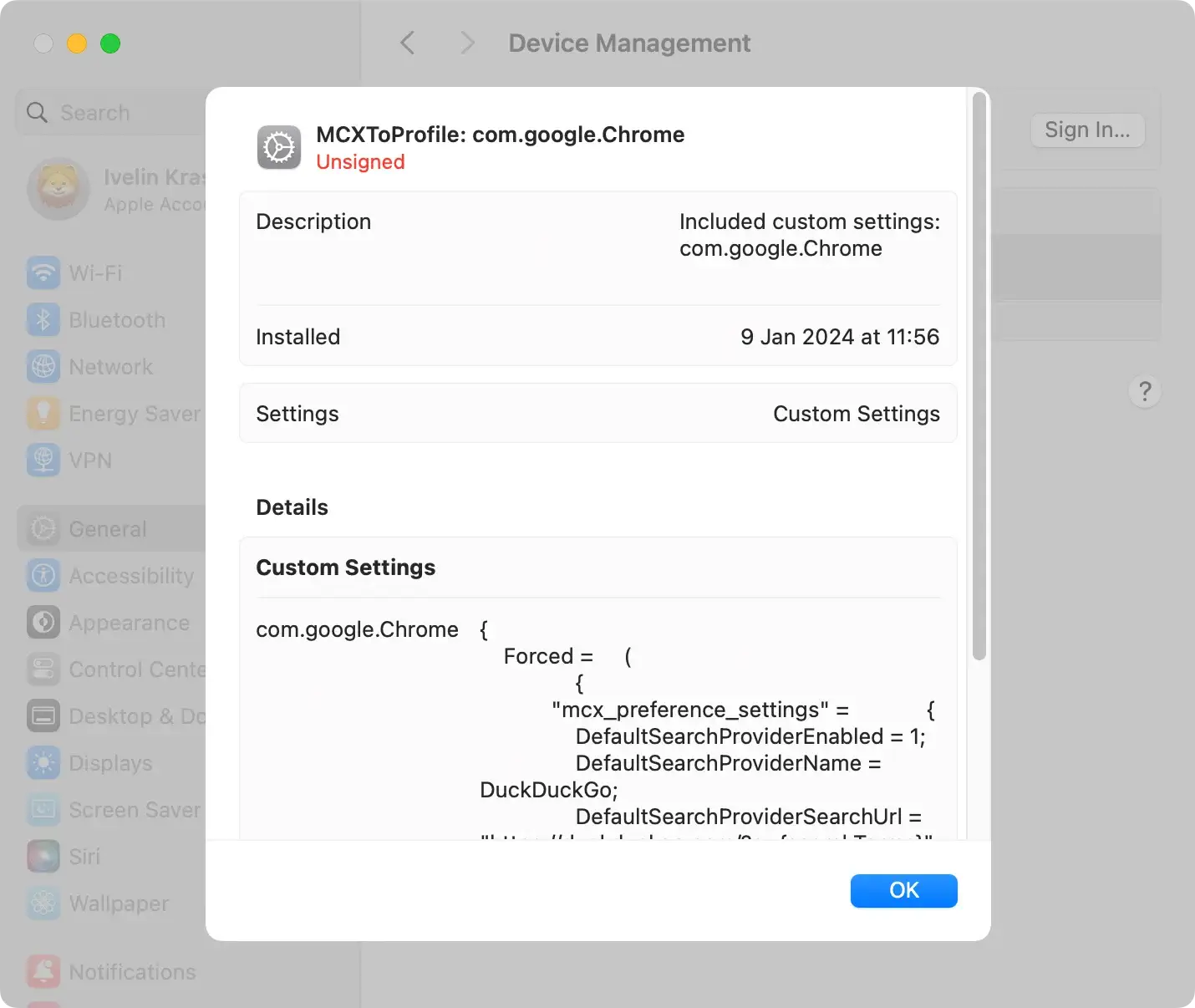
Malicious configuration profiles are a common tactic used by adware like Pled.dylib to assert control over your Mac. These profiles can alter system settings without your consent, making removal essential.
To delete these profiles, access System Preferences/System Settings, select Profiles, and carefully review each.
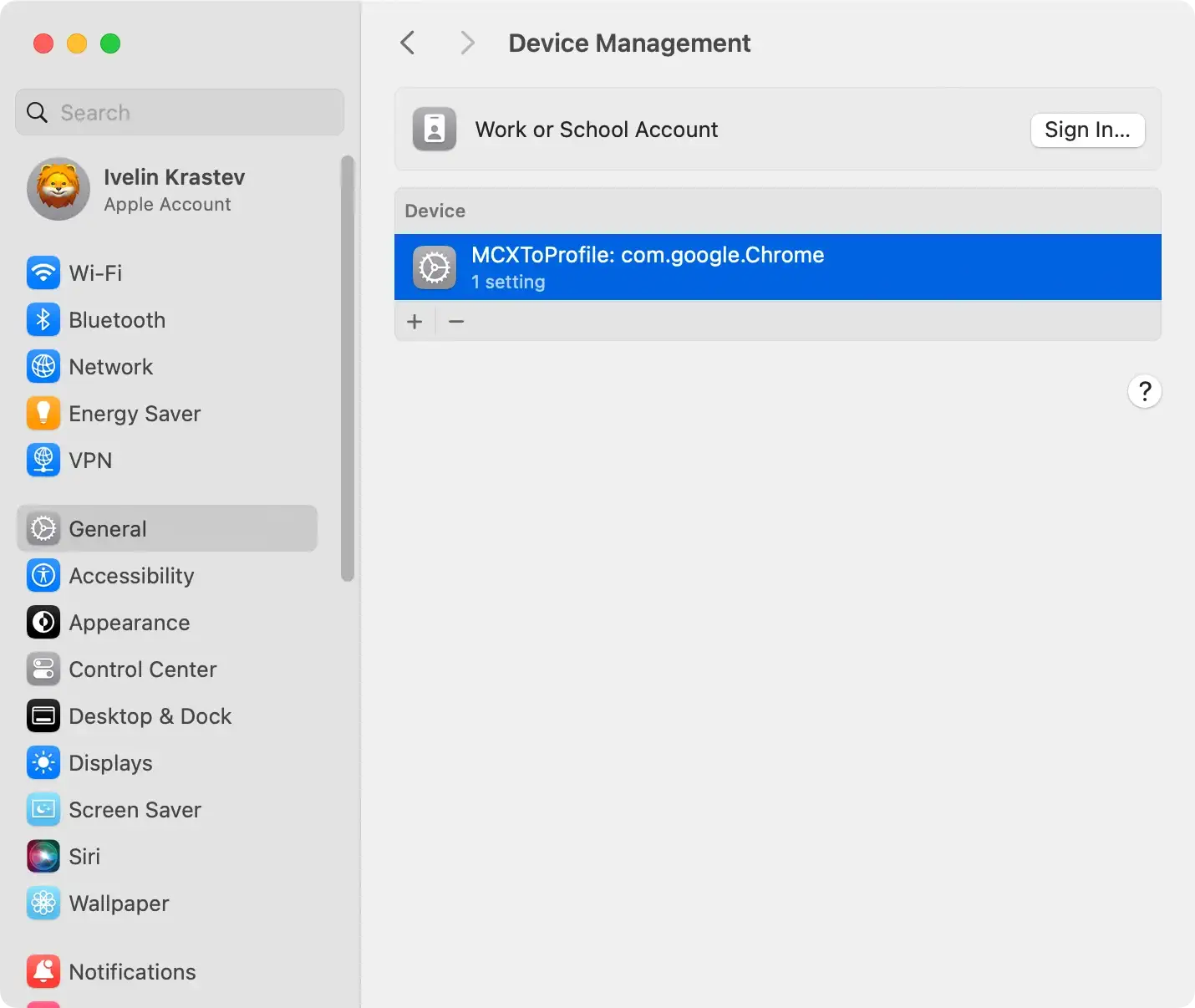
Look for any unknown, unnecessary, or related to Pled.dylib, and remove them to prevent the malware from enforcing unwanted settings.
2. Delete apps and files related to Pled.dylib
Pled.dylib often infiltrates systems through applications and files that appear innocent.
Start by examining the Applications folder for any software installed without your approval or that seems suspicious. Moving these apps to the Trash/Bin is the first step.

Next, use Finder to search for and eliminate any files or folders in the Library, Application Support, and System directories linked to the malware. This step is crucial for cutting off the malware’s access and preventing it from functioning.
3. Remove malicious browser extensions associated with Pled.dylib
Browser extensions can be a hidden source of malware activity. Pled.dylib may install extensions that track browsing, display ads, or redirect your searches.
Open your browser’s extensions or add-ons menu to identify unknown or suspicious extensions. Removing these can help restore your browser’s performance and security, eliminating the adware’s ability to monitor or influence your online activity.
Remove Pled.dylib automatically
For those seeking a straightforward, reliable method to combat Pled.dylib, SpyHunter for Mac offers a robust solution.
Its comprehensive scanning capability is designed to detect and eliminate complex malware threats. SpyHunter simplifies the removal process, ensuring that even the most stubborn malware and associated files are eradicated from your system.

- Download SpyHunter from here and follow the instructions to install SpyHunter on your Mac.
- Once installed, the app will launch, initiating an automatic system scan to detect Pled.dylib and other potential threats.
- Allow SpyHunter to remove detected malware, secure your system, and strengthen its defenses for the future.
Opting for SpyHunter’s automatic removal means embracing a hassle-free approach to cybersecurity, where the complexities of malware detection and eradication are handled efficiently, leaving your Mac secure and your mind at ease.

Whether you choose manual removal or the efficiency of SpyHunter for Mac, addressing the Pled.dylib malware promptly is crucial for maintaining your system’s security.
Protect your Mac from Pled.dylib and similar threats
While Pled.dylib is a concerning threat, it’s not the only one that can compromise your Mac’s safety.
Protecting your Mac involves vigilance and proactive measures to thwart these and other comparable threats. Implementing a comprehensive security strategy that includes the regular scanning of your system, secure browsing practices, and avoidance of dubious downloads is crucial in safeguarding your Mac.
Enhance your Mac against malware attacks
To fortify your Mac against malware like Pled.dylib, it is paramount to enhance your digital protection.
Regular updates to your operating system and all installed applications are essential, as they often include patches for vulnerabilities.
Additionally, employing a reliable security solution that offers real-time protection can provide a significant line of defense.
Be mindful of phishing attempts and maintain good cyber hygiene by using strong, unique passwords for each service and enabling two-factor authentication. Educating yourself about the latest threats will strengthen your Mac’s defenses against malware infiltrations.
Frequently asked questions about Pled.dylib
What are the warning signs of Pled.dylib infection?
Indications of a Pled.dylib infection on your Mac could be varied. Still, some common symptoms include:
- A noticeable decline in system performance.
- Frequent application crashes.
- Unexpected pop-up ads.
- Changes to browser settings without your consent.
- Web searches are being redirected through unknown sites.
A vigilant approach to monitoring these signs can help in the early detection and swift remediation of the Pled.dylib threat.
Can updating macOS prevent the Pled.dylib malware?
Regularly updating macOS can reduce the risk of Pled.dylib infections since updates often include security patches that close off vulnerabilities exploited by malware.
Staying current with the latest macOS version strengthens the system’s defenses against potential threats.
Additionally, it is vital to source your software downloads from reputable platforms and remain cautious about suspicious emails or websites to prevent the risk of Pled.dylib further.
What should you do if your Mac is infected with Pled.dylib?
Suppose you suspect that your Mac is infected with Pled.dylib, it’s crucial to take action immediately.
Start by running a full system scan using a trusted anti-malware tool tailored for Mac systems like SpyHunter for Mac. Such a tool can locate and isolate the Pled.dylib files for removal ( Download SpyHunter from here ).
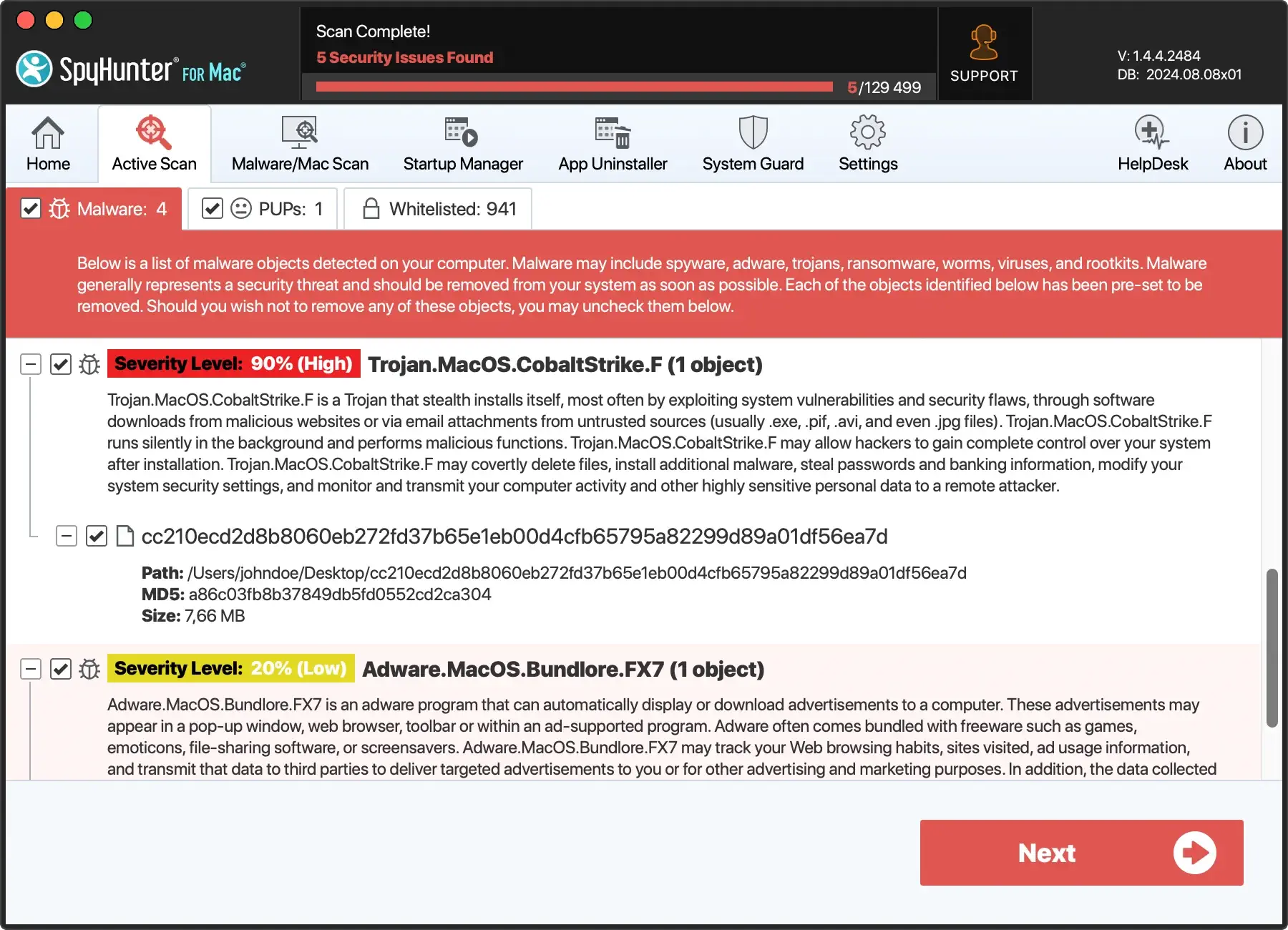
After the malware is identified, follow the recommended procedures to remove it.
Post-removal, changing your passwords, and monitoring your accounts for any unusual activity is advisable to ensure your personal information remains secure.
Research insights: Our Pled.dylib research process
Our research methodology follows a strict procedure to ensure a comprehensive understanding of Pled.dylib and its capabilities as a threat to MacOS systems.
Our team engages with a network of independent security researchers who provide daily insights into the latest malware definitions. This collaboration aids in real-time updates on Mac threats, particularly adware and potentially unwanted programs affecting users.
Our investigation of the Pled.dylib threat is supported by tools like VirusTotal, which aggregates data from numerous antivirus scanners to evaluate suspicious files and URLs, offering a broad view of the potential threat landscape.
This multi-layered approach to research allows us to provide our readers with reliable and actionable information to mitigate the risks posed by malware like Pled.dylib.
The articles and guides that stem from our research aim to equip users with the knowledge to recognize and respond to the dangers of Mac malware effectively.
Our content, prepared with diligence and dedication, assists Mac users in navigating and resolving security issues that may compromise their system’s integrity.
